

Your Website Was Redesigned. Why Did Google Enquiries Drop?
A practical investigation of missing pages, redirects, indexing, changed content and enquiry tracking after a website redesign.

Share this article
Browse all insightsYour redesigned website is live, but Sales is getting fewer enquiries from Google. Start with one service page that used to bring in work. Check whether buyers can still find it, get the information they need and reach your team before commissioning another redesign.
Cover disclosure. The cover is an AI-generated editorial illustration. Its people, business and records are fictional.
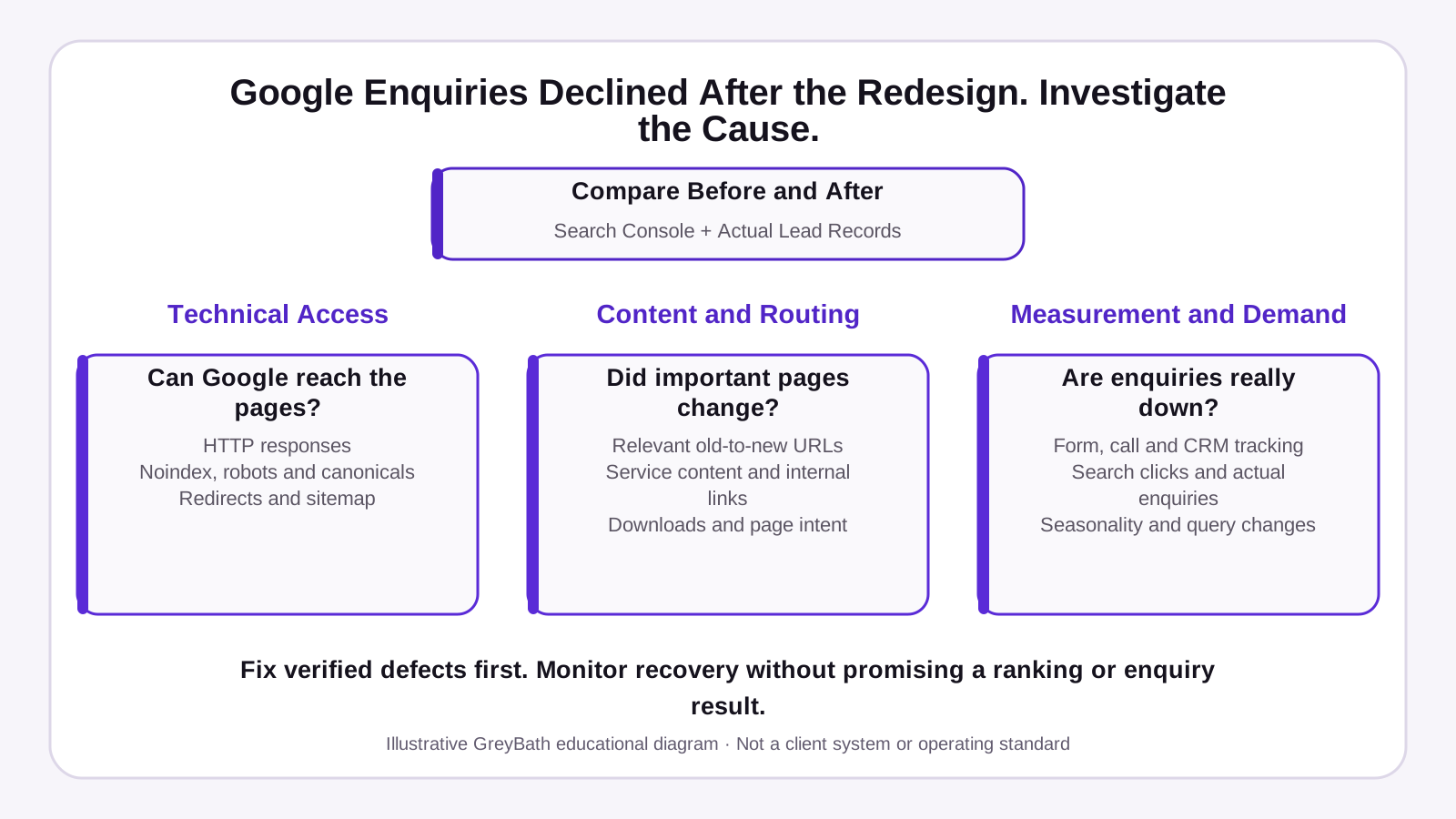
Investigate the drop after redesign
Compare Search Console data and actual enquiry records before and after the redesign.
- Technical access
Can Google reach the pages? Check response codes,
noindex, robots.txt, canonical URLs, redirects and the sitemap. - Content and routing
Did important pages change? Check old-to-new page matches, service content, internal links, downloads and what the visitor came to find.
- Measurement and demand
Are enquiries actually down? Test form, call and CRM tracking. Compare Search clicks with actual enquiries, and check seasonality and changes in search queries.
Fix confirmed problems first. Monitor rankings and enquiries over time.
Find where the drop started
Compare Search clicks with enquiries received
In Search Console, open Performance and compare complete periods of the same length. Check Pages first to see which services or products lost clicks. Where an address changed, review the old and new URLs together. Then check the affected queries, devices and countries. If demand is seasonal, compare with the same period last year where data is available. Google’s guide to investigating traffic drops.
- Search clicks fell. Start with visibility and the affected pages.
- Clicks held, but Sales received fewer enquiries. Test the contact routes from those pages.
- Sales received about the same number, but the dashboard shows a drop. Check tracking and attribution.
Several patterns can occur together. A change around launch gives you a point to investigate. Check demand and the affected pages before attributing the drop to the redesign.
- Enquiry receivedCan Sales find the lead?
- Contact actionDid the form or link work?
- Landing pageDid the buyer reach the right page?
- Google SearchDid that page still earn clicks?
Use a different piece of evidence for each question.
Swipe or scroll to see all columns.
| Area | Question | Start with |
|---|---|---|
| Technical access | Can Google reach and index the intended page? | HTTP response and Search Console URL Inspection |
| Content and routing | Does the destination answer the buyer’s original need? | Old-to-new URL map and a side-by-side page review |
| Enquiry measurement | Did enquiries stop arriving, or did reporting change? | Test submission, inbox or CRM record, and analytics event |
Check whether Google can reach the right pages
Build a simple URL map
Pull old addresses from the previous sitemap, Search Console exports or a site backup. Keep working URLs where the page stays in place. For a permanent move, point the old address directly to the closest relevant replacement with a 301 or 308. For content genuinely retired without a suitable replacement, return 404 or 410. A generic homepage often leaves a buyer without the information they came for.
Give each important old address one decision and one testable expected result.
Swipe or scroll to see all columns.
| Old path | Decision | Destination | Expected result |
|---|---|---|---|
/air-handling-units | Move | /solutions/industrial-air-handling-units | 301 or 308, then 200 |
/maintenance-services | Move | /services/maintenance | 301 or 308, then 200 |
/industries/pharma | Move | /industries/pharmaceutical | 301 or 308, then 200 |
/company-profile | Review before merging | /about if it serves the same need | Approve the destination before redirecting |
/expired-campaign | Retire | None | 404 or 410 |
The CSV includes illustrative rows from the fictional Western Industrial Air Systems example. Replace the example addresses with your own full URLs and fill in the owner, actual result and date tested as you work.
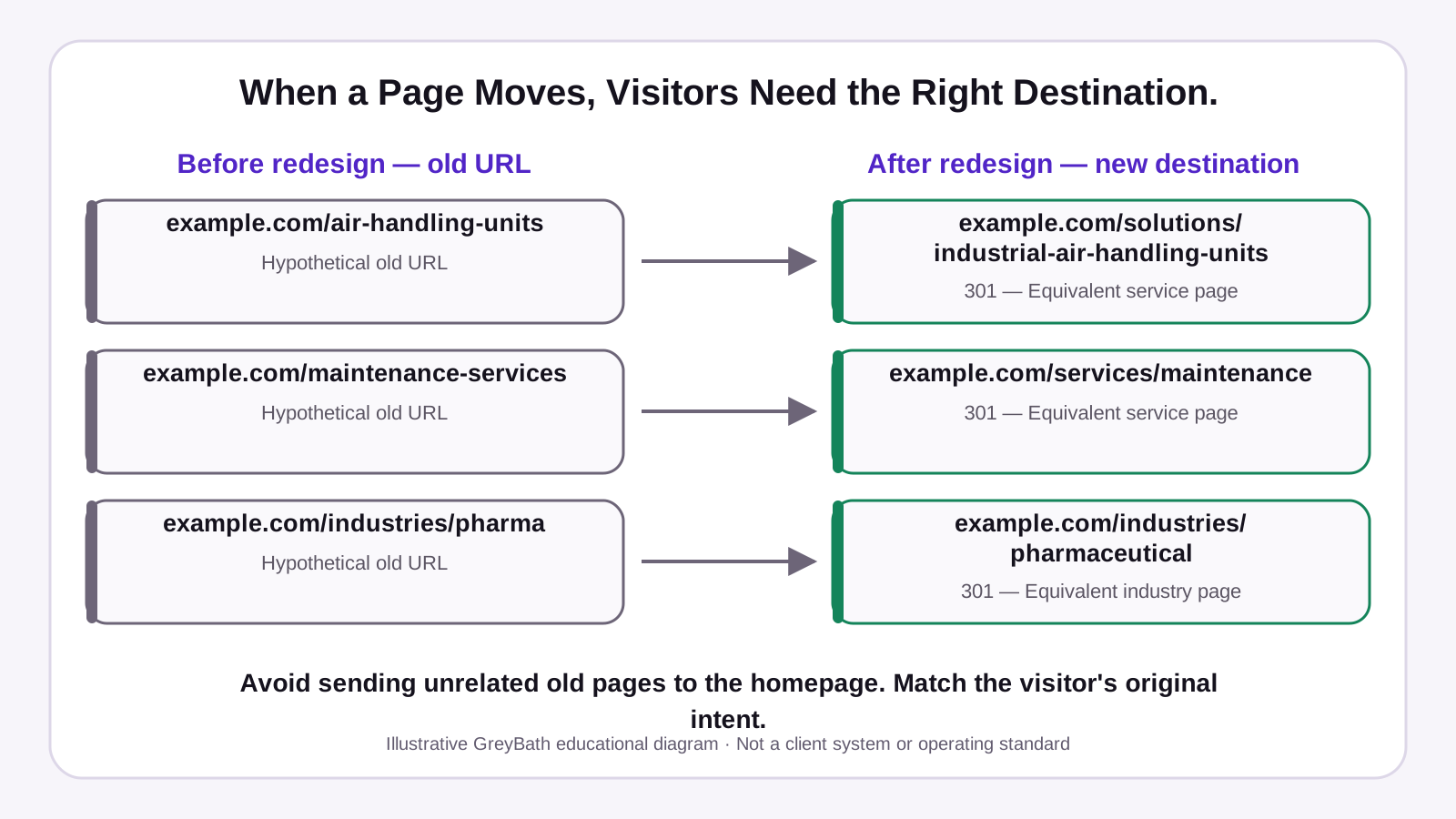
Match each old URL to the right destination
- Air-handling units
Old URL
example.com/air-handling-unitsNew destination
example.com/solutions/industrial-air-handling-units301 permanent redirect to the equivalent service page.
- Maintenance services
Old URL
example.com/maintenance-servicesNew destination
example.com/services/maintenance301 permanent redirect to the equivalent service page.
- Pharmaceutical industry
Old URL
example.com/industries/pharmaNew destination
example.com/industries/pharmaceutical301 permanent redirect to the equivalent industry page.
Match what the visitor came to find. Avoid sending unrelated old pages to the homepage.
Check redirects, indexing settings and the sitemap
Check that each intended replacement returns 200 and is accessible to Google. Look for an accidental noindex or a robots.txt rule left over from testing. Confirm the site declares the preferred URL as canonical, then update internal links and submit the current sitemap. Keep redirects working for at least a year where possible. Before cancelling old hosting, confirm where those rules are served. Google’s site-move guidance.
If the domain changed, verify both Search Console properties and check whether the move qualifies for the Change of Address tool. For affected landing pages, use the URL Inspection live test to see whether Google can access the current page and whether it appears eligible for indexing.
A successful live test does not mean the page is already indexed. After fixing the issue, check the indexed URL Inspection report to see whether Google has indexed the intended page and selected the expected canonical URL. An accepted indexing request also does not confirm indexing.
If access or indexing issues affect several priority pages, a technical SEO review can help you work out which fixes to make first.
Check what buyers find on the new pages
Compare the old and new service information
A buyer may land directly on a service or application page. If the old page described supported equipment, typical applications or included a datasheet, check that those details are easy to find on the new page. Restore useful information your business can stand behind, correct outdated details and place the enquiry action where the buyer needs it. Ask the product or sales owner to review the page against a common enquiry.
If you commission website redesign and development work to restore missing details, give the team the old page and an example of what buyers need to find.

Test how enquiries reach Sales
Check the receiving channel and the reporting event
Open the affected page on a real phone and check that the main content, forms and enquiry buttons load and work correctly. Pay particular attention to large images, animations or JavaScript introduced during the redesign.
Follow the test to the inbox or CRM. Check the form, email, phone, WhatsApp and any active dealer enquiry route. For a form, confirm the submission arrived and then check whether analytics recorded it. A contact link click shows a tap. Use Sales records to confirm the enquiry itself. Count qualified enquiries using the same definition for both periods and note when the source is unknown. Use the website form-to-CRM audit if you need to trace where a submission went missing.

A finding is ready to close when someone can demonstrate the expected result.
Swipe or scroll to see all columns.
| Finding | Owner | Retest |
|---|---|---|
| Broken redirect, wrong destination or outdated internal link | Website developer | Open the old address and the updated link. |
| Unintended noindex on a priority page | Developer or SEO lead | Inspect the live page and confirm indexing is allowed. |
| Product or service details missing | Product or sales owner | Review the page against a common buyer question. |
| Lead missing from the inbox, CRM or dashboard | Sales or analytics owner | Trace one labelled test enquiry through each system. |
| Search demand may have changed | Marketing owner | Compare affected queries with a similar period and check Google Trends. |
Worked example · Western Industrial Air Systems
What changed across 18 pages
Ten of the 18 old pages need a relevant redirect. The two retired pages need their own decision.
Swipe or scroll to see all columns.
| What happened | Pages | What to check |
|---|---|---|
| Kept the same URL | 6 | The original address still works. |
| Moved to a new URL | 8 | The old address redirects to its replacement. |
| Merged into a relevant page | 2 | The destination still answers the old page’s purpose. |
| Retired with no replacement | 2 | The old address returns 404 or 410. |
| Total | 18 | — |
Seven of the ten required redirects worked and three were missing. One new public service page also carried an unintended noindex.
What the figures show and what to fix first
Clicks and qualified enquiries both fell. The comparison cannot tell the team how many enquiries each fault cost.
Swipe or scroll to see all columns.
| Measure | Before launch | After launch | Change |
|---|---|---|---|
| Google Search clicks | 1,200 | 780 | −35% |
| Qualified enquiries attributed to Google | 24 | 15 | −37.5% |
| Reported enquiries ÷ Search clicks | 2.00% | 1.92% | — |
The last row is a rough enquiry-to-click ratio. Search Console clicks and attributed enquiries may represent different people or visits. Use consistently measured session-based data for conversion reporting.
Verify the three URL mappings and the indexing instruction first. Fix the confirmed defects, retest the affected pages and review clicks and qualified enquiries separately in the next comparable period.
Post-launch checklist
- Save an export of pre-launch Search Console data and qualified enquiry counts.
- List the priority old URLs and record whether each stayed, moved, merged or retired.
- Test changed URLs through to their final destinations.
- Check that intended pages return
200and allow crawling and indexing. - Check canonical URLs, internal links and the current sitemap.
- Confirm old redirects will still work after any hosting or domain changes.
- On a real phone, check that the main content, forms and enquiry buttons work, especially after adding large images, animations or JavaScript.
- Send a labelled test enquiry on mobile and confirm receipt in the inbox or CRM.
- Compare the received test lead with the analytics event.
- Assign owners to faults and review clicks and qualified enquiries in the next comparable period.
Enquiries dropped after your website redesign?
Share your website URL, redesign launch date and any old page links with GreyBath. We can review the affected pages, redirects, indexing settings and enquiry flow, then prepare a prioritised plan for the fixes required. Our team can also implement the agreed corrections.
Request a Website Redesign ReviewSources
- Google Search Central · Site moves with URL changes
- Google Search Central · Debugging search traffic drops
- Google Search Central · Getting started with Search Console
- Google Search Central · Troubleshooting crawling errors
- Google Search Central · Helpful, reliable, people-first content
- Google Search Central · Article structured data
- Google Search Console · Change of Address
- Google Search Console · URL Inspection
Keep reading
More practical thinking from GreyBath across design, engineering and growth.
All articles