

The AI Overconfidence Trap: A Working Demo Is Not a Finished Product
AI can build a convincing website, portal or CRM quickly. Production readiness still depends on access rules, resilient data, testing, recovery and accountable technical ownership.

Share this article
Browse all insightsAI can now produce a convincing website, portal or basic CRM before a conventional project has finished its first round of wireframes. The screens look polished. Forms submit. Reports load. Sometimes the application is already online.
That speed is genuinely useful. It also creates an awkward moment for a business owner: if the demonstration works, what is left for a technology team to do?
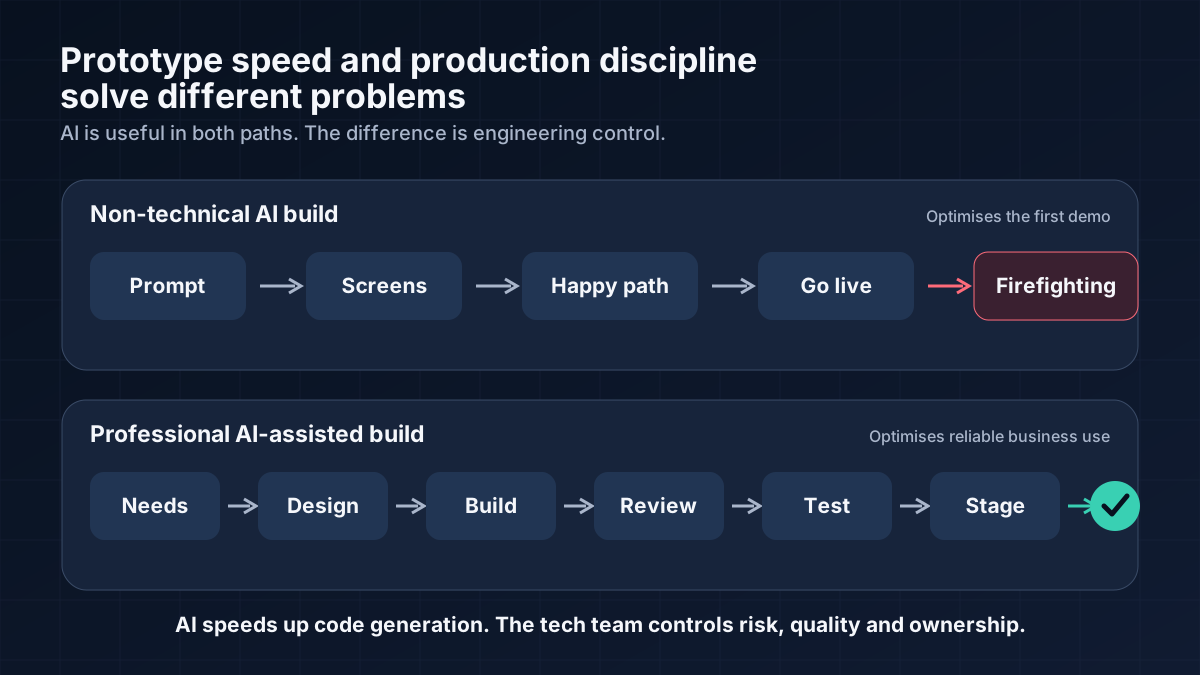
Most of the difficult work is behind the demonstration. Someone still has to decide which employee may open each record, what happens when a payment confirmation arrives twice, how customer data is recovered after a bad update, and who responds when an integration fails on a Sunday morning.
A working flow proves the idea. It does not prove that the product is ready to carry a business.
Where overconfidence begins
Software is easiest to judge by what we can see, so the interface receives most of the attention. Production failures tend to start elsewhere: an incomplete permission rule, a fragile data relationship, an expired API token or a backup nobody has tried to restore.
A login screen is a good example. It confirms who a user is. It does not decide whether that user may export every customer, edit an approved invoice or open another branch's leads by changing an ID in the address bar. Those decisions belong to the access model, not the screen. OWASP still ranks Broken Access Control first in its 2025 web-application risk list. [10]
Our review process at GreyBath starts behind the interface. We look at the data model, permission matrix, failure paths, release process and recovery plan before treating a feature as finished. This work is less dramatic than generating a dashboard in minutes, but it is what makes the dashboard dependable.
What the evidence tells us
The useful question is not whether AI writes good or bad code. Human developers produce both as well. The better question is where AI changes the risk and where human judgement still matters.
Secure code is a separate result
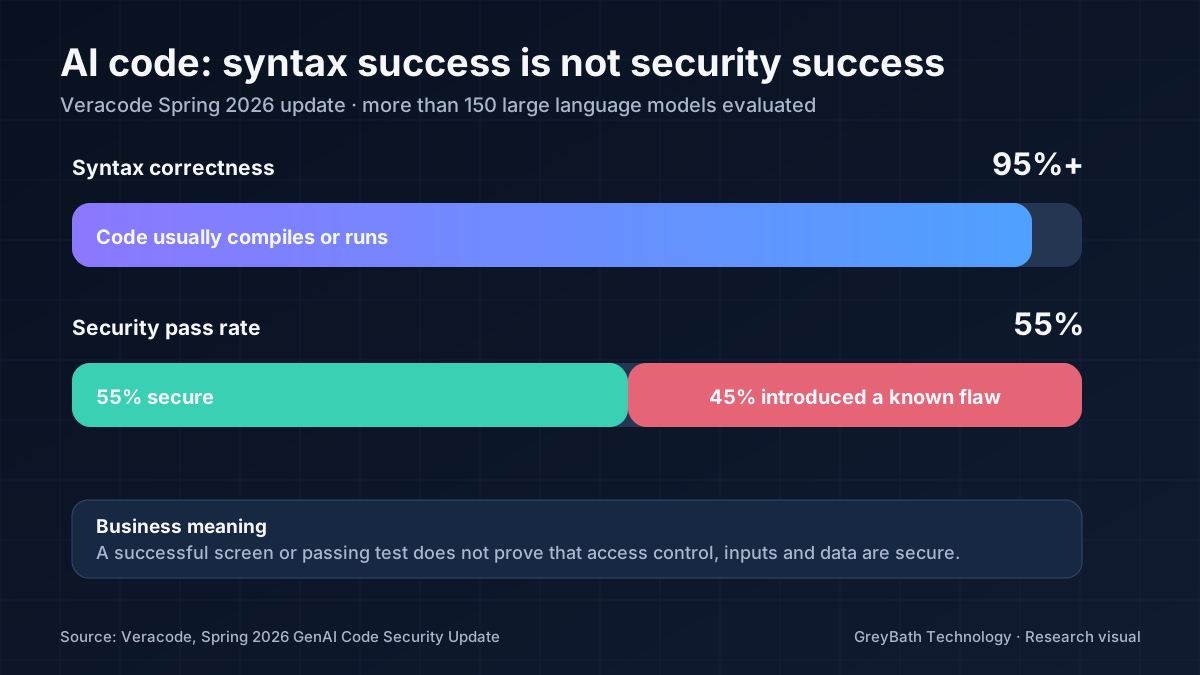
Veracode's Spring 2026 study covered more than 150 language models. Syntax correctness exceeded 95%, yet only 55% of the tested generation tasks produced secure code. A known security flaw appeared in the remaining 45%. [1] The program could run and still fail the security test.
CodeRabbit saw a related pattern in 470 open-source pull requests. AI-assisted changes averaged 10.83 review findings, compared with 6.45 in the group classified as human-only. Logic, error handling and several security categories appeared more often in the AI-assisted set. [2] The classification was not perfect, but the review burden is difficult to dismiss.
Passing tests is only part of the answer
Two academic projects reached the same point from different directions. An IEEE ISSRE 2025 study of more than 500,000 Python and Java samples found AI-generated code simpler and more repetitive, but also more likely to contain unused constructs, debugging remnants and high-risk vulnerabilities. [3] A separate analysis of 4,442 Java tasks found no direct relationship between passing the functional tests and producing clean, secure code. [4]
That gap can survive the first review. Researchers examining 302,600 verified AI-authored commits found that 22.7% of the issues they tracked were still present in the latest repository version. [5] AI also removed some existing code smells, so this is not a claim that every generated commit is poor. It is evidence that unresolved defects do not disappear because the code arrived quickly.
Speed depends on the work around the tool
Developers clearly find AI useful: 84% of respondents in Stack Overflow's 2025 survey were using it or planning to. Trust was much lower. Forty-six per cent distrusted its accuracy, and the most common complaint was an answer that was almost right. [6]
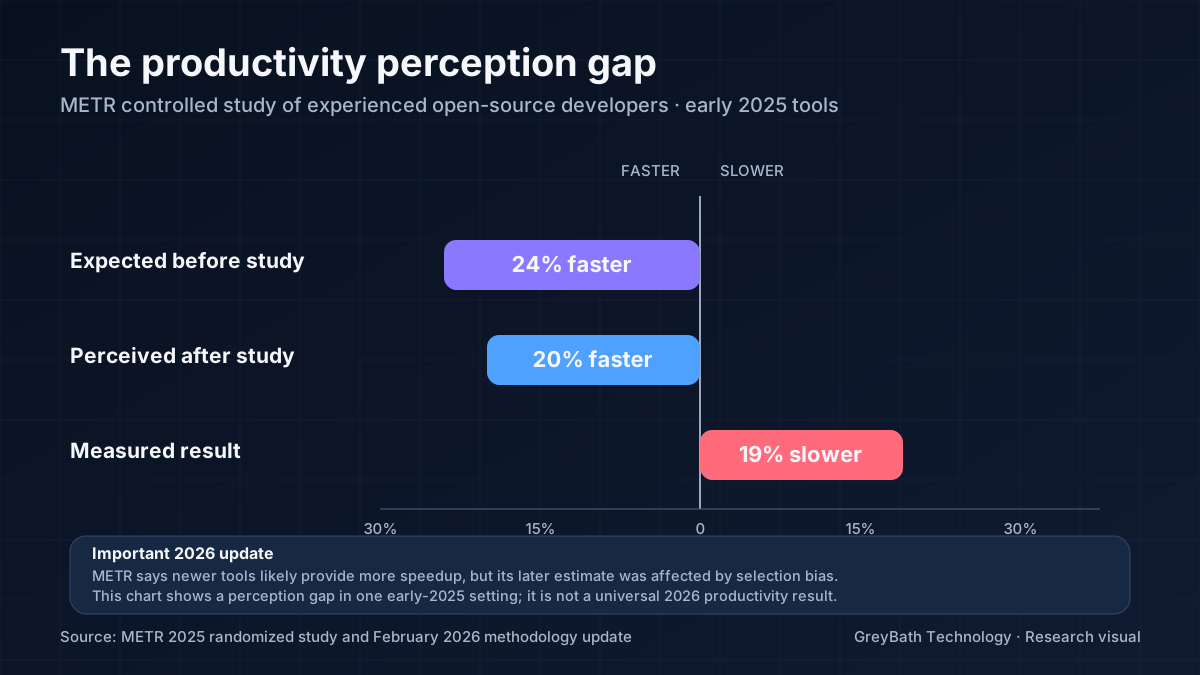
METR's controlled study provides a useful counterweight to the feeling of speed. Sixteen experienced open-source developers expected early-2025 tools to make them faster and believed afterward that they had. Measured completion time was 19% slower across the 246 tasks. [7] METR later said newer tools probably perform better, although its 2026 follow-up could not produce a reliable estimate because the participant selection had become biased. [8]
Google Cloud's 2025 DORA research describes AI as an amplifier. Disciplined teams gain leverage from it; weak delivery systems can multiply their existing problems. [9] That description matches the evidence better than either extreme of “AI replaces developers” or “AI code cannot be trusted.”
Research note: these studies use different tools, languages and methods. Company studies and preprints are identified in the source list. Their individual percentages should not be treated as a universal failure rate.
What the demo cannot show
The rules nobody wrote down
Suppose an AI-built CRM can create a lead and assign it to a salesperson. The prompt may never explain whether mobile numbers must be unique across branches, whether reassignment needs approval, what happens to open leads when an employee leaves, or whether a manager may export the whole pipeline.
These are not coding details. They are business decisions that must become validation rules, permissions and test cases. When the rule is absent from the prompt, the software will usually follow the easiest interpretation.
Data that has to survive future changes
A simple customer screen can sit on top of companies, contacts, branches, quotations, invoices, payments, products and audit records. Those records change at different times and for different reasons. One payment may cover two invoices. A contact may move to another company. An old report may need to preserve the company name that existed when it was issued.
A database designed around the first screen often becomes expensive during the second year. Relationships, unique fields, transactions, indexes, retention and migrations need attention before thousands of real records depend on them.
Failures outside the happy path
A successful payment test says little about a delayed webhook, a duplicate callback or a gateway timeout after money has already moved. The same applies to WhatsApp, email, ERP and logistics integrations. Production code needs retries, idempotency, reconciliation and an answer for partial success.
Real users also double-click buttons, upload oversized files and edit the same record at the same time. Servers restart. Tokens expire. External APIs change. These cases are ordinary, not exotic, and they rarely appear in a five-minute demonstration.
Operations after launch
Source control, separate development and production environments, protected secrets, monitoring, deployment approval, rollback and tested restoration all sit outside the visible feature. NIST's Secure Software Development Framework and OWASP ASVS treat these controls as part of development, not optional work after it. [11] [12]
A recoverable warning
The Replit database incident
In July 2025, Replit discussed an incident in which its Agent deleted application data. Rollback restored the database, so the data was not permanently lost. Replit also explained that this happened before it introduced stronger separation between development and production databases. [13]
The important part is not the brand or the tool. It is what made the event recoverable: a rollback existed. A destructive action in an environment without reliable backups would have ended differently.
This is why production access needs boundaries. Development should be separate, destructive actions restricted, backups automatic, restoration tested and unusual activity visible to someone who can respond.
Where an AI-only build is reasonable
Risk changes with the job. A disposable concept does not need the same controls as a system holding payroll, medical or payment data.
| Project | Reasonable approach |
|---|---|
| Design concept or internal prototype | AI-only is usually fine. Keep real confidential data out of it. |
| Brochure or campaign website | AI can do most of the build. Review forms, consent, spam protection and mobile performance before launch. |
| Lead-generation website | Add technical review for data flow, CRM connections, analytics and access to submissions. |
| Ecommerce, customer portal or operational CRM | Use accountable engineering for payments, permissions, integrations, testing and support. |
| Healthcare, finance or HR system | Experienced engineering, security and compliance review are essential. |
A practical team model
A technology team does not always mean a large department. A small business application may need one experienced full-stack developer, an independent technical reviewer, focused QA before release, and DevOps or security support at the points where the risk justifies it.
The composition follows the risk, not the page count. A ten-screen portal with payments and sensitive records can demand more engineering than a hundred-page information site.
Let AI accelerate
- repetitive implementation and UI variations;
- test and documentation drafts;
- debugging, refactoring and migration assistance.
Keep people accountable for
- requirements, architecture and permissions;
- review, security, release and recovery;
- incidents, documentation and future ownership.
AI should reduce typing work. It should not remove engineering ownership.
Before production
Seven questions worth answering
- Who owns the assets? The business should control the repository, hosting, domain, database and third-party accounts.
- Is production isolated? Development and testing must happen without placing live customer data at risk.
- Are permissions written down? Define who may view, create, edit, approve, export and delete each kind of record.
- Has somebody independent reviewed it? Code, architecture, dependencies, secrets and common access risks need a second pair of qualified eyes.
- Have failure paths been tested? Include duplicate clicks, bad inputs, timeouts, API downtime and partial payments.
- Can the team recover? Restore a backup and practise rollback instead of assuming both will work.
- Who owns the next problem? Monitoring, support, documentation and an exit plan should not depend on one prompt history or one person.
If several answers are unclear, the build may still be a useful prototype. Give it the controls and ownership it needs before real customers, money or operations depend on it.
Use the speed without borrowing the risk
AI has changed how quickly a team can explore an idea and how much routine work one developer can complete. That advantage is already real.
The responsible approach is equally straightforward: use AI aggressively inside a process that still has architecture, review, testing, recovery and a named owner. The tool can write more of the code. The business still needs someone who understands what the code is allowed to do.
Frequently asked questions
What is vibe coding?
Vibe coding means building software mainly through natural-language instructions to AI, sometimes without understanding or reviewing every generated part. It is effective for experiments and risky when important data or workflows depend on it.
When is an AI-only build acceptable?
It is a reasonable choice for mock-ups, disposable prototypes and low-risk information pages that do not hold confidential data or control important transactions. Riskier systems need technical review and accountable ownership.
What should a business check before launching AI-generated software?
Confirm ownership, environment separation, permissions, independent review, failure testing, restoration, monitoring and ongoing support. The seven-question checklist above provides a practical starting point.
Research sources
Company research and academic preprints are identified below so their findings can be read in context.
- Veracode, Spring 2026 GenAI Code Security Update.
- CodeRabbit, State of AI vs Human Code Generation Report.
- Cotroneo, Improta and Liguori, Human-Written vs. AI-Generated Code, IEEE ISSRE 2025.
- Sabra, Schmitt and Tyler, Assessing the Quality and Security of AI-Generated Code, research preprint.
- Liu et al., Debt Behind the AI Boom, 2026 research preprint.
- Stack Overflow Developer Survey 2025, AI section.
- METR, early-2025 AI productivity study.
- METR, February 2026 experiment update.
- Google Cloud DORA, 2025 AI Capabilities Model Report.
- OWASP Top 10:2025.
- NIST SP 800-218, Secure Software Development Framework 1.1.
- OWASP Application Security Verification Standard 5.0.
- Replit, Doubling down on our commitment to secure vibe coding.
Keep reading
More practical thinking from GreyBath across design, engineering and growth.
All articles