

Your Warehouse Shows Stock, but Sales Cannot Dispatch It. Here’s Why.
A practical guide for SMEs to separate physical, accepted, reserved, quality-held, returned and location-ready stock before Sales promises a dispatch.

Share this article
Browse all insightsA customer orders 300 units. The inventory report shows 650 available, so Sales promises dispatch. Then the warehouse calls: only 180 units can be shipped.
Cover disclosure: the warehouse photograph is an AI-generated editorial illustration of a fictional stock review. It does not show a GreyBath client, real inventory records or a real customer commitment.
The remaining stock is physically present, but some units are reserved for other customers, some are awaiting inspection, and some are sitting in another warehouse.
The customer does not care about these internal explanations.
They were promised 300 units.
Your business now has to explain why it cannot deliver them.
This situation does not always mean somebody counted the stock incorrectly.
Sometimes the inventory count is accurate.
The problem is that the business is using the wrong definition of available stock.
For small manufacturers, distributors and wholesalers, solving this distinction can prevent unnecessary sales commitments, dispatch confusion and repeated calls between sales and warehouse teams.
The solution does not necessarily require another ERP.
It begins with understanding what the existing stock figures mean.
One product can have several correct stock quantities
Imagine a manufacturer of industrial fasteners.
The company has 1,000 units of a particular component physically present across its storage locations.
Accounts can see 1,000 units in the stock report.
Warehouse staff can physically count 1,000 units.
Both figures may be correct.
But that does not mean the company can accept a fresh order for 1,000 units.
Some units may already belong to confirmed sales orders.
Others may be under quality inspection.
Some may be damaged.
A few may have been returned by customers and have not yet been inspected.
Another portion may be stored in a warehouse too far away to meet today's dispatch commitment.
This is why businesses need to distinguish stock on hand from stock that can be promised and fulfilled.
Zoho Inventory’s current stock-tracking documentation defines available-for-sale stock as stock on hand minus committed stock. It also documents two transaction-driven tracking modes: physical stock changes with purchase receives and shipments, while accounting stock changes with bills and invoices. Neither system view is a substitute for a controlled physical count.
The principle is useful even if you do not use Zoho.
Your inventory figure must answer the question being asked.
A finance manager may want to know how much inventory the business holds.
A warehouse manager needs to know where those goods are and whether they can be dispatched.
A salesperson needs to know how much can be promised to a new customer.
Those are related questions, but they are not identical.
The difference between stock on hand and stock available for sale
Consider these inventory categories.
| Stock category | What it means | Can sales promise it to a new customer? |
|---|---|---|
| Physically present | Goods currently stored in company-controlled locations | Not automatically |
| Accepted and released | Goods approved for normal sale or use | Potentially |
| Reserved | Goods allocated to existing commitments | Generally no, unless formally released |
| Quality hold | Goods awaiting inspection or a release decision | No |
| Damaged or rejected | Goods not approved for normal sale | No |
| Returned, awaiting inspection | Goods received back but not yet assessed | No |
| At another warehouse | Goods at a different location | Depends on transfer time and delivery commitment |
| In transit | Goods moving between locations | Not yet available for immediate picking at the destination |
These are recommended operational categories. Your software may use different names or calculate availability differently.
The important principle is that every quantity should have a clear operational meaning.
For example, accepted stock is not automatically available to new customers when it is already reserved against confirmed orders.
Similarly, physically returned goods should not automatically become saleable merely because the warehouse has received them.
How 1,000 units become only 600 available
Consider a hypothetical company called Konkan Engineering Components.
This is an illustrative example, not an actual GreyBath client.
The company manufactures components and supplies them to industrial equipment manufacturers.
It operates two storage locations.
For one component, the warehouse records 1,000 physical units.
After reviewing the stock position, management discovers the following:
| Stock position | Quantity |
|---|---|
| Accepted, released stock | 780 |
| Awaiting quality inspection | 120 |
| Damaged or rejected stock | 40 |
| Customer returns awaiting inspection | 60 |
| Total physically present | 1,000 |
The first important finding is that 220 units are physically present but have not been approved for sale.
The company therefore has:
780 units of accepted, released stock.
However, 180 of those units have already been reserved for confirmed customer orders.
That leaves:
780 − 180 = 600 units potentially available for new orders.
The difference is substantial.
Management started with a physical stock figure of 1,000 units.
It can currently promise only 600 units across its two locations, subject to the required delivery date and location.
The remaining 400 units have not vanished.
They are simply unavailable for new orders for different reasons.
That distinction matters because management should respond differently to each category.
Damaged goods may require a final rejection decision.
Quality-hold stock needs authorised inspection and release.
Customer returns need assessment.
Reserved units are already supporting another commercial commitment.
Treating all four categories as one generic stock shortage hides the real situation.
Illustrative stock bridgeSwipe sideways on a small screen to inspect every stage
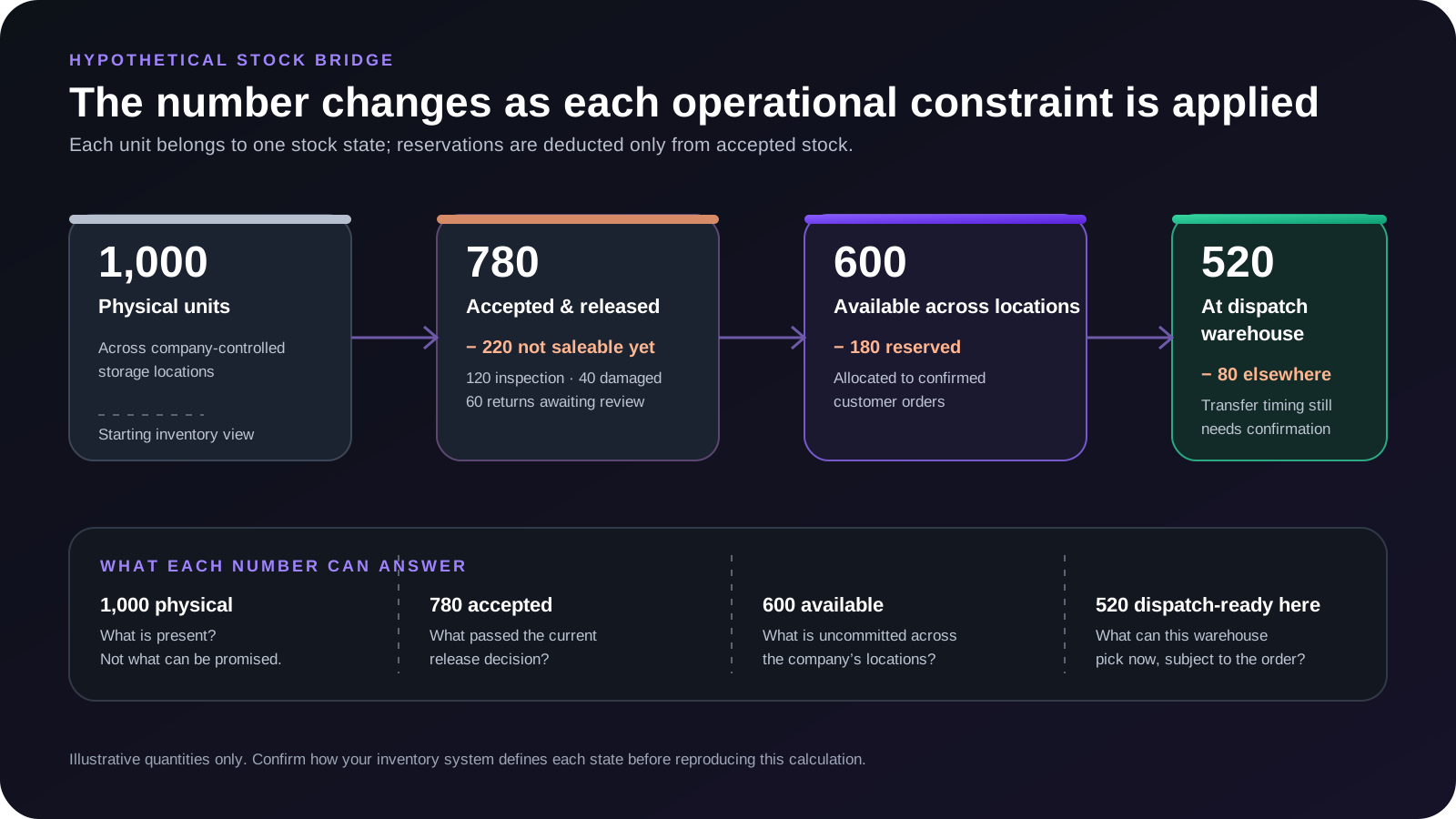
Original GreyBath educational diagram based only on the fictional quantities in this article.
Avoid subtracting the same stock twice
The calculation above assumes that each physical unit belongs to exactly one mutually exclusive stock category, and that reservations are deducted only from accepted, released stock.
Your ERP may already exclude quality holds, scrap or other quantities from its available-stock figure.
If so, subtracting those quantities again would produce an incorrect result.
Understand the system's stock definitions before creating a separate availability calculation.
The spreadsheet or dashboard must follow the underlying inventory transaction rules.
The problem becomes harder when you have two warehouses
Now consider the same manufacturer.
Of the 600 units available for new orders, 80 are at its second warehouse.
The remaining 520 are at the warehouse responsible for today's dispatch.
The position becomes:
| Inventory view | Quantity |
|---|---|
| Physical stock across both locations | 1,000 |
| Accepted, released stock | 780 |
| Already reserved for confirmed orders | 180 |
| Available for new orders across both locations | 600 |
| Uncommitted stock at the second warehouse | 80 |
| Available at the dispatch warehouse | 520 |
This does not mean the company has only 520 units available for sale.
It has 600 potentially available across both locations.
But a sales commitment requiring immediate dispatch from the first warehouse can initially rely on only 520 units, assuming those goods are in pickable locations and satisfy the order's requirements.
The other 80 units may become available after an internal stock transfer.
The company needs to establish:
- Which warehouse will fulfil the order?
- Can the goods be transferred in time?
- Has the transfer been initiated?
- Have the goods actually arrived?
Current Zoho Inventory transfer-order documentation distinguishes an initiated transfer, which is in transit, from a transfer received at the destination. Creating or tracking the movement is therefore not the same as having dispatch-ready stock at the receiving warehouse.
For an SME, that distinction can be managed using existing software or a controlled transfer register.
The important point is not to promise goods from another location without considering the actual transfer.
Quality-hold stock should not look like normal stock
Imagine that 120 units failed an initial inspection.
The warehouse keeps them on a separate rack while the quality team determines whether they can be released.
If those units remain in the ordinary pickable stock pool, sales may promise them and warehouse staff may accidentally select them.
A safer process separates stock that is physically present from stock that has been approved for use or sale.
Odoo 20’s failure-location documentation describes one configured approach: with storage locations enabled and a quantity-based quality control point, the failed quantity can be directed to a selected failure location when the operator confirms the result and validates the order. A failed check does not universally or instantly quarantine stock; the configured workflow and final transaction matter.
You do not need Odoo to apply the principle.
Even a small warehouse can maintain separate identified areas:
- Accepted stock
- Awaiting inspection
- Quality hold
- Rejected or damaged stock
The physical arrangement should match the inventory records.
A software label alone is insufficient if warehouse staff continue picking from the same unmarked shelf.
A hold needs an owner and a release decision
A useful quality-hold record should identify the item, quantity, location, reason for hold and person authorised to decide what happens next.
For example:
| Field | Example |
|---|---|
| Item | EC-240 |
| Batch | B26091 |
| Quantity on hold | 120 |
| Reason | Dimension verification pending |
| Physical location | QC-HOLD-02 |
| Responsible person | Quality supervisor |
| Current status | Awaiting inspection |
| Next action | Record inspection result |
| Release authority | Authorised quality personnel |
This is an illustrative record.
The objective is not to create more paperwork.
It is to prevent stock from becoming available merely because somebody moved it physically.
A release should be supported by the appropriate inspection result or authorised decision.
For food, pharmaceutical, chemical and other regulated products, the business must also follow applicable product-specific quality, safety, traceability and disposition requirements.
Do not treat a generic inventory status as permission to override those controls.
Returned goods need their own decision
A customer returns 50 units.
The delivery vehicle brings them back.
Warehouse staff accept the cartons.
The system records the return.
Can those 50 units immediately become available for sale?
Not necessarily.
The company may need to determine whether the goods are:
- unopened
- undamaged
- complete
- within their usable period
- correctly identified
- suitable for normal sale.
Consider two returns.
Return A: unopened engineering components
The customer ordered the wrong quantity.
The components are intact, correctly identified and pass the required inspection.
The authorised team may decide they can return to saleable stock.
Return B: damaged consumer products
The outer packaging is crushed and the condition of the contents is uncertain.
Those goods should not automatically return to normal saleable inventory.
The appropriate handling depends on product condition, company policy and applicable requirements.
If the business treats every return as immediately available, stock figures can increase without a corresponding increase in dispatch-ready goods.
Zoho’s inventory-adjustment documentation covers exceptional quantity corrections such as damage, theft, write-off and data error. Odoo 20 documents controlled database scrapping for unusable or unsellable goods by moving them to a virtual scrap location. That database action is not itself physical disposal, and it is distinct from stock still awaiting a quality decision.
The useful lesson is that receiving a return and approving it for resale are separate decisions.
Your inventory process needs clear stock movements
A small business can prevent many discrepancies by defining which events change a stock category.
The process does not have to be complicated.
When purchased goods arrive
Record the physical receipt.
If inspection is required, place them in the appropriate pending-inspection category.
Once authorised acceptance is complete, release the approved quantity to normal stock.
Any rejected quantity should remain separately controlled.
When a sales order is confirmed
Determine whether the order creates a reservation.
Different inventory systems reserve stock at different stages, depending on configuration.
Define exactly when your business considers goods allocated to an order.
Avoid a situation where three salespeople promise the same 100 units because nobody has recorded the commitments.
When goods are picked and dispatched
Record the movement at the correct stage for your system.
Do not deduct the same goods independently when picking, invoicing and shipping unless the software's transaction model explicitly handles those stages without double counting.
Zoho’s physical-stock and accounting-stock documentation provides an example of why invoicing and shipping can produce different system views.
When stock is moved internally
Record the source location, destination, quantity and movement status.
A transfer initiated is not the same as a transfer received.
When goods fail inspection
Move them into the relevant controlled stock state and location.
Only an authorised release should make those goods available again.
These transitions are the foundation of reliable availability.
Stock-state workflowSwipe sideways on a small screen to follow the movement
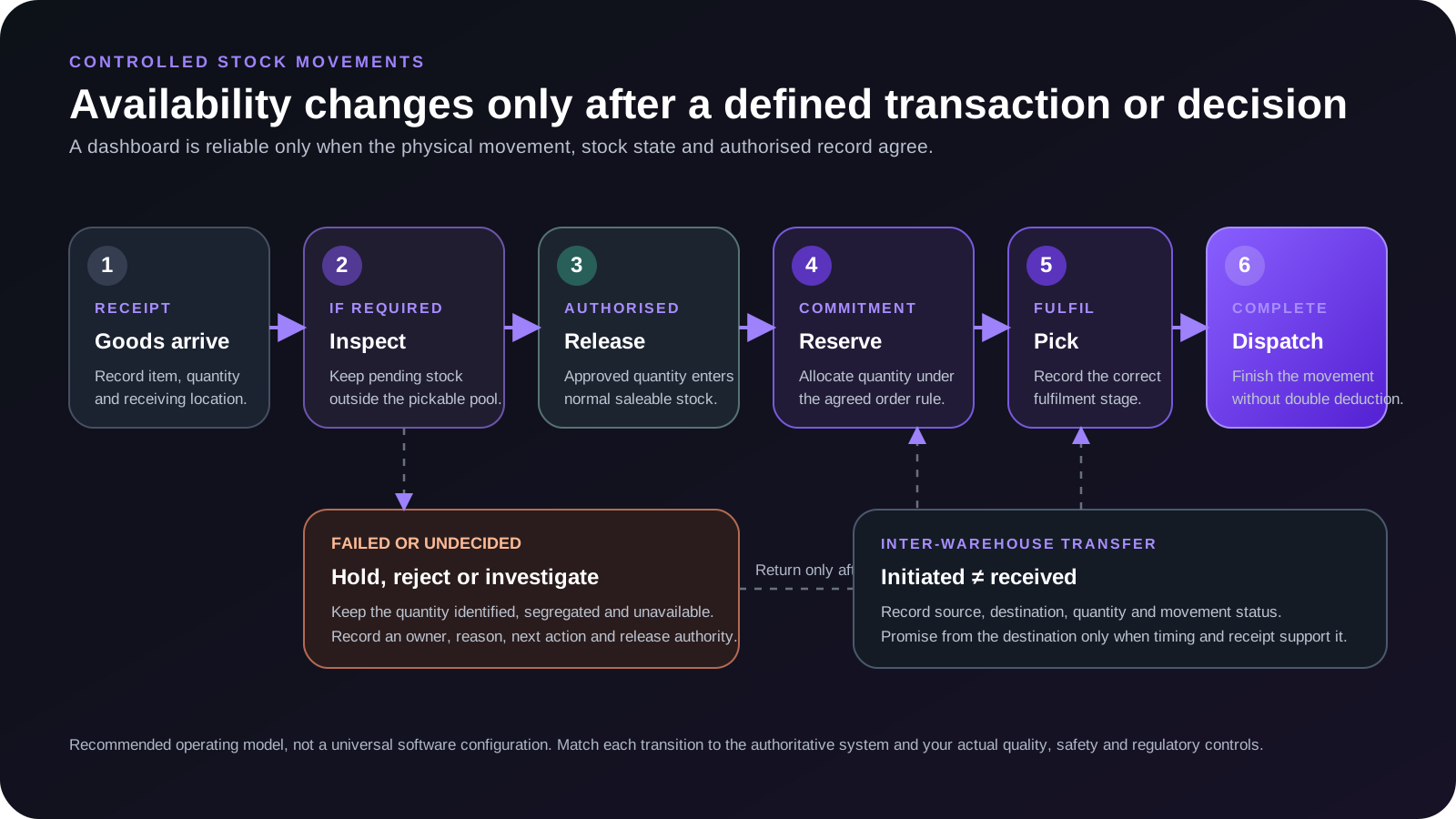
Original GreyBath educational diagram. Adapt the transitions to the authoritative system and the business’s actual quality, safety and regulatory controls.
If the movement rules are unclear, a real-time dashboard may simply show incorrect information faster.
Stock reservation can be more important than frequent stock counting
Consider a warehouse with 500 perfectly good units.
Two salespeople are speaking with customers.
The first salesperson confirms an order for 300 units.
The second salesperson receives a request for 250.
If the first order has not reserved stock, both may still see 500 available.
The business can end up promising 550 units when it has only 500.
This is not a physical counting problem.
It is a reservation problem.
The company needs a clear rule for what constitutes a confirmed commitment.
A practical approach is:
Quotation: Indicates interest but does not automatically reserve stock unless the business has an approved policy for it.
Confirmed sales order: Reserves the agreed quantity according to the company's allocation rules.
Cancelled or reduced order: Releases only the authorised unused reservation.
Dispatch: Completes the movement through the relevant fulfilment transaction.
This is a recommended process, not a universal software configuration.
For some businesses, stock may be reserved for approved quotations, production orders or contractual commitments.
What matters is that the rule is explicit and consistently applied.
Odoo 20 documents at-confirmation, manual and before-scheduled-date reservation methods. Its Detailed Stock report separately shows on-hand and reserved quantities. A reservation is a system allocation, not necessarily a physical move.
A small business should establish its own reservation rules before expecting salespeople to interpret availability consistently.
FMCG and perishable goods have another complication: expiry
For products with expiry dates, not every physically usable unit will meet every customer's delivery requirements.
Suppose an FMCG distributor has two batches of the same product.
| Batch | Quantity | Expiry | Customer requirement |
|---|---|---|---|
| Batch A | 300 | 30 November 2026 | Minimum 90 days remaining |
| Batch B | 400 | 30 June 2027 | Minimum 90 days remaining |
Assume the customer requires at least 90 days of remaining shelf life at delivery.
For a proposed delivery in October 2026, Batch A would not meet that requirement.
Batch B may qualify, subject to the precise delivery date and the agreed shelf-life calculation.
The company physically holds 700 units.
But it should not automatically promise all 700 to that customer.
The customer-specific available quantity may be only 400.
This does not necessarily mean Batch A is expired or legally unsuitable for every purpose.
It means the batch may not satisfy that particular customer's requirement.
FIFO and FEFO are not interchangeable
FIFO means First In, First Out.
FEFO means First Expired, First Out.
For shelf-life-sensitive inventory, the oldest received batch is not necessarily the batch with the earliest relevant removal or expiry date.
Odoo 20’s FEFO documentation describes a removal strategy that prioritises the nearest assigned removal date, normally calculated before expiry. It depends on correct lot or serial tracking, expiry configuration and the applicable product-category or location strategy.
Businesses handling food, cosmetics, chemicals, pharmaceuticals or other sensitive products must apply the appropriate handling and regulatory requirements.
For an ordinary engineering-component distributor, this level of expiry control may not be needed.
The process should match the actual stock risk.
An inventory dashboard should answer operational questions
Many dashboards show:
Total stock
Stock value
Low-stock items
Purchases
Sales
These can be useful.
But a warehouse manager may need a different view.
For each important item, the system should help answer:
- How many units are physically present?
- How many are accepted for sale?
- How many are reserved?
- How many are blocked or awaiting inspection?
- How many are available at the warehouse needed for this order?
- Which stock movements have not been completed?
The answers need to come from reliable transactions, not manually maintained totals that drift apart.
A practical stock-availability view
| SKU | Physical | Hold / rejected / uninspected | Accepted | Reserved | Available across locations |
|---|---|---|---|---|---|
| EC-240 | 1,000 | 220 | 780 | 180 | 600 |
| EC-255 | 500 | 50 | 450 | 200 | 250 |
| EC-280 | 300 | 0 | 300 | 90 | 210 |
These are hypothetical figures.
Each quantity category is defined to avoid overlap.
The table gives an operational availability view. It does not establish whether every available unit can satisfy a specific dispatch date, customer requirement or warehouse location.
A useful system should allow staff to examine those details before confirming a commitment.
Do not begin by purchasing a warehouse management system
If your business has one storage location, a manageable number of items and a small team, you may not need custom warehouse software.
Start by examining your existing accounting or inventory application.
Find out whether it already supports:
- stock reservations
- warehouse-wise balances
- stock adjustments
- returns
- batch information
- quality or blocked-stock locations
- and transfer orders.
Current systems such as Zoho Inventory and Odoo 20 document several of these capabilities. Availability depends on product edition, configuration, enabled modules, tracking mode and, in some cases, add-ons or early-access features.
Do not assume the features are unavailable merely because your team does not currently use them.
When a spreadsheet may be enough
A controlled spreadsheet can work for a small warehouse if it records the necessary stock states and the person responsible for updating them.
However, a standalone spreadsheet becomes risky when several employees simultaneously accept orders or change quantities.
The same units can be promised more than once if updates are delayed.
In such cases, maintain an authoritative stock and reservation source rather than several independent copies.
When an existing ERP is enough
If the ERP already supports reservations, locations and quality holds, the first project may simply be better configuration and staff training.
This is often more sensible than building another application with the same functions.
When custom integration becomes relevant
A connected workflow becomes more reasonable when the company needs to combine information from several systems.
For example:
- The accounting application records inventory transactions.
- The warehouse records inspection results.
- Sales records confirmed commitments.
- The dispatch team tracks warehouse movements.
- Management needs one dependable view without repeated copying.
Before development, establish which systems are authoritative and whether supported APIs, exports or other approved integration methods are available.
The objective should be to reduce manual reconciliation.
Not to create another stock database that employees must maintain separately.
An internal stock-availability agreement
A business does not need an elaborate policy document to establish stock responsibility.
Start with a one-page agreement between Sales, Warehouse, Quality and Accounts.
Use this structure:
| Decision | Business rule to define |
|---|---|
| Physical receipt | Who records goods arriving at the warehouse? |
| Quality acceptance | Who releases inspected stock for sale? |
| Rejected goods | Where are they stored and how are they recorded? |
| Sales reservation | At which order stage is stock committed? |
| Reservation release | Who can cancel or reduce an allocation? |
| Customer returns | Who decides whether returned goods are saleable? |
| Inter-warehouse transfer | When does stock become available at the destination? |
| Quantity correction | Who authorises inventory adjustments? |
| Sales availability | Which report or system is the recognised source? |
| Exception handling | What happens when the system and physical stock disagree? |
The answers should reflect your actual business.
Once documented, explain them to the people creating and fulfilling orders.
For SMEs, clarity between departments can be more useful than a complicated implementation nobody follows.
Measure dispatch reliability, not just inventory quantity
Once the process is working, track whether availability information is becoming more dependable.
Orders promised without sufficient dispatch-ready stock
Record orders for which the promised quantity was not genuinely available under the agreed rules when the commitment was made.
Investigate the cause.
Was stock already reserved?
Was it blocked?
Was the wrong warehouse used?
Was the quantity outdated?
This directly measures the business problem.
Stock held without a next action
Track how many units remain in inspection or blocked categories without a responsible person and a next decision.
Do not measure quality-team performance by pressuring employees to release stock faster regardless of safety.
The objective is to make pending decisions visible while preserving proper controls.
Inventory discrepancies
Compare controlled physical counts with system records.
Record the differences and causes.
Repeated discrepancies may indicate that receiving, transfer, adjustment or dispatch transactions are not being completed correctly.
Stock promise accuracy
A useful internal measure is:
Orders whose promised quantity and dispatch conditions were supported by verified availability at commitment ÷ orders reviewed × 100
This measures whether the original promise was supported by stock information.
It is different from on-time delivery, which can also be affected by transport and other operational factors.
Repeated manual corrections
Count how often employees change quantities outside the defined workflow to make records match.
Frequent manual corrections can indicate a process problem.
Do not treat every adjustment as an error. Legitimate adjustments are part of inventory management.
The concern is recurring corrections without a clear explanation.
When this approach may not be enough
This guide is intended for normal SME stock management.
Some businesses require additional controls.
A pharmaceutical manufacturer may need formal quality-release procedures and regulated traceability.
A chemical business may have segregation and hazardous-storage requirements.
A food company may need product-specific shelf-life, hygiene and safety controls.
A high-volume automated warehouse may require specialist warehouse-management equipment and integration.
An item tracked by weight, length or variable measurement may also need more careful unit conversion than a simple piece-count example.
Do not substitute these general operating practices for specialised legal, quality or safety obligations.
Likewise, a dashboard cannot correct a warehouse process that employees routinely ignore.
Physical controls, accurate transactions and authorised decisions must support the information displayed on screen.
The decision that matters
When your warehouse says it has stock but cannot dispatch it, do not immediately assume that purchasing more goods will solve the problem.
First understand why the existing stock is unavailable.
Is it already committed?
Awaiting inspection?
Damaged?
Returned but not approved?
Stored in the wrong warehouse?
Or unavailable because the system has not recorded the latest movement correctly?
Each situation needs a different response.
Buying additional stock when 200 units are merely awaiting inspection may be unnecessary.
Releasing goods without proper inspection to avoid buying stock may be unsafe.
And promising reserved inventory to another customer may simply move the shortage from one order to another.
The objective is to make physical stock, saleable stock, committed stock and dispatch-ready stock visible as different quantities.
Once your business can distinguish them reliably, sales commitments become easier to manage.
Technology can help maintain that distinction.
But the operating rules have to come first.
Optional workflow implementation support
Where GreyBath can contribute
GreyBath develops custom web applications, ERP/CRM workflows and dashboards, and system integrations.
For manufacturers, distributors and trading businesses, a potential project could connect existing inventory records with warehouse operations, stock reservations, quality-hold status and dispatch information.
Depending on the company's systems and actual requirements, the implementation could include a warehouse-wise stock dashboard, controlled stock-status updates, role-based permissions, approval workflows, alerts and management reports.
Where supported interfaces exist, GreyBath could assess integrations with the customer's existing ERP or inventory software rather than replacing the entire system. Any integration would require confirmation of available APIs, access permissions, technical feasibility and the agreed scope.
GreyBath's published capabilities include ERP workflows for orders and inventory, process mapping, dashboards, data integration and access-controlled applications.
For a smaller business, improving the existing inventory software may be sufficient.
A custom application becomes relevant when the company has a clear operational requirement that its present tools cannot manage effectively.
The right starting point is to identify why stock shown in your system cannot be dispatched. The technology decision should follow that finding.
Primary product documentation
Sources reviewed
Product names and behaviour can change. These official sources were reviewed on 9 October 2026; confirm the current edition and configuration before changing an operational workflow.
- Zoho Inventory: stock-tracking modes and availability
- Zoho Inventory: physical and accounting stock preferences
- Zoho Inventory: transfer orders
- Zoho Inventory: inventory adjustments
- Odoo 20: quality-check failure locations
- Odoo 20: inventory capability index
- Odoo 20: reservation methods
- Odoo 20: Detailed Stock report
- Odoo 20: FEFO removal strategy
- Odoo 20: scrap inventory
Keep reading
More practical thinking from GreyBath across design, engineering and growth.
All articles