
How Small Suppliers Can Track Invoice Approvals and Payment Follow-Ups
A practical guide for small suppliers to connect outstanding balances with buyer approvals, missing documents, responsible owners and the next payment follow-up action.

Share this article
Browse all insightsTo manage customer payments properly, a small supplier needs more than an outstanding-balance report. Each unpaid invoice should also show what is holding it up, who must act next and when that action is due.
Consider a small distributor’s weekly payment discussion. Accounts says, “The customer owes ₹2,40,000.” Sales says, “I spoke to them. Payment is under process.” Dispatch says, “The goods were delivered.” The owner asks, “Then why are we still waiting?” Nobody has a clear answer.
The amount is known. The next action is not. Sending another general reminder might help—but not if the buyer is waiting for a delivery acknowledgement, an invoice correction or confirmation from its receiving team.
There is a real distinction between sending an invoice, the buyer receiving it, approving it and issuing payment. SAP Business Network’s invoice-status guidance separates routing status from invoice document status. Its supplier guide distinguishes whether an invoice reached the customer’s system from whether the customer approved it for payment and whether payment was reported as paid or partly paid. A small supplier does not need enterprise software to apply that distinction. Start by giving every open invoice an accountable next action.
Cover image: AI-generated editorial illustration of a fictional small supplier’s accounts and sales team reviewing invoice approvals and payment follow-ups. It is not a GreyBath client implementation and does not show real customer or payment data.
01 · Diagnose the work behind the balance
An outstanding report answers only part of the question
An ageing report tells you how much is outstanding and how long it has been outstanding. For example, Zoho Books’ India receivables documentation lists an Invoice Details report with due dates and pending balances and an Aging Details report with transaction date, age, amount and balance due. Both can be exported.
That information is essential. But it does not necessarily explain why a specific customer has not paid.
Compare two updates about the same invoice
Update A: Invoice 1047: ₹84,000 outstanding. Overdue.
Update B: Invoice 1047: ₹84,000 outstanding. Buyer is waiting for the signed delivery acknowledgement. Dispatch coordinator to send it today. Accounts to confirm approval tomorrow.
The balance is identical. The second update tells the business what to do.
Keep the accounting record as the authority for the amount owed. Add an operational view for the work required to collect it. The two should support each other—not become competing versions of the accounts.
02 · Make each status actionable
Replace “payment pending” with a useful next action
Use a small set of internal work stages that your team can understand consistently. The following is a suggested operating model, not a mandatory sequence imposed by any accounting platform.
Suggested operating modelMove from a vague status to a verified next step
| Current situation | What to establish | Next action |
|---|---|---|
| Invoice sent, receipt not confirmed | Did it reach the correct person or portal? | Confirm receipt and the invoice reference |
| Supporting document missing | Which document is required? | Obtain and send that specific document |
| Commercial issue unresolved | Is there a price, quantity or other disagreement? | Assign the issue to the responsible sales or operations person |
| Approval confirmed, payment date unknown | Has the buyer provided a payment date? | Request a specific date and amount |
| Payment promised | What amount and date were confirmed? | Record the commitment and review it when due |
| Buyer reports payment sent | Has the receipt reached the bank and been allocated? | Accounts verifies and matches the transaction |
Do not mark an invoice “approved” because someone opened the email or said they would check it. Record how you know the status: a buyer email, a portal reference, a dated call note or another appropriate confirmation.
Also allow “status not confirmed.” It is better to show an information gap than turn an assumption into a green dashboard indicator.
Practical control flowSwipe sideways to follow all six control points
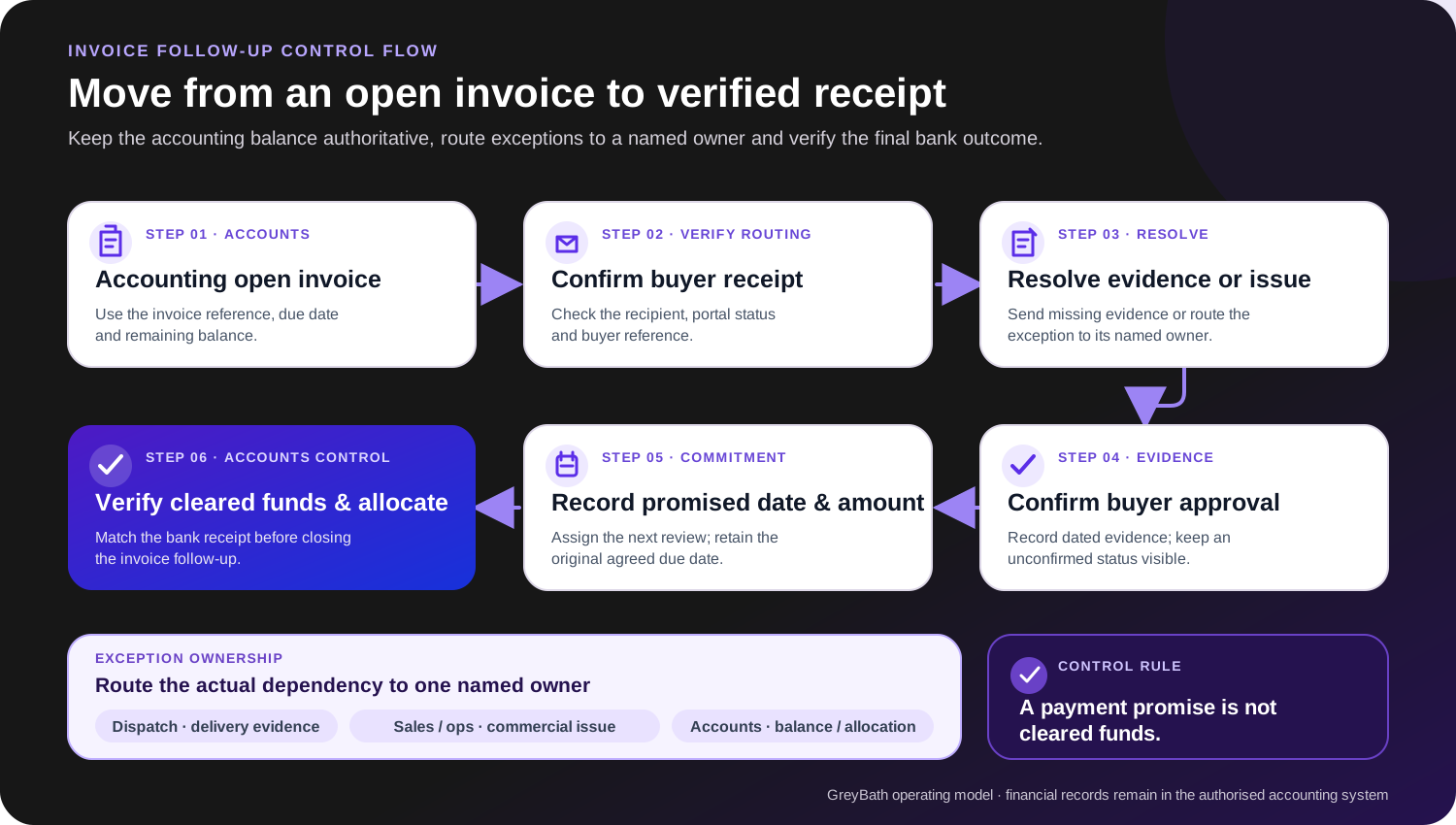
Original GreyBath educational diagram. The stages are a recommended operating model, not a universal buyer workflow or an accounting-system status map.
03 · Preserve the financial truth
Keep approval status separate from payment status
One status field cannot always describe the whole situation. An invoice may be approved but unpaid. It may be partly paid while the remaining amount is disputed. A buyer may report a transfer that your accounts team has not yet matched.
Use two separate views:
- Financial position
- Original invoice amount, payments received and matched, authorised adjustments and remaining balance.
- Follow-up position
- Current issue, supporting evidence, responsible person and next action.
Example
Financial position: ₹1,18,000 invoiced; ₹80,000 received; ₹38,000 outstanding.
Follow-up position: Buyer reviewing a deduction against the remaining balance; sales owner to obtain a written explanation.
Do not change the remaining balance merely to make it agree with a customer’s verbal claim. Have accounts verify and record the appropriate treatment.
Likewise, do not equate a buyer-network status with cleared funds. In SAP Business Network’s supplier view, Paid or Partially Paid for an invoice means the customer has paid or is in the process of issuing payment. Verify the bank credit and invoice allocation independently, and close the payment follow-up only after accounts has verified the receipt and any properly authorised remaining adjustments.
04 · Coordinate around one invoice record
Build one shared follow-up view
For a small business, the first version can be a controlled spreadsheet linked to documents and refreshed from the accounting system. You do not need to recreate the entire ledger.
Use an existing invoice identifier wherever possible. If invoices come from multiple company entities or systems, ensure the identifier remains unique across them.
| Information | What to record |
|---|---|
| Invoice identity | Selling entity, customer and invoice reference |
| Financial position | Invoice amount, remaining balance and last accounts update |
| Dates | Agreed due date, buyer-promised payment date and next-action date |
| Current issue | The specific reason action is required |
| Responsibility | One internal owner and the relevant buyer contact |
| Evidence | Confirmation reference and links to relevant documents |
| Next action | What must happen, by whom and by when |
| Latest update | What changed, who recorded it and when |
Restrict financial edits to the appropriate accounts users. Other team members can contribute operational updates without independently changing the amount owed.
“One shared view” does not mean every employee needs access to every customer’s commercial information. Give each role the access its work requires.
One invoice, three questionsEach question is shown as a separate card
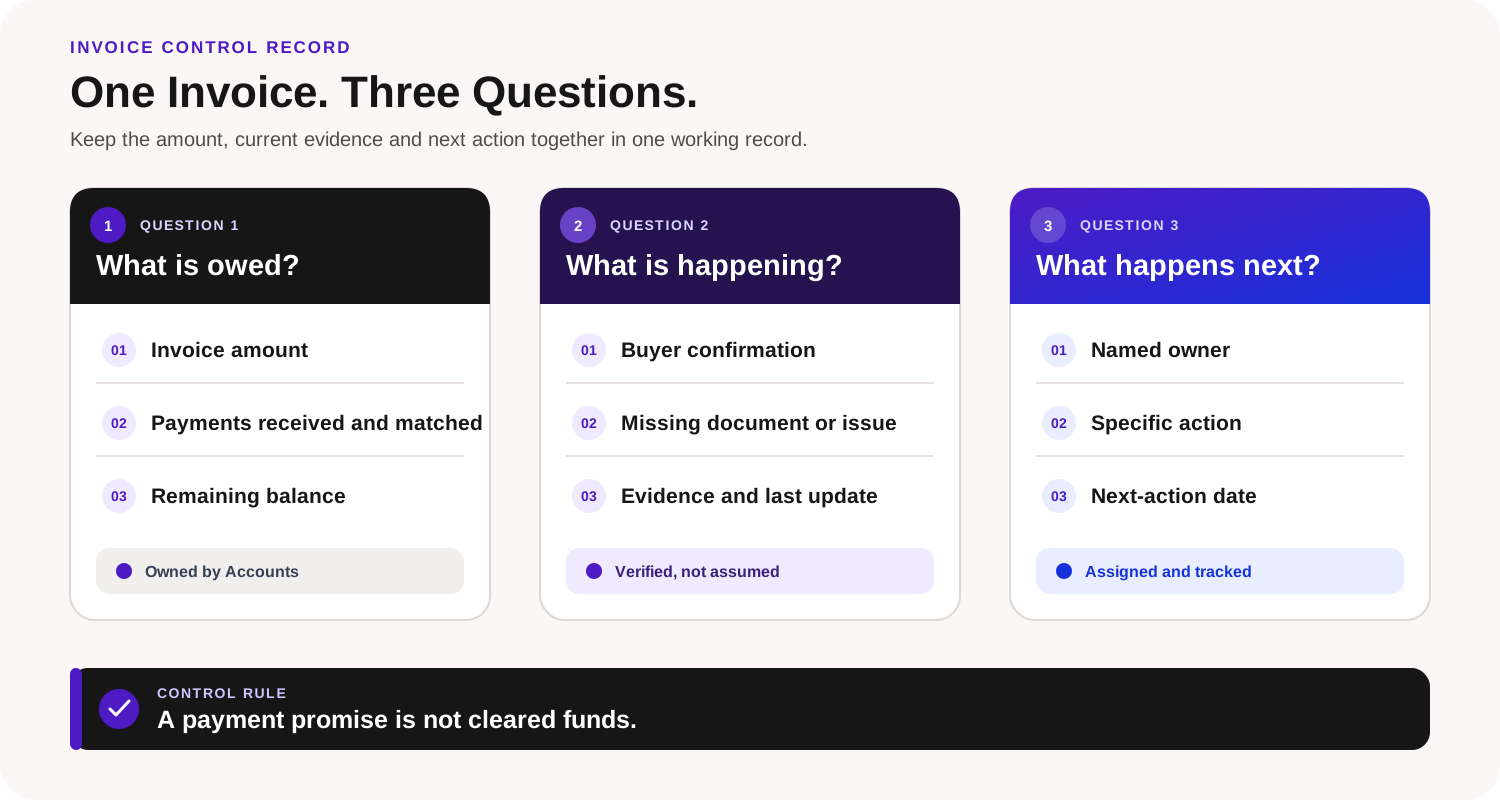
What is owed?
- Invoice amount
- Payments received and matched
- Remaining balance
Owned by Accounts
What is happening?
- Buyer confirmation
- Missing document or issue
- Evidence and last update
Verified, not assumed
What happens next?
- Named owner
- Specific action
- Next-action date
Assigned and tracked
Control rule: A payment promise is not cleared funds.
Original GreyBath educational diagram. It illustrates an operating model, not a live customer system or a claim that software controls the buyer’s approval process.
Keep three dates—not one
The agreed due date, buyer-promised date and next-action date serve different purposes. Suppose an invoice was due on 30 September. The buyer later promises payment on 8 October. Your team plans to confirm the transfer on 9 October. Keep all three dates.
Recording a later promise should not silently overwrite the original due date or erase the ageing history. Any formally agreed change to terms should be handled through the business’s authorised process.
This also prevents an operational problem: repeatedly moving a single date forward until an overdue invoice appears current.
05 · Resolve the actual dependency
Link the missing evidence to the invoice
Imagine a customer saying, “We cannot process this invoice because the receiving confirmation is missing.” The right response is not necessarily another copy of the invoice. It is to identify the required confirmation and get it to the right person.
This is a genuine dependency in some buyer systems. In a configured SAP Ariba goods-receipt-based invoice-verification workflow, an electronic invoice without an associated receipt can enter Awaiting Receipts when a reconciliation delay is configured. It can move on when a receipt is created, the delay expires or an invoice administrator starts reconciliation, so the exact dependency is configuration-specific.
For your own customers, establish what their process requires. A goods supplier might need a purchase-order reference, delivery acknowledgement or receiving confirmation. A service business might need completion or milestone acceptance. These are examples to verify with the customer—not a universal document list.
Keep the relevant files linked to the invoice record, with clear descriptions.
Useful record: “Signed delivery acknowledgement sent to buyer accounts on 3 October; confirmation awaited.”
Unhelpful record: “Documents shared.”
Avoid publishing invoice folders through unrestricted links. Share only what the intended recipient needs.
Give each issue one internal owner
“Accounts and sales are following up” sounds reassuring, but it can mean neither person knows who should act next. Assign one owner for the current action.
If a delivery document is missing, dispatch may need to provide it. If the price differs from the agreed order, sales may need to resolve it. If a transfer cannot be matched, accounts should investigate.
The person owning the customer relationship does not have to perform every task personally. They do need to know who is responsible.
A short ownership statement
Issue: Buyer cannot locate the delivery acknowledgement.
Owner: Dispatch coordinator.
Action: Send the signed copy to the named accounts contact.
Next check: Accounts confirms whether the invoice can proceed.
That is enough to coordinate a small team without adding a complicated approval hierarchy.
06 · Ask for a specific decision
Change the message according to the issue
A standard “payment pending” message asks the customer to investigate the whole situation again. A specific message asks for a specific decision.
When a document has been supplied
Hi [Name],
The signed delivery acknowledgement for invoice [number] is attached. Confirm whether any other document is pending and which team is handling approval. The outstanding amount in our records is ₹[amount].
When approval is confirmed but timing is unclear
Hi [Name],
Your team confirmed approval of invoice [number] on [date]. Share the expected payment date and amount so we can update our collection schedule.
When the customer reports a transfer
Hi [Name],
Share the transfer reference and invoice-wise allocation for the payment reported on [date]. Our accounts team will verify the receipt and update the balance.
Before sending any message, check the latest accounts position and recent customer response. A correct message becomes incorrect if the customer paid after the tracker was last refreshed.
07 · Hypothetical operating example
The same ₹12.4 lakh, but a different action plan
Consider a fictional industrial-consumables distributor with 18 open invoices across six customers. Its accounting records show ₹12.4 lakh outstanding.
Previously, every invoice appeared in one list labelled “Payment follow-up.” The team reviews each invoice and groups it by its immediate next action:
Hypothetical exampleEach invoice is counted once by its main next action
| Main action required | Invoices | Remaining balance |
|---|---|---|
| Provide missing delivery or receiving documents | 4 | ₹3,20,000 |
| Resolve price or quantity discrepancies | 3 | ₹2,40,000 |
| Obtain a payment date after confirmed approval | 5 | ₹2,80,000 |
| Follow up the remaining balance after part-payment | 2 | ₹1,50,000 |
| Establish the current position with the buyer | 4 | ₹2,50,000 |
| Total | 18 | ₹12,40,000 |
Hypothetical balance breakdownSwipe sideways to compare every next-action group
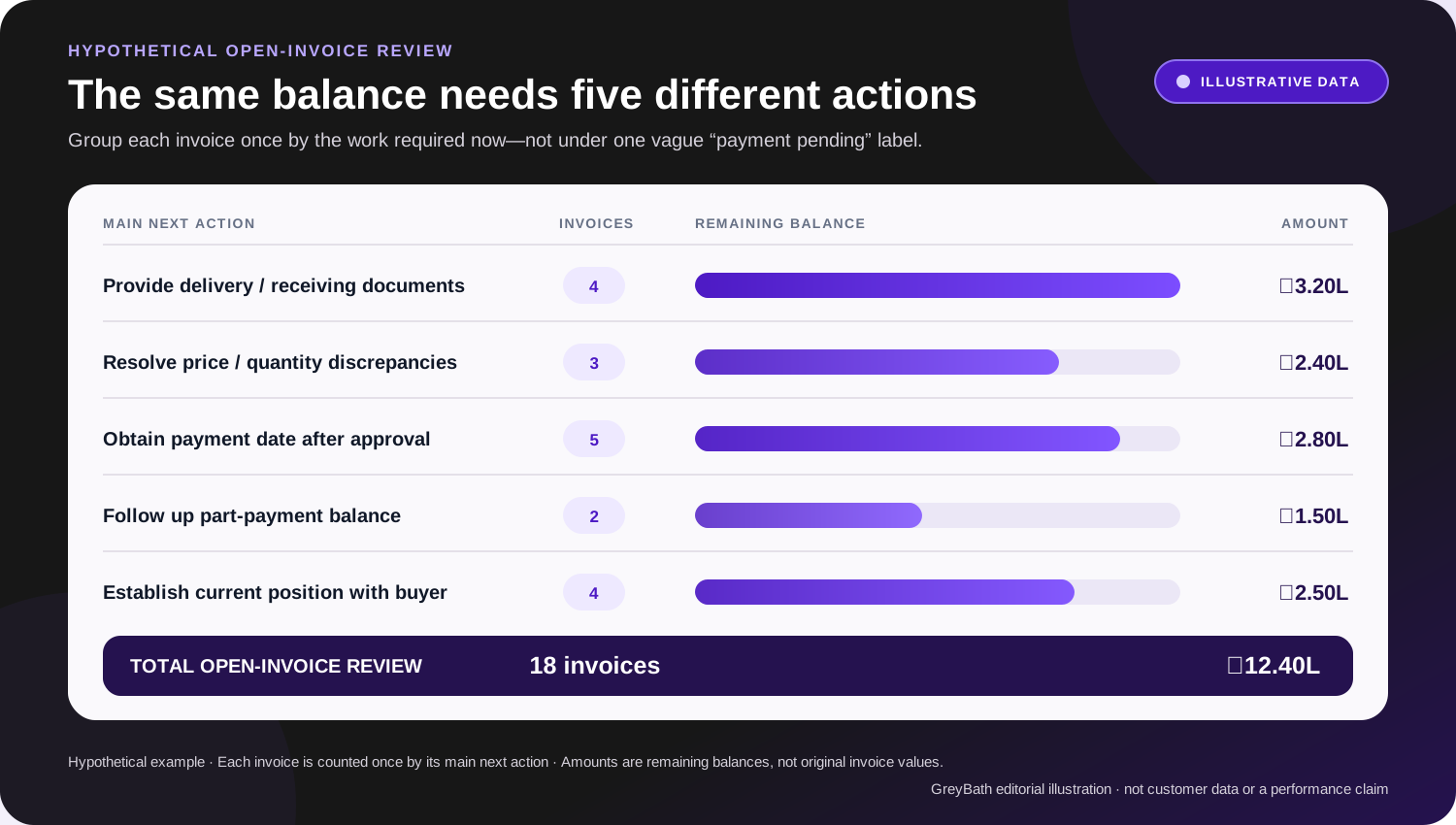
Original GreyBath educational chart using the fictional figures in this article. It is not customer data, a recovery forecast or evidence of improved collection performance.
These figures are hypothetical. Each invoice is counted once by its main next action, and the amounts are remaining balances—not original invoice values.
The three invoices with commercial discrepancies do not necessarily have their entire ₹2,40,000 disputed. The team must establish the actual disputed amounts separately.
What changes immediately?
Dispatch now has four document tasks. Sales has three commercial issues to resolve. Accounts has five payment-date requests, two balance follow-ups and four status enquiries.
The owner can also see that ₹2.5 lakh has no confirmed operational explanation yet. That amount should not be presented as a confirmed near-term receipt merely because the invoices have been raised.
What has not changed?
The business is still owed ₹12.4 lakh. No payment has been recovered simply by creating the table.
The improvement is that the business now knows which actions to take. Actual collection must be measured separately when money is received and allocated. This is the difference between a useful operational system and a dashboard that only makes outstanding money look organised.
08 · Configure before commissioning
Use the features you already pay for
Before commissioning a new application, check the reporting, reminder and customisation features in your existing software.
For example, Zoho Books’ India receivables documentation lists an Invoice Details report with due dates and pending balances and an Aging Details report with transaction date, age, amount and balance due; both can be exported. That can supply the financial foundation for a follow-up view.
Its current reminder guidance documents customer invoice reminders based on due date and internal notifications based on an expected payment date. The “Don’t remind about payment until then” option suppresses regular customer reminders until that date. Availability and labels can vary by edition, country, configuration and permissions.
These examples are not a recommendation to change your accounting package.
Ask your current software provider or accounts team: “Which parts of this process can our existing system handle, and which information would still need to be maintained separately?”
Check your actual edition, configuration and access permissions before assuming a feature is available. The cheapest suitable solution may be better configuration—not new software.
09 · Automate verified rules
Automate internal actions before customer reminders
If your team cannot reliably identify the right next action, automatically sending more messages can create more confusion.
Begin with internal reminders. For example, notify the responsible employee when a document task is overdue, an expected buyer response has not arrived or an invoice has no assigned owner.
Then introduce customer reminders for situations where the information and message are dependable.
Build explicit exceptions into the process
- Payment reported but not matched
- Send the task to accounts rather than immediately sending another overdue notice.
- Commercial dispute
- Use a specific issue-resolution message rather than repeatedly demanding the full amount without context.
- Buyer commitment still within the agreed follow-up window
- Follow the defined schedule rather than sending unrelated reminders.
- Financial data refresh failed
- Hold affected automated messages until the balance is checked.
These are recommended operating controls. They need to be configured and tested; they should not be assumed to exist because an automation is switched on.
Your system cannot see a buyer’s approval process without a source
This is an important boundary. Your accounting system knows that you raised an invoice. It does not automatically know whether the customer’s purchase, warehouse or finance team has approved it.
Even established buyer networks depend on the information customers provide. SAP also says that not every customer sends remittance information to SAP Business Network. Treat a missing or stale network status as a reason to verify with the customer, not as proof of non-payment.
For each external status, identify the source:
- Buyer email or confirmation: Record who confirmed it and when.
- Buyer portal: Record the reference and last checked time.
- Supported integration: Record the source and synchronisation status.
If no supported connection exists, a controlled manual update may be the correct answer. Do not let software label a customer invoice “approved” merely because an internal employee approved sending it. Those are different approvals.
10 · Add software only for a proved gap
When a connected application becomes worthwhile
A shared tracker may remain sufficient when invoice volume is manageable, a small team owns the process and updates are easy to maintain.
Consider a connected workflow when the same information is being entered repeatedly, several teams need different permissions, documents are difficult to locate or management cannot tell which updates are current.
The starting scope should be narrow: import open invoices and balances, attach the relevant documents, assign follow-up owners, record buyer confirmations and show the next actions.
Keep the accounting system authoritative for financial records. Begin with read-only financial imports where that meets the need.
Before approving implementation, require tests for practical failure cases: a duplicate import, a partial payment, a customer dispute, a failed data refresh and an unauthorised user attempting to open another account’s documents.
Also agree who maintains the application and how the business can export its information. A new system should reduce manual coordination—not become another place staff must update after finishing their real work.
11 · Separate effort from results
Measure collection work and collection results separately
Use a few measures that answer different questions.
How much remains unexplained?
Track the number and balance of open invoices whose current position has not been confirmed. In the fictional example, four of 18 invoices fall into that category. That tells management where information is missing; it does not establish that those customers will fail to pay.
Are internal actions completed on time?
Track overdue document tasks, unresolved assignments and missed follow-up dates. This measures the part your team can directly control.
How long do confirmed approvals take?
For invoices with reliable submission and approval dates, examine the elapsed time. State whether you use calendar or working days and keep unapproved cases visible separately.
Do not calculate an apparently improving average by silently excluding invoices that remain stuck.
How much cash was actually received?
Use receipts matched by accounts. Do not count a buyer promise, an internal approval or a reduced balance caused by an authorised credit adjustment as cash collected.
Review these measures together. More activity is not automatically better collection, and better information is not itself a payment.
Know what this process cannot fix
An organised workflow cannot make an insolvent customer able to pay. It cannot decide a genuine contractual dispute, replace professional advice on legal recovery or correct the economics of an unprofitable order.
It can help your business distinguish those problems from missing documents, unclear responsibility and avoidable internal delays.
Keep tax adjustments, credit notes, formal changes to payment terms and legal escalation under the appropriate professional and management controls. The aim is not to automate every decision. It is to ensure that important invoices do not remain unexplained because the necessary information is scattered across people and systems.
The useful result: every invoice has a next action
Your business does not need another screen that says “₹12.4 lakh pending.” It needs to answer:
- Which invoices need a document?
- Which need a commercial decision?
- Which have confirmed approval?
- Which have a payment commitment?
- Who must act next?
Start with those questions using your existing records. Improve the process before adding automation. Once the rules are clear, technology can connect the information and make the work easier to manage.
Optional workflow implementation support
Connect the process without replacing the ledger
GreyBath develops ERP/CRM workflows and dashboards, approvals, role-based systems and integrations. Its services also include custom web applications and integrations between suitable business tools.
For this problem, a proposed implementation could bring invoice balances, document links, buyer-status evidence, assigned follow-up tasks, reminders, escalation rules and management reports into one controlled workspace. The scope would begin with the current billing system, how each customer confirms approval and which tasks still move through email or spreadsheets. Existing-software configuration or a controlled tracker may remain sufficient for a smaller business; custom development becomes relevant only when repeated work, multiple teams or access requirements justify it.
Any connection to accounting software or buyer portals would depend on verified interfaces, permissions and applicable charges. The accounting system would remain authoritative for financial records.
Research record
Official sources
Official product documentation reviewed on 4 October 2026 supports the cited examples of invoice status, receipt-based verification, receivables reporting and reminders. Product features and status meanings can vary by buyer, edition, region, configuration and permissions.
- SAP Help Portal: Invoice Status LevelsDefinitions for sent, approved, paid and partially paid invoice statuses, including the limit that not every buyer sends remittance information.
- SAP Help Portal: Viewing Invoices on the Invoice Status PortalVisible approval, payment, overdue and remittance information available when configured by the buyer.
- SAP Help Portal: Goods Receipt-Based Invoice Verification WorkflowAn example of buyer configuration in which invoice lines are checked against receipt information.
- Zoho Books: Receivables ReportsCustomer balances, ageing, invoice details, pending balances and report exports.
- Zoho Books: RemindersDue-date and expected-payment-date reminder options in the documented product configuration.
Keep reading
More practical thinking from GreyBath across design, engineering and growth.
All articles