
The 90-Minute Product Data Drift Audit: Find Conflicting Specs Before Customers Do
A practical 90-minute audit for finding conflicting product specifications, PDFs, website data, ERP fields and sales information before customers do.

Share this article
Browse all insightsA customer downloads your product PDF. Your sales executive opens an old spreadsheet. Your website shows another specification. Your ERP contains a fourth value. The latest technical drawing contains a fifth. Which one is correct?
For many B2B businesses, product information does not become inconsistent because somebody makes one dramatic mistake. It happens gradually. A dimension changes. Packaging is revised. A certificate expires. Marketing updates the website. Sales keeps last month's brochure. A dealer still has the previous PDF. Someone updates ERP but does not inform the website team.
This guide calls that condition product data drift: the same business fact has gradually become different across the systems, documents or channels that are supposed to represent it. You do not need a Product Information Management platform, or PIM, to discover whether this is happening. Start with a spreadsheet, 10 to 15 representative products and 90 focused minutes.
Cover image: AI-generated editorial illustration; not a client product-data system or audit result.
01 · Diagnose the real problem
Why this is bigger than a website error
Suppose a product has a nominal diameter of 50 mm. The website and latest specification say 50 mm, while an old brochure says 45 mm. The visible correction may take five minutes. The operational questions are harder:
- Why did the brochure miss the approved change?
- Who was responsible for replacing it?
- Which system or process should have supplied the value?
- How many other fields passed through the same broken process?
- Which customers, salespeople or distributors can still obtain the old document?
Correcting one visible value without answering those questions leaves the failure mechanism intact. Product-data work should therefore begin with governance and evidence, not software selection.
GS1 describes good-quality data as complete, consistent, accurate, time-stamped and based on industry standards. That is a useful set of principles for this exercise, although the audit below is GreyBath's editorial framework rather than a GS1 certification method. See the official GS1 explanation of good-quality data.
The governing question
For each important product fact, can the business name the approved value, its authoritative location, the business owner, the approver and every active destination that should receive it?
02 · Define the domains
Separate the five types of product information
One reason catalogues become difficult to control is that businesses call everything "product data". Different information has different owners, consumers, risks and change frequencies. Separate the domains before deciding where they should live.
1. Product identity
Identity includes the internal SKU, model number, product name, family, variant, GTIN where applicable and manufacturer part number. These fields establish what the product is. Changing one can affect integrations, order history, URLs, external listings and the ability to distinguish a replacement from a revision.
2. Technical data
Technical data includes dimensions, weight, material, grade, capacity, tolerance, power, temperature range, pressure rating, colour and compatibility. In an industrial company, these fields may originate with engineering, production, quality or product management rather than marketing. A technically plausible value is not necessarily an approved value.
3. Commercial data
Commercial data includes minimum order quantity (MOQ), price, currency, pack size, order unit, lead time, customer category, availability, warranty and payment condition. Not every field belongs on a public website. A B2B company may legitimately use customer-specific pricing while maintaining one approved source for public specifications.
4. Compliance and controlled documentation
This domain includes technical datasheets, Safety Data Sheets (SDS, sometimes still called MSDS), certificates, declarations, warranty documents, test reports, installation manuals, drawings and revision numbers. Documents need controlled status and history just as database fields do.
5. Marketing information and media
Marketing information includes descriptions, applications, benefits, images, videos, diagrams, SEO titles and downloadable brochures. Marketing can own the wording without becoming the authority for an engineering specification. That separation gives the team freedom to communicate clearly without permitting an approved limit, material or dimension to drift.
03 · Assign authority
Do not blindly declare ERP the single source of truth
Your ERP may be authoritative for SKU, inventory, order unit, list price and pack size. Engineering may control drawings, technical specifications and revisions. A quality system may control certificates and compliance documents. The CMS may control descriptions and SEO content. A business can therefore have several authoritative systems, divided by data domain.
The goal is not necessarily to put everything in one database. The better objective is that everyone knows which location has final authority for each field, who owns its meaning and who may approve a change. That distinction is also useful when planning ERP, CRM and data integrations: integration should respect data ownership rather than allow two systems to overwrite each other.
Build a Product Authority Matrix first
Create a spreadsheet with separate columns for the authoritative location and the people accountable for the field. If the team does not yet know an answer, write UNKNOWN. A provisional matrix is useful precisely because it exposes unresolved authority; do not invent an owner just to make the sheet look complete.
Authority matrixScroll sideways to review every responsibility
| Field | Example value | Authoritative location | Business owner | Update approver | Public? |
|---|---|---|---|---|---|
| SKU | VAL-050-S316 | ERP | Operations | Operations lead | Yes |
| Material | SS316 | Product master | Engineering | Engineering lead | Yes |
| Working pressure | 16 bar | Approved specification | Engineering | Engineering lead | Yes |
| MOQ | 25 | ERP / CRM | Sales operations | Sales head | Maybe |
| Standard lead time | 3 weeks | ERP | Operations | Operations lead | Maybe |
| Product description | Industrial valve... | CMS | Marketing | Marketing lead | Yes |
| Datasheet | Revision 4 | Document repository | Engineering | Engineering lead | Yes |
| Product image | Front view | DAM / CMS | Marketing | Marketing lead | Yes |
| Unresolved field | Regional warranty | UNKNOWN | UNKNOWN | UNKNOWN | Maybe |
Product authority mapSwipe sideways to follow sources and destinations
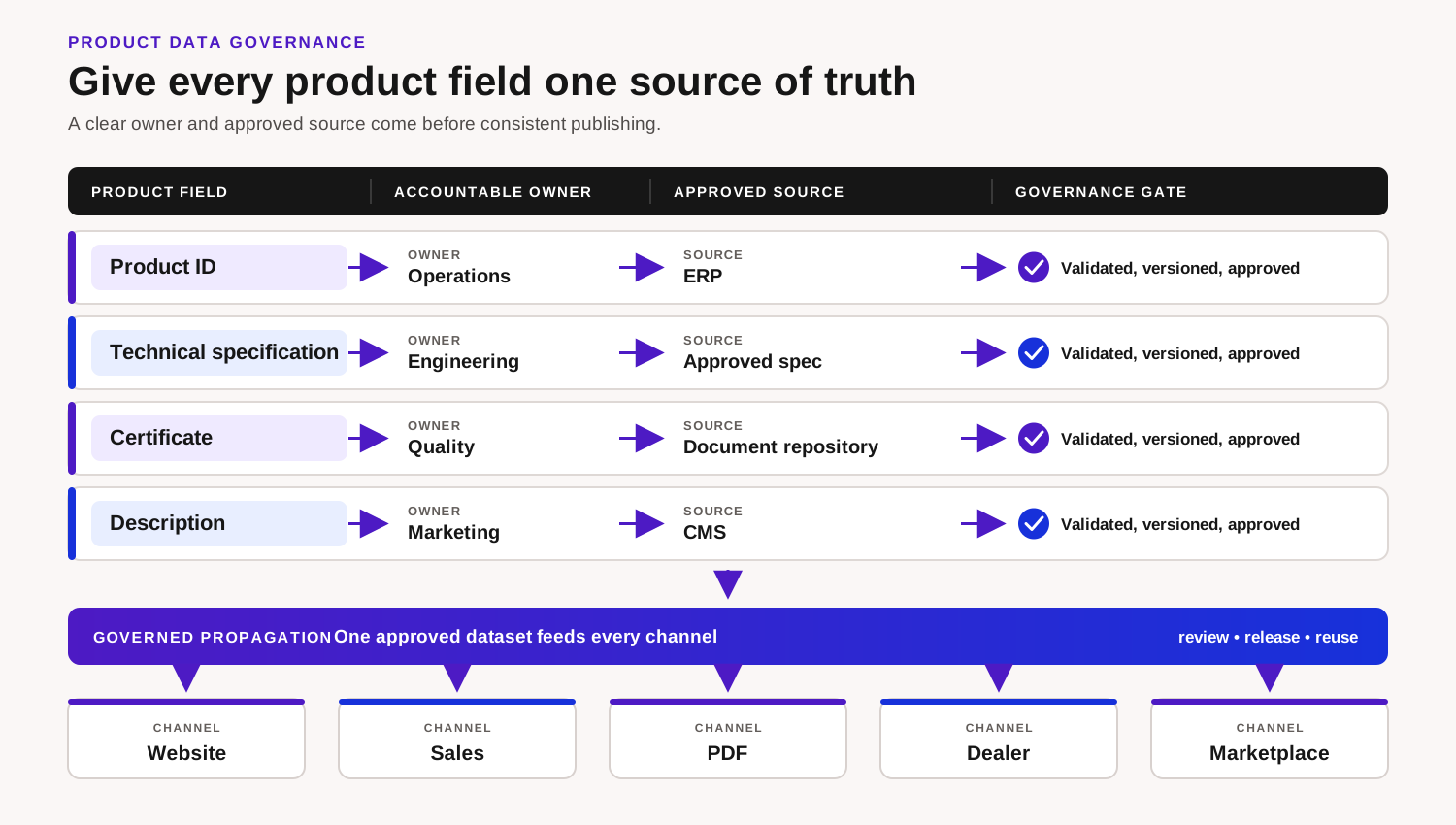
Original GreyBath governance diagram. It describes an operating model, not a client architecture.
04 · Run the diagnostic
The 90-minute product data drift audit
Do not attempt to audit the entire catalogue first. The objective is to discover whether a systematic problem exists and where it originates. Before minute zero, arrange access to the selected records, current documents and people who can clarify authority. If access is missing, record that as a dependency rather than consuming the exercise searching for credentials.
90-minute auditSwipe sideways to follow all six stages
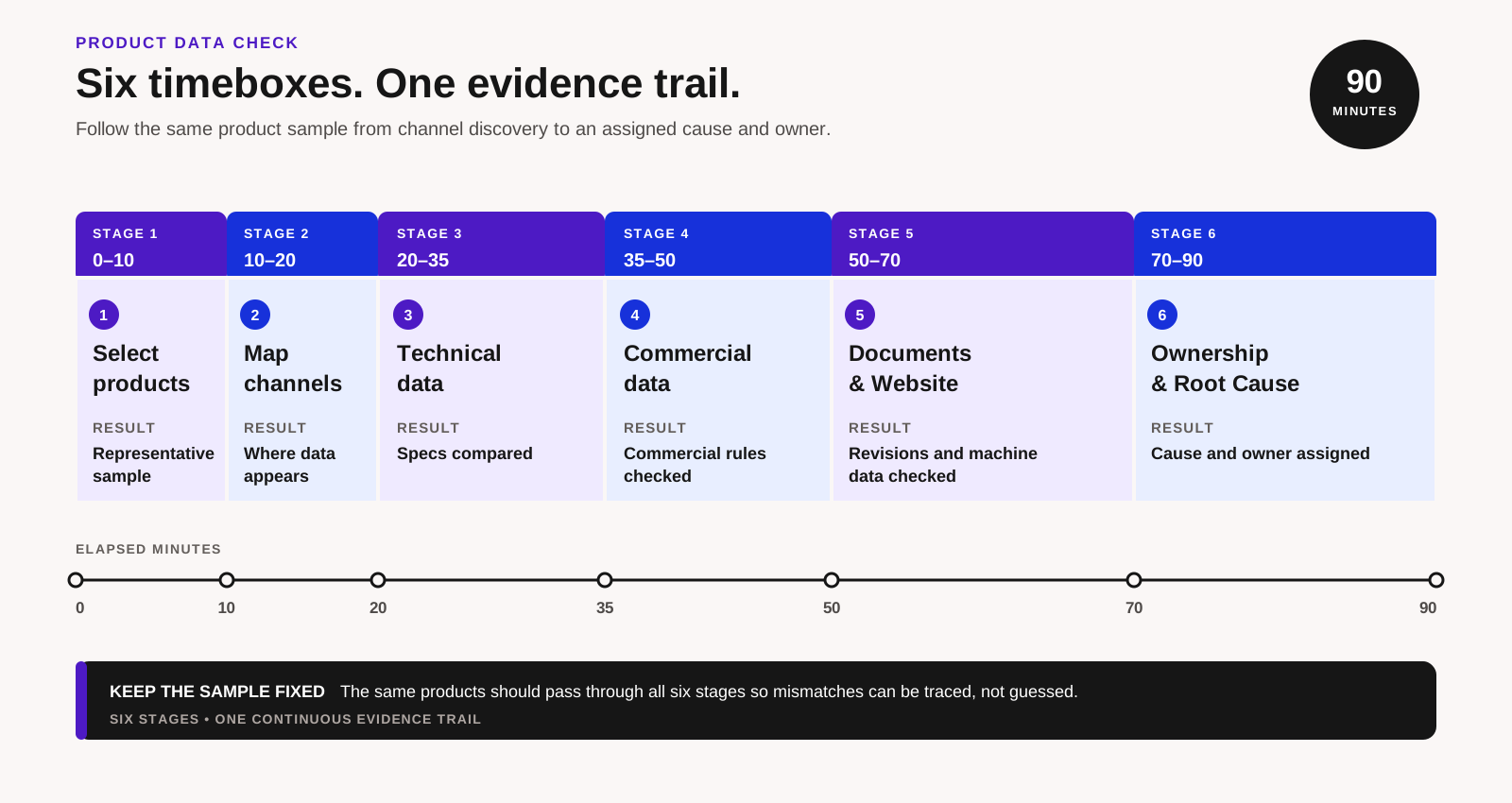
Original GreyBath audit timeline. The exercise is a diagnostic sample, not a certification or guarantee of catalogue accuracy.
Minute 0 to 10: select products intelligently
Do not choose only the first ten products alphabetically. Select 10 to 15 products that reveal different kinds of risk. Include a high-volume product, a recently changed product, an older product, an item with several variants, a technically complex item, one frequently quoted by sales, one with downloadable documents, one distributed through partners, one with a recent packaging or MOQ change and one that somebody remembers causing confusion.
This is not a statistically representative sample. It is a practical diagnostic designed to reveal repeatable failure patterns.
Minute 10 to 20: map every place people obtain product information
Do not limit the inventory to the website. Record internal systems such as ERP, CRM, inventory, engineering databases, product spreadsheets and shared drives. Add customer-facing sources such as the website, portal, e-commerce store, downloadable PDF, technical datasheet, printed catalogue and quotation template. Then add sales and partner channels: dealer portals, distributor spreadsheets, marketplaces, WhatsApp PDFs, presentation decks and laptop folders.
The last category is often missed. A central database can be accurate while a salesperson keeps sending a PDF downloaded six months ago. If a customer portal is involved, compare the principles in GreyBath's B2B customer portal planning guide: the portal should expose accountable records rather than become an unowned second master.
Minute 20 to 35: compare identity and technical specifications
Create one row for every evaluated product-attribute combination. That row is the unit of measurement in this audit. If one SKU is checked across nine attributes, it contributes nine evaluated rows, not one product-level pass or failure.
Comparison exampleCompare every source with the approved value
| SKU | Attribute | Approved value | Website | Sales sheet | Result | |
|---|---|---|---|---|---|---|
| VAL-050 | Material | SS316 | SS316 | SS316 | SS316 | Match |
| VAL-050 | Size | 50 mm | 50 mm | 45 mm | 50 mm | Drift |
| VAL-050 | Pressure | 16 bar | 16 bar | 16 bar | 16 bar | Match |
Do not immediately correct errors. First record them. Fixing values during the audit can hide the pattern that produced them. Use three statuses:
- MATCH
- Every active source checked agrees with the approved value.
- DRIFT
- At least one active source conflicts with the approved value.
- UNKNOWN
- The team cannot establish which value or authority is correct.
UNKNOWN can be more important than DRIFT. A visible mismatch can be corrected. Unknown authority means the business cannot confidently decide what the correction should be.
Normalise units before calling something a mismatch
Do not classify 2.5 kg and 2500 g as contradictory merely because their formatting differs. The same applies to 50 mm and 5 cm, SS 316 and SS316, or 1/2 inch and 0.5 inch. Separate meaning from display format.
Representation can still be a data-quality problem when inconsistent units or labels break filters, comparison, integrations, export feeds or automated documents. Ask both: Is the meaning different? and Is the representation standardised enough for every system that uses it?
Minute 35 to 50: audit commercial information separately
Compare MOQ, pack size, list price where publicly used, order unit, lead time, warranty and availability. Do not mix a negotiated customer price with a public list price and label the difference as drift. Context matters.
A useful record might state Price type: customer-specific; Customer: Example Industries; Valid from: 1 October; Currency: INR, rather than pretending one global price applies everywhere. The same principle applies to MOQ and lead time. If a value varies by customer, market, location or configuration, model the rule instead of storing several unexplained values.
For businesses that submit offers to Google Merchant Center, inconsistent machine-readable data has an external consequence. Google states that a product can be disapproved when the submitted price does not match the landing-page price. Its guidance also explains that automatic item updates are not a replacement for keeping source data current. Review the official guidance on price mismatch and maintaining product data. Many industrial catalogues do not use Merchant Center; apply this checkpoint only where relevant.
Minute 50 to 60: audit documents and revisions
For each sampled product, collect the documents a normal customer can currently obtain. Record the title, type, revision, issue date, associated product or SKU, current status and public URL where applicable. Compare each one with the approved current version.
| Document | Website version | Approved repository | Result |
|---|---|---|---|
| Technical datasheet | Revision 2 | Revision 4 | Drift |
| Installation guide | Revision 3 | Revision 3 | Match |
| Certificate | Valid to Dec 2026 | Valid to Dec 2026 | Match |
Do not automatically delete old documentation. Some businesses need historical versions internally. The issue is whether a customer requesting the current document receives the approved current version. A filename such as datasheet_final_latest_new2.pdf is not version control. Use explicit metadata such as product ID, document type, revision, approval date, current or superseded status and the revision replaced.
Minute 60 to 70: compare visible and machine-readable website data
For e-commerce or structured product pages, inspect more than what a person sees. A page can expose visible content, JSON-LD structured data, Merchant Center feed data, APIs, JavaScript state and social metadata. Google's structured-data policies require markup to represent visible page content accurately. Google also explains the complementary ways businesses can share product data with Search.
Where applicable, compare visible price with structured-data price and submitted feed price. Repeat the check for availability, product identity, variant and currency. This is part of responsible structured data and technical SEO, not a reason to add Product markup indiscriminately. An informational blog article that discusses products is not a product page.
Minute 70 to 80: trace one recent change
Choose one attribute that genuinely changed recently, such as a pack size moving from 20 to 25. Reconstruct the history. Who approved it? Where was it changed first? Who updated ERP, the website and the PDF? Who informed sales and distributors? How long did each step take? What evidence shows that every required destination was completed?
Do not change another live product merely to run the audit. Trace an historical change. You may discover that the real workflow is: operations emails marketing, marketing updates the website, somebody remembers the brochure later, and sales learns about the change from a customer. That is a process problem before it is a technology problem.
Minute 80 to 90: classify every discrepancy
Do not finish with one giant list of errors. Classify the cause so the next action addresses the mechanism.
Source
The authoritative location itself contains the wrong value.
Synchronisation
The source is correct, but another system did not update.
Document
A superseded PDF or catalogue remains active.
Ownership
Nobody knows who owns or approves the field.
Modelling
A variable value is represented as though it were universal.
Process
Updates depend on somebody remembering to notify another team.
Display
The underlying value is correct but formatted or interpreted incorrectly.
External channel
Internal records are correct, but a dealer, marketplace or feed remains stale.
The classification indicates whether to correct source data, change a workflow, improve an integration, replace documentation, redesign the data model or introduce a new system.
05 · Keep the evidence
Create one reusable Product Drift Register
Use one row per evaluated product-attribute combination. Keep the register focused on product governance. Do not store passwords, unnecessary personal information, customer-specific confidential pricing or unrelated sensitive data in it.
Product Drift RegisterRecord evidence, cause, action and verification
| Column | What to record |
|---|---|
| Product ID | Stable SKU or master identifier |
| Product name | Human-readable name |
| Attribute | Field being evaluated |
| Authoritative value | Approved current value, or UNKNOWN |
| Authoritative location | System, controlled document or process |
| Business owner | Role accountable for the field's meaning |
| Update approver | Role permitted to approve a change |
| Website | Current website value where applicable |
| Current customer-document value | |
| ERP | Current ERP value |
| CRM / sales | Current commercial value used by sales |
| Distributor | Partner value where relevant |
| Status | Match / Drift / Unknown |
| Severity | Critical / High / Normal |
| Root cause | Source / Synchronisation / Document / Ownership / Modelling / Process / Display / External channel |
| Correction owner | Person accountable for remediation |
| Target date | Agreed correction date |
| Verified | Date and evidence that the correction reached required destinations |
Prioritise by consequence
A punctuation difference is not equivalent to the wrong chemical grade. Mark a discrepancy Critical when it could create a safety risk, regulatory problem, materially wrong product selection, incorrect contractual specification or significant pricing error. Escalate a critical discrepancy immediately through the responsible safety, quality, engineering, commercial or legal route; do not wait for the 90-minute session to end before containing a credible serious risk.
Mark it High when it could cause a wrong quotation, return, rejection, incorrect MOQ, wrong packaging expectation, lost order or substantial support work. Use Normal where the meaning remains correct but formatting, imagery, wording or naming conventions differ. Fix critical items first. Do not spend the first week standardising capitalisation while customers can download an obsolete specification.
06 · Establish a baseline
Calculate match, unknown and propagation measures
Use the evaluated product-attribute row as the unit for both the numerator and denominator. Keep the definition beside every reported percentage so it cannot be mistaken for an overall product-quality score.
A hypothetical baseline
Suppose 15 products are evaluated across 12 attributes each. That creates 180 product-attribute rows. If 153 are verified matches, 19 show drift and 8 have unknown authority, the Verified Match Rate is 153 ÷ 180 × 100 = 85%. The Unknown Authority Rate is 8 ÷ 180 × 100 = 4.4%.
That does not mean the catalogue is "85% good". It means that 85% of the sampled product-attribute rows matched the currently identified authoritative values. Unknowns should remain visible rather than being guessed away to improve the result.
Measure how long approved changes take to arrive
Accuracy alone is not enough. If engineering approves a change today and the website becomes accurate 18 days later, the final value may eventually be correct while the update process remains weak.
Engineering approval: Monday 10:00
ERP updated: Monday 12:00
Website updated: Tuesday 11:00
PDF updated: Thursday 16:00
Distributor sheet verified: following Monday 15:00
Approximate propagation time: 7 days
Count stale assets
Monthly or quarterly, count customer-facing assets that should no longer be active: superseded PDFs, obsolete brochures, old price lists, retired product pages, expired certificates and archived distributor files still being shared. A specific objective such as "reduce active superseded product documents from 37 to fewer than 5" is easier to manage than a vague request to improve data quality. It remains an internal target, not an industry benchmark.
07 · Correct the mechanism
Fix the workflow before buying a PIM
A PIM can be useful, but software cannot decide organisational questions the business has avoided answering. Before evaluating platforms, establish product identity, field ownership, product families, variant rules, required attributes, approval responsibilities, document versions, system integrations and publishing channels. Without those rules, a new platform can centralise the confusion.
A controlled spreadsheet may be enough
A spreadsheet can work when the catalogue is manageable, few people edit it, changes are infrequent, channels are limited, approval is simple and integrations are not required. The important word is controlled. Use one approved master, defined columns, stable IDs, controlled permissions, change history, clear ownership and a defined publishing process.
The problem is usually not Excel itself. It is ten spreadsheets whose users all believe theirs is the master.
Know when a structured database becomes useful
Move beyond a simple sheet when complexity begins to exceed it: many related variants, concurrent editors, complicated validation, multilingual data, hundreds of document relationships, customer-specific visibility, multiple websites, marketplaces, distributor feeds, automated PDFs or APIs. The suitable option might be an existing ERP module, a database, a low-code application, a PIM or a custom product-data service.
Do not assume PIM is automatically better than improving an ERP module already owned. If the audit points to website, catalogue or checkout propagation, plan e-commerce and product catalogue development around the authority rules rather than copying every source field into another database.
Automate only after source and approval rules are stable
Good candidates include master product record to website, master record to dealer portal, approved document repository to download page, ERP stock to e-commerce availability and approved commercial fields to a quotation system. Automation should not copy everything everywhere. Define which system may write each field.
For example, ERP might publish SKU, stock and list price. The CMS might publish description, SEO title and application copy. The engineering system might publish technical attributes and the approved datasheet. Clear write authority prevents systems from continuously overwriting each other.
Use effective dates where timing affects transactions
If packaging changes from 10 pieces per carton to 12 next month, overwriting the field today may cause sales to quote future packaging for an order shipping this week. Where the process requires it, record the current value, future value and effective date. Not every field needs that complexity; use it where timing affects real transactions.
Separate technical truth from marketing wording
Engineering may approve "Maximum operating temperature: 120°C". Marketing may describe the product as designed for demanding high-temperature applications. The sentence can change without altering the approved technical fact. Marketing must not independently turn 120°C into 150°C because it sounds stronger.
Treat PDFs as controlled product outputs
B2B customers may need datasheets they can print, email, attach to an approval, archive or use offline. PDFs are not inherently a problem; independent manual duplication is. Where the economics justify it, generate customer documents from the same approved structured information used by the website. Otherwise include revision, issue date, product ID and document owner, and maintain a controlled replacement process.
Do not silently overwrite history. A current public page should normally show the current approved specification, while an internal order record may need to preserve the revision that governed an earlier transaction. Current state and historical state sometimes need to coexist.
Build a lightweight change-request workflow
An existing ticketing tool, spreadsheet, shared form or workflow system may be sufficient. For every material change, record the product, attribute, old and new values, reason, approver, effective date, each required destination, completion owner and verification date.
Do not consider a change complete because tasks were assigned. Consider it complete when the required active destinations have been checked.
08 · Hypothetical example
Example Flow Systems finds five different causes
Example Flow Systems is fictional. It is not a GreyBath client, and the figures below are not an industry benchmark or claimed result. The example shows how the method and calculations work.
The company sells valves, fittings and flow-control products. It uses an ERP, a corporate website, downloadable technical PDFs, one master sales spreadsheet and dealer-shared documents. Management assumes the information is reasonably consistent because no formal audit has been run.
The team chooses 12 representative SKUs and evaluates nine attributes for each: product name, material, size, pressure, connection type, weight, MOQ, standard pack and datasheet revision. That creates 108 product-attribute rows.
Verified matches: 82
Drift cases: 17
Unknown-authority cases: 9
Verified Match Rate: 82 ÷ 108 × 100 = 75.9%
Unknown Authority Rate: 9 ÷ 108 × 100 = 8.3%
The discrepancies are not random. Seven come from old PDFs because engineering has no reliable public-file replacement process. Four come from sales spreadsheets copied into personal folders. Three involve MOQ because nobody formally assigned ownership. Two involve inconsistent units because engineering stores kilograms while the website expects grams. One is a genuine source error: the ERP contains the wrong pack quantity.
The corrective plan therefore has five parts:
- Obsolete PDFs: introduce controlled filenames, revision metadata and one public document location.
- Personal sales files: replace copies with a read-only published master view.
- MOQ ownership: assign commercial ownership to sales operations and define ERP as the authoritative location.
- Unit inconsistency: establish unit-normalisation rules before publication.
- Wrong ERP value: correct it through the master-data approval process.
Buying one system would not automatically solve all five. The remedies work because they correspond to causes rather than symptoms.
09 · Operate the control
Repeat the audit without gaming the result
Run the audit again after remediation. Keep a small control group and rotate additional SKUs so the exercise covers more of the catalogue over time. Track Verified Match Rate, Unknown Authority Rate, Change Propagation Time and Stale Asset Count. These are internal management measures, not standard certification scores.
Do not reward teams for hiding discrepancies. A demand for "100% match rate by Friday" may encourage people to delete questionable fields or declare an arbitrary master. Unknown values should be resolved by the responsible business owner, not guessed for the dashboard.
When the audit is especially useful
Run it after a product redesign, ERP migration, website redesign, acquisition, distributor onboarding, marketplace integration, catalogue reprint, price-policy change, major specification update, PIM implementation, product-range consolidation or supplier change. It is also valuable before a large website migration. Moving inconsistent data into a beautiful new interface gives the old problems a new surface.
What this audit does not establish
The exercise does not independently establish regulatory compliance, engineering validity, product safety, legal warranty wording, tax correctness, contractual pricing, cybersecurity or intellectual-property rights. Those questions require the appropriate specialist or accountable internal team.
The narrower test is: Does the same approved product information remain consistent across the places where the business uses and publishes it?
Should you buy a PIM afterwards?
Maybe. A PIM becomes more compelling when information has many attributes and variants, frequent updates, several editors, multiple languages and channels, complex approvals, large media libraries, automated feeds or distributor requirements. A small catalogue with one website and occasional changes may not justify it.
The first objective is to know what the authoritative information is, who owns it, how it changes and where it must go. Once those rules are explicit, choosing technology becomes easier.
10 · A smaller starting point
The 20-minute version for a small catalogue
If the full diagnostic is too large for the first session, choose the five most commercially important products. For each product, compare the name or SKU, primary specification and pack or MOQ across the website, current PDF and sales source.
Then answer four questions: Are the values the same? If not, which value and location are authoritative? Who should correct the active mismatch? Why did it become different? This smaller exercise cannot provide the same breadth, but it can expose the underlying process.
11 · Put it into practice
Final product-data checklist
- Is there a stable identifier for every product?
- Who owns technical specifications?
- Who owns commercial attributes?
- Which location is authoritative for each important field?
- Who may approve each kind of change?
- Are units and attribute names standardised?
- Do PDFs have controlled revisions and statuses?
- Can obsolete documents be identified without destroying required history?
- Does sales use the same approved information?
- Are distributors receiving controlled updates?
- Can one recent change be traced end to end?
- Do integrations know which system may write each field?
- Are important values effective-dated where required?
- Does visible website data agree with machine-readable data where applicable?
- Are unknown authority issues recorded rather than guessed?
- Is somebody accountable for verifying completed changes?
If one answer is missing, that is the next improvement task. The answer may still be a clearer process rather than new software.
The final takeaway
Product information rarely fails all at once. It drifts. A new specification reaches engineering but not marketing. A revised PDF reaches the website but not sales. A commercial rule reaches CRM but not the dealer. Each gap looks small until nobody can confidently answer which version is correct.
The solution begins with three disciplines: Authority, to establish who owns each important fact; Propagation, to define every destination an approved change must reach; and Verification, to prove that it arrived. Only then decide whether the implementation needs a spreadsheet, ERP module, PIM, integration or custom product-data platform.
Implementation support, if needed
Found a repeatable break between approved data and customer channels?
GreyBath can help scope the implementation layer after your team has identified the authoritative records and failure pattern. That may include catalogue workflows, ERP or CRM integrations, controlled product feeds, website publication, APIs or data-quality checks. Scope, access, responsibilities, timing and fees are agreed before work begins. The audit itself can be completed internally without engaging GreyBath.
Research record
Sources
Official guidance was checked on 27 September 2026. It supports the stated data-quality and Google platform requirements, not the condition of any business catalogue. The audit stages, registers, calculations and fictional worked example are GreyBath editorial tools.
- GS1: What is good-quality data?, for the stated completeness, consistency, accuracy, timing and standards principles.
- Google Merchant Center: Fix mismatched product price, for the circumstances in which submitted and landing-page prices can cause disapproval.
- Google Merchant Center: Tips for keeping product data up to date, for source-data maintenance and the limits of automatic item updates.
- Google Search Central: General structured-data guidelines, for the requirement that markup represent visible page content accurately.
- Google Search Central: Share product data with Google, for structured data, Merchant Center and other complementary product-data methods.
Keep reading
More practical thinking from GreyBath across design, engineering and growth.
All articles