
B2B Customer Portals for Manufacturers: A Practical Planning Guide
A research-backed guide to deciding what a manufacturing customer portal should do, how it should connect to ERP and document systems, and how to measure a safe pilot.

A customer asks where an order is. Someone in customer service opens the ERP, searches by the buyer’s purchase-order number, checks whether the dispatch date has changed, and emails a reply. Later that day, the same customer asks accounts for the invoice and quality for a batch certificate.
That is the problem a manufacturing customer portal can solve. The portal is not the value by itself. The value comes from letting an authorised customer retrieve the right approved record without asking an employee to find and forward it.
01 · Diagnose the work
Start with the questions customers already ask
Do not begin with a dashboard wish list. Take a sample of customer emails, calls and service tickets and ask what work sits behind them. The most useful candidates are usually routine requests that have a dependable answer in an existing system:
- Has our order been accepted?
- Which lines have shipped, and what remains outstanding?
- What price applies to our account, quantity and unit of measure?
- Can we download the approved invoice, drawing or certificate?
- Did you receive our revised RFQ?
- Who owns this exception, and when should we expect a response?
Separate those requests from work that needs judgement. A quality dispute, an engineering change or a new commercial agreement should not be squeezed into self-service simply because a form can be built for it. The portal should make routine work easier and give exceptions a clear path to a person.

Original GreyBath editorial illustration. This is a conceptual scene, not a client photograph or product screenshot.
A portal is worth investigating when
- the same status, invoice or document questions recur;
- employees spend time retrieving rather than interpreting information;
- the answer already exists in a reasonably reliable system;
- customer identity and record ownership can be mapped; and
- a named business team will own exceptions.
Fix the process first when
- orders, prices or customer records routinely disagree;
- documents are not approved or version-controlled;
- nobody can say which application owns a field;
- volumes are too low to justify another service; or
- a clearer email, shared mailbox or existing ERP feature would solve the problem.
02 · Evidence, with limits
Manufacturing digital orders are not one-channel
Eurostat’s 2025 ICT and e-commerce survey covered about 157,000 EU enterprises with at least ten people. For the 2024 reference year, 68.48% of manufacturing enterprises that made e-sales received electronic orders through websites or apps, while 46.04% used EDI-type messages. The same enterprise could use both, so the figures must not be added together. They describe channel use among manufacturers already making e-sales—not customer-portal adoption across all manufacturers.
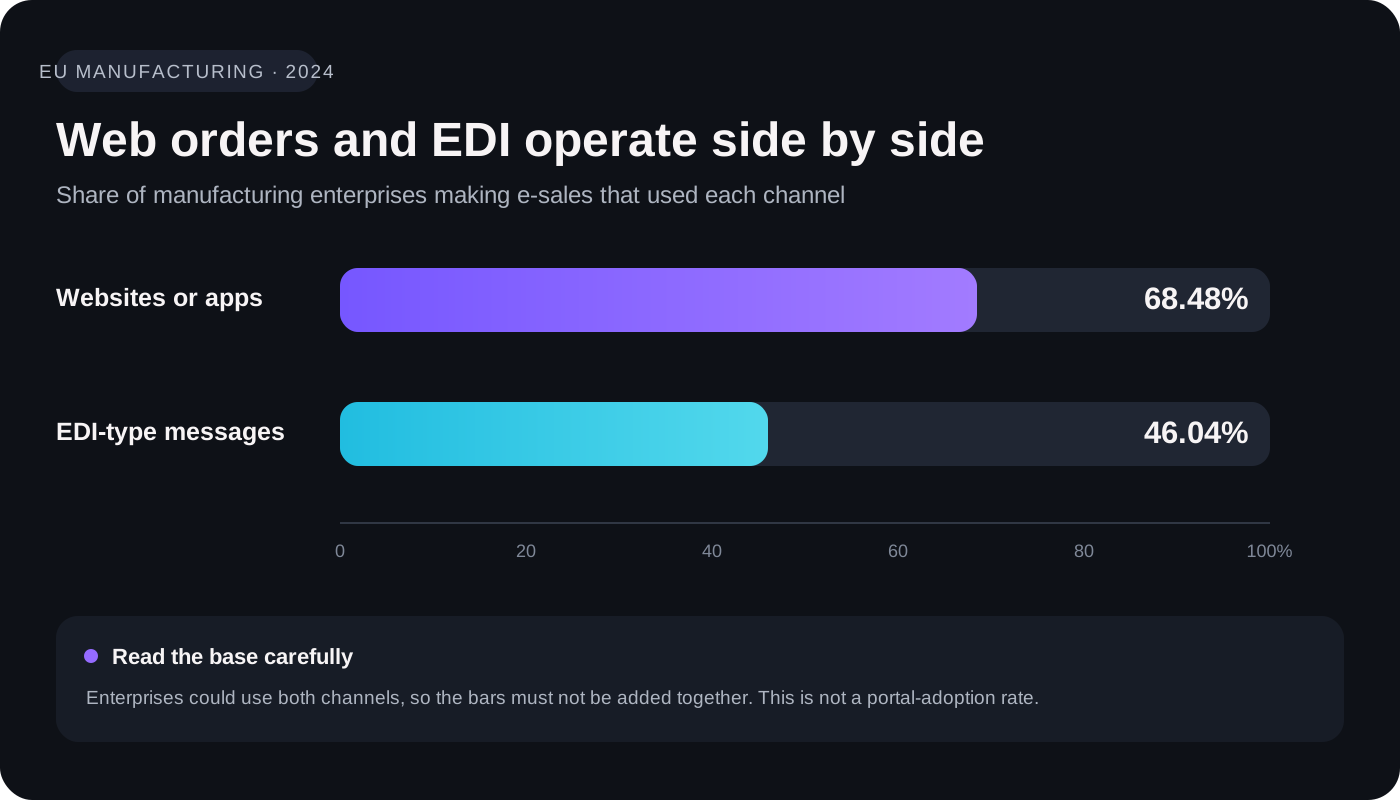
Source: Eurostat, E-commerce statistics, data extracted February 2026; 2024 reference year. Channels overlap.
The wider B2B picture supports the same conclusion. McKinsey’s 2024 B2B Pulse survey gathered responses from nearly 4,000 decision-makers across 34 sectors in eight industries and 13 countries. Respondents used an average of ten interaction channels; at each buying stage, preferences were broadly split among in-person, remote and digital self-service. More than half said they were likely to turn elsewhere when the experience across channels was not smooth. This is cross-industry research, not a manufacturing benchmark, but it is a useful warning against forcing every buyer through one digital route.
The practical aim is therefore not “move every customer online”. It is to give customers a reliable self-service route for suitable tasks while preserving email, EDI, phone and account-team support where they remain useful.
03 · Scope the first release
Choose tasks, not a catalogue of features
Order status: show the line, not a vague progress badge
A single label such as “in progress” is rarely enough. Oracle’s current order-management documentation distinguishes order, order-line, fulfilment-task and orchestration statuses. Its fulfilment views can include shipped quantities, units, tracking references, delivery dates and invoice details. Your ERP may model these differently, but the design lesson is portable: the customer needs the business facts behind the status.
For each order, decide whether the portal should show:
- the buyer’s PO number and your order number;
- the accepted product revision, quantity and unit of measure;
- requested, estimated and confirmed dates as separate fields;
- shipped and outstanding quantities by line;
- carrier, tracking, waybill or bill-of-lading references;
- the time the status was last refreshed; and
- who to contact when the order is on hold or disputed.
Avoid an invented percentage-complete indicator unless the production data genuinely supports it. “Two of five lines dispatched; next committed date 28 September” is more defensible than “80% complete”.
RFQs and quotations: keep revisions attached to the commercial decision
An RFQ should collect enough information for a useful review without becoming a universal fifty-field form. For an engineering manufacturer that might mean product, material, quantity, drawing revision, delivery location and required date. Use conditional questions for special certificates, finishes or packaging.
Revision control matters. If a buyer requests 3,000 components against drawing C and later uploads drawing D, the earlier quotation should not quietly appear valid for the new revision. Preserve the original reference, identify what changed, and require a new review where the change affects price, lead time or manufacturability.
Account pricing and repeat orders: revalidate before accepting
B2B pricing can depend on the customer organisation, agreement, currency, unit, quantity tier and validity date. Microsoft documents contract pricing derived from a B2B customer hierarchy; SAP documents unit-specific price groups. These are vendor examples, not a universal architecture. The important point is that the price should come from the system authorised to calculate it, not from a copied spreadsheet embedded in the portal.
A repeat-order button can copy useful details, but it should re-check the product revision, current price, delivery address, minimum quantity, credit rules and available commitment. Make “request submitted” visibly different from “order accepted”.
Invoices, certificates and drawings: retrieve the approved version
Microsoft and SAP both document B2B access to invoice details and PDFs. A useful implementation still has to answer a harder question: which user at which customer account may retrieve which record? Historical orders may require the certificate or drawing revision approved for that batch, not the newest file in a folder.
GS1’s EANCOM reference guidance provides a good discipline even when a business does not implement EANCOM itself: carry the buyer’s order number and line reference through the order response, despatch advice, invoice and remittance chain. Stable references make it easier for customers and staff to reconcile what they are looking at.
04 · Data ownership
Keep one source of truth for every record
The portal does not need its own editable copy of every order, price and invoice. In most established businesses it should expose approved data from the applications that already own those records, and own only the records explicitly assigned to it—perhaps a draft RFQ, a user preference or a pending request.
Architecture diagramScroll horizontally on smaller screens to view every label
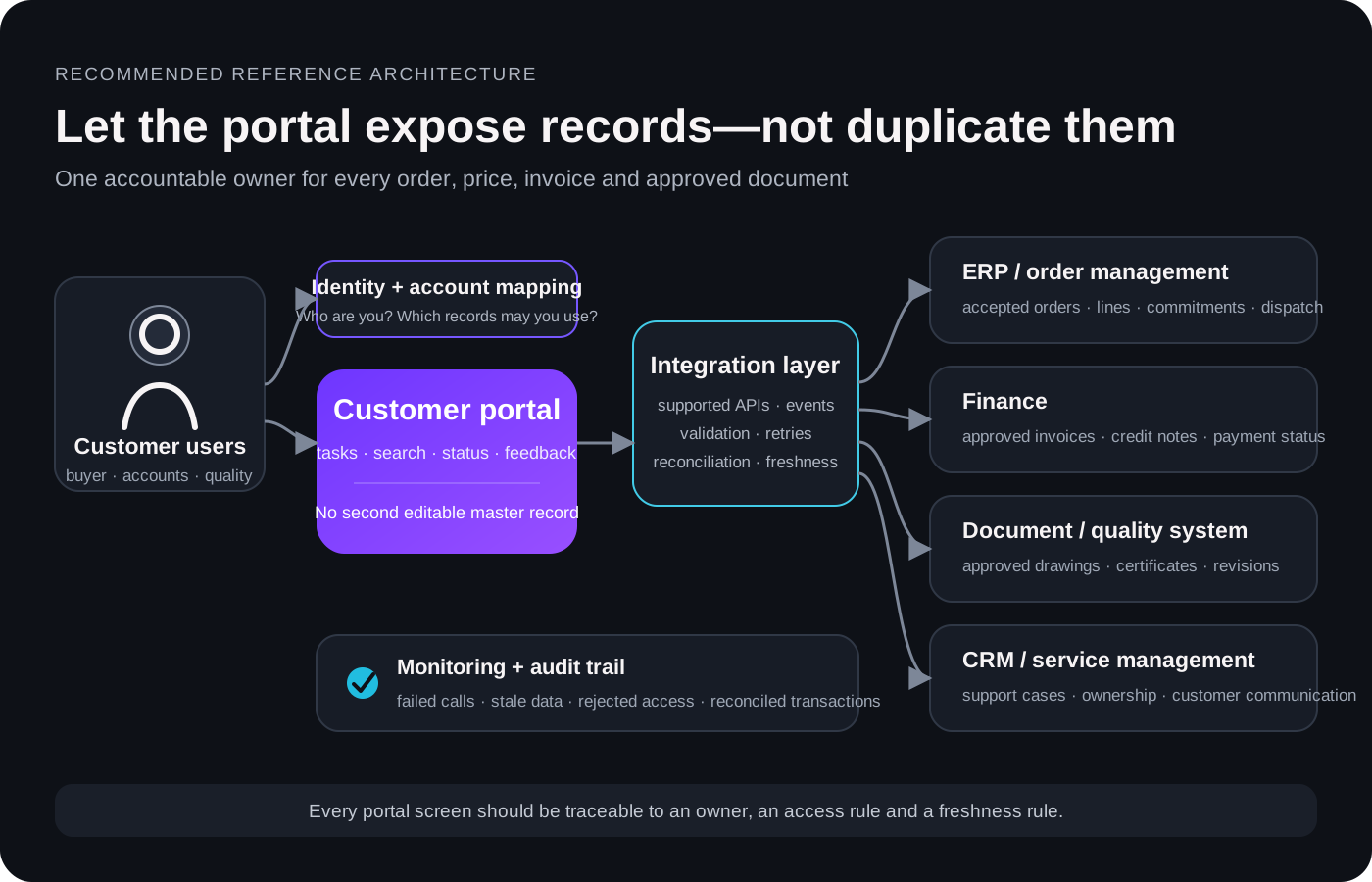
GreyBath editorial diagram based on documented integration and authorisation patterns. It is not a diagram of a specific client system.
Record ownership matrixScroll horizontally if the full table does not fitEach record is grouped into a labelled card below
| Record | Likely owner | Portal job | Failure to design for |
|---|---|---|---|
| Accepted order and line | ERP or order-management system | Read approved details; submit controlled requests | Portal and ERP show different commitments |
| Account price | ERP, commerce or CPQ | Request or display a server-calculated price | Expired copied price is used |
| Invoice and payment status | Finance system | Provide authorised access | Uploaded receipt marks an invoice paid without reconciliation |
| Approved drawing or certificate | Document or quality system | Retrieve the correct order or batch version | Latest file replaces the historically approved version |
| Support case | CRM or service system | Create a linked case and show permitted updates | Portal message becomes an unowned second inbox |
Microsoft describes its Supply Chain Management customer portal as a starting template that depends on configured data synchronisation; it is not expected to be a finished, fully functional service by itself. That is a useful reality check for any vendor demonstration. A polished login screen does not remove the work of mapping accounts, deciding record ownership, handling failures and reconciling transactions.
05 · Integration choices
Decide what must be live—and admit when it is not
“Everything in real time” sounds reassuring but is not a specification. Microsoft’s integration guidance separates synchronous calls from asynchronous batch patterns and recommends considering business timing, frequency and peak volume. The choice belongs at workflow level.
Integration decision matrixScroll horizontally if the full table does not fitEach task is grouped into a labelled card below
| Task | Possible pattern | Question to settle |
|---|---|---|
| Check current order status | Live read from the order system, or a near-real-time read model | How old may the displayed status be? |
| Submit an order | Validated transaction with a stable request ID | What prevents a duplicate after a timeout and retry? |
| Browse historical documents | Controlled synchronisation may be sufficient | How is an amended or withdrawn file handled? |
| Receive a dispatch update | Event-driven notification after the shipment record changes | Which event is authoritative, and what happens if delivery fails? |
| Bulk product update | Asynchronous batch processing | How are rejected rows reported and reconciled? |
If an API is unavailable, do not silently present an old value as current. Show the last successful refresh and a plain-language state such as: “Order information last updated at 10:15. A newer update is temporarily unavailable.” Then provide a route for a time-sensitive exception.
Retries need deliberate handling. A portal may submit an order successfully and lose the response before it reaches the browser. Retrying the same request must not create a second accepted order. Use a stable transaction identifier, log the result, reconcile uncertain outcomes and test this failure before launch. Microsoft’s Azure Architecture Center makes the same distinction in its retry guidance: repeat only where the operation and its side effects are understood.
06 · Trust boundaries
Login is only the first access check
A valid user must still be blocked from another customer’s order, invoice and document. OWASP’s API Security Top 10 identifies broken object-level authorisation as a leading API risk: every endpoint that receives an object identifier should verify that the signed-in user may act on that particular record. Random-looking IDs are not a substitute for the check.
Security acceptance tests worth writing down
- A user from account A cannot retrieve account B’s order by changing a URL, request body or export filter.
- A user limited to their own orders cannot see company-wide records.
- Removing a role ends access to screens, APIs, files and cached links.
- A direct document URL is authorised on every request; hiding it from navigation is not enough.
- Uploads enforce permitted types, size limits and protected storage, with malware checks where appropriate.
- Account recovery does not let a support conversation bypass the intended identity controls.
- High-impact actions are logged with actor, account, record, time and outcome.
- Authentication, access and upload controls are re-tested after changes.
NIST SP 800-63B-4, published in 2025, is a useful benchmark for authentication design. Its AAL2 requirements include two factors and an offered phishing-resistant option. That does not automatically make AAL2 a legal requirement for a private manufacturer; use the organisation’s risk assessment, contracts and applicable law to set the assurance level. The key is to make the decision explicit rather than defaulting to passwords alone.
For a structured technical verification list, OWASP’s Application Security Verification Standard 5.0.0 can be referenced in the acceptance plan. It does not replace threat modelling or penetration testing, but it helps make “secure portal” testable instead of promotional.
07 · Usability
Prototype three real tasks before drawing the full dashboard
Ask representative customers to complete a small set of tasks with realistic but non-production data:
- Find an order using the reference they normally quote to your team.
- Confirm what shipped and what remains outstanding.
- Download the approved invoice or batch certificate for the correct order line.
Observe without narrating each click. Record whether they completed the task, where they hesitated, which words they expected, and whether they switched to email or phone. Test with the customer roles that actually differ: buyer, accounts, quality, branch administrator and account-wide administrator.
Run the journeys on a phone as well as a desktop. Tables need usable reflow or controlled horizontal scrolling; form errors need to identify the field and describe the problem in text; keyboard focus must remain visible; and status changes should be exposed to assistive technology. WCAG 2.2 is the current W3C Recommendation and provides testable criteria across desktop and mobile. An automated scan can help find defects, but it cannot prove that the complete journey is accessible.
A dashboard earns its space when it helps someone decide what to do next. “Two quotations need your response” is useful. A decorative chart of order counts may not be.
08 · Delivery
Prove read-only access before adding transactions
The first release does not need to carry the greatest commercial risk. Start by proving identity, account mapping, data accuracy and support ownership. Then add transactions when the team can monitor and reconcile them.
Workflow and integration proof
- What is delivered
- Named record owners, customer roles, representative reads from test systems
- Evidence required to continue
- Correct records returned; access model agreed; failure states demonstrated
Read-only pilot
- What is delivered
- Selected orders, invoices and documents for a limited customer group
- Evidence required to continue
- Accurate data; customer separation; measured task completion; support route works
Controlled transactions
- What is delivered
- RFQs, reorders, uploads or approvals
- Evidence required to continue
- Validation, duplicate prevention, reconciliation and audit trail tested
Expansion
- What is delivered
- More accounts and workflows based on pilot evidence
- Evidence required to continue
- Adoption, reliability, support effort and operating cost reviewed
These are decision gates, not fixed-duration promises. Name a business owner for every workflow and an operational owner for every integration alert. If a failed order sits in a technical queue that nobody in sales or operations watches, the customer experience has still failed.
09 · Measurement
Measure work completed, not accounts created
Set a baseline before the pilot. A change in order volume can otherwise make performance appear better or worse. Agree the formulas, exclusions and measurement period with customer service, sales, finance and IT.
Exclude employee tests, monitoring bots and duplicate browser retries where the metric requires genuine use. Pair the numbers with short customer interviews and support-ticket review. A high completion rate can still hide confusing language if customers succeed only after calling for help.
A transparent business-value calculation
The following numbers are invented solely to demonstrate a method. They are not a GreyBath result, an industry benchmark or a promised return.
Baseline: 800 routine requests × 6 minutes ÷ 60 = 80 staff hours per month
Pilot hypothesis: 40% completed successfully through self-service = 320 avoided requests = 32 gross hours
Operating effort: 8 hours for portal support and integration reconciliation
Illustrative net capacity: 32 − 8 = 24 hours per month
Released capacity is not automatically a cash saving. Salaries may not change, the time may be used for other work, and the portal has one-time and recurring costs. Compare investment, operating cost, risk and service quality separately; do not count the same benefit twice.
10 · A practical starting point
Run a ten-working-day request audit
Use a spreadsheet or the ticketing tool you already have. Do not copy confidential drawings, invoice contents or passwords into the audit. Record an internal reference and restrict access to the working file.
- Date + internal reference
- Enough to review the source request later
- Request type
- Order status, invoice, certificate, RFQ clarification or another agreed category
- Handling minutes
- Time spent finding, checking and communicating the answer
- Authoritative source
- The application or approved record that supplied the answer
- Ready to share?
- Yes, or the approval/data correction still needed
- Human judgement?
- Why the request needed expertise or a commercial decision
- Repeat request?
- Whether the same customer had already asked for the information
At the end, group requests by type and calculate total handling time, median time per request and the share answerable from an approved record. If the business is seasonal or the sample is small, extend the observation period before committing money.
Pick one workflow with frequent demand, reliable data and a clear owner. Write the acceptance criterion in ordinary language: “An authorised customer can retrieve the approved invoice for their order without contacting accounts.” Then test whether a process change or existing system feature can meet it before commissioning new software.
11 · Make the investment decision
Buy, configure or build only after proving the gap
Check your ERP, commerce platform and document systems first. Existing products already support combinations of company accounts, account pricing, sales orders, invoices and documents. A configured platform deserves serious consideration when it can meet the required workflow, permissions and integrations without fragile customisation.
Custom development becomes more relevant when critical work crosses several systems, customer roles are unusually complex, or available products cannot deliver the necessary journey and controls. Compare the whole operating model, not licence price against build price.
Questions to settle before approval
- Which one or two customer tasks define the first release?
- Which application owns every field shown or changed?
- How fresh must each field be, and how will stale data be labelled?
- How are users invited, mapped to accounts, reviewed and removed?
- What proves one customer cannot retrieve another customer’s record?
- What happens after a timeout, rejected file or failed integration?
- Who owns customer support and technical reconciliation?
- Which pilot metrics and thresholds determine expansion, change or stop?
- Can the business export its data and maintain the service if the supplier changes?
- What are the recurring costs for licences, hosting, monitoring, security and support?
Ask vendors to demonstrate a complete journey with representative test data: find an order by the buyer’s reference, show line-level fulfilment, download the correct document, block a record belonging to a different account, recover from an interrupted request and explain how a failed integration is reconciled. A dashboard tour is not enough.
12 · If the evidence supports a project
Turning the audit into a scoped pilot
If the request audit exposes a real workflow or integration gap, GreyBath can help map the customer tasks, prototype the journeys and scope a controlled implementation. Our ERP, CRM, portals and dashboards service covers connected business workflows, while our UI/UX work can support research, information structure and usability testing.
A useful first brief contains the anonymised request log, the systems that hold the answers, the customer roles involved and one measurable outcome. Keep sensitive production records out of the initial enquiry; use an approved secure channel when detailed data is needed. You can contact GreyBath with the workflow you want to investigate.
Research record
Sources and method
Sources were checked on 22 September 2026. Statistics are presented with their stated population and reference period. Vendor documentation is used to verify supported concepts and implementation constraints, not independent performance outcomes. Security and accessibility references are standards or community verification guidance. No client result, testimonial, search-volume estimate or ranking claim has been invented.
- Eurostat: E-commerce statistics — data extracted February 2026; 2025 enterprise survey; 2024 e-sales reference year.
- McKinsey: 2024 B2B Pulse Survey — published 12 September 2024; nearly 4,000 decision-makers across 13 countries.
- Microsoft: Dynamics 365 customer portal overview — external B2B order processing, portal scope and integration dependencies.
- Microsoft: Customise and use the customer portal — order workflow and required account data.
- Microsoft: Finance and operations integration patterns — synchronous, asynchronous and order-status examples.
- Microsoft Azure Architecture Center: Retry pattern — transient faults, repeat operations and side effects.
- Oracle: Order management statuses, release 26A and Monitor order fulfilment, release 26B — line and fulfilment detail examples.
- Microsoft: Commerce price settings and SAP: B2B unit-specific price groups — account-pricing examples.
- Microsoft: B2B invoice management and SAP: Billing invoice integration — invoice access examples.
- GS1 EANCOM: Reference-number rules and GS1: Despatch Advice message — continuity of order and shipment references.
- OWASP API1:2023 Broken Object Level Authorisation and OWASP ASVS 5.0.0 — record-level authorisation and testable application-security requirements.
- NIST SP 800-63B-4 — final publication, 2025; authentication and authenticator management.
- W3C: Web Content Accessibility Guidelines 2.2 — Recommendation dated 12 December 2024.
- GOV.UK Service Manual: Measuring completion rate — transaction-completion measurement and exclusions.
Keep reading
More practical thinking from GreyBath across design, engineering and growth.
All articles