
Your Website Says “Thank You”. Did Sales Actually Get the Lead?
A practical form-to-CRM reconciliation audit for finding website enquiries that disappear, lose important fields or attribution, remain unassigned, or never become an actionable sales record.

Share this article
Browse all insightsA customer fills in your website enquiry form, clicks Submit and sees a thank-you message. Marketing may count a conversion. Everyone assumes sales now has the lead. Those are different events.
A working form can still fail further downstream. The submission might reach the form system but not the CRM, update an old contact without creating the expected sales task, land in a spam queue, lose important fields or campaign information, remain unassigned, notify an inactive employee, or create a duplicate record.
The useful question is not, “Is our contact form working?” It is, “Can we prove that every valid website enquiry becomes the correct sales record, with the correct information, owner and next action?”
This guide shows how to answer that question with evidence. You do not need to replace your CRM or rebuild your website before running the audit.
Cover image: AI-generated editorial illustration; not a screenshot of a client CRM or measured lead flow.
01 · The operating model
A website lead is not one event
For operational purposes, treat a website enquiry as a chain of checkpoints:
Visitor → Website form → Submission record → Integration → CRM → Lead owner → Sales action
Each step can succeed while a later step fails. That matters because different tools observe different parts of the journey.
When enhanced measurement is enabled for a web data stream, Google Analytics can collect form_start and form_submit events. Google separately documents optional recommended lead events, including generate_lead, qualify_lead and close_convert_lead, which require implementation. These analytics events describe measured interactions or business events. They do not establish that the CRM created the intended record or that sales acted on it.
Likewise, Microsoft documents field and value mapping when an existing website form is captured into Dynamics 365 Customer Insights. The mapping and its error handling affect what reaches the business system. A visible success message alone does not verify that configuration.
The practical rule
Never use one system as evidence that the entire lead journey worked. Reconcile the systems against each other.
02 · Six checkpoints
What every B2B website lead should pass
Use these checkpoints whether your stack is custom-built, HubSpot, Dynamics, Zoho, Salesforce or another platform. Document the expected result for each commercially important form before you test it.
Lead flow mapSwipe sideways to follow every handoff

Original GreyBath operational diagram. The labels describe the audit model, not a specific vendor implementation.
Checkpoint 1: The visitor received a genuine successful submission
Begin at the website. A successful lead should have passed the form’s actual validation and submission process. Do not count somebody opening the form, clicking Submit when validation fails, firing a JavaScript event, visiting the form page or entering the first field.
The visible success state should occur only after whatever your website defines as a successful submission. For a custom application, the development team should be able to explain exactly what triggers that message. For a hosted form product, identify what the platform records as a submission.
Checkpoint 2: The submission exists somewhere authoritative
A website should not depend solely on an email notification as evidence that a lead existed. Where practical, every accepted submission should leave a durable record before or during the CRM handoff. That record could live in a CRM-native forms area, a form-platform submissions table, an application database, a controlled integration log or another lead-intake system.
If the handoff is server-side, whoever owns your website and web application development should be able to identify the durable intake record, the retry or failure path and the evidence available for reconciliation.
HubSpot, for example, documents a form submissions view from which an associated CRM object can be opened. It also distinguishes total submissions from unique contacts because one contact can submit the same form more than once. That separation lets you ask, “We received 84 legitimate submissions. How many produced the expected CRM state?” rather than assuming two counters must match.
Checkpoint 3: The CRM accepted the intended record and data
Search the CRM, but do not stop when something appears. Verify the correct object and values. Depending on your design, an enquiry may create or update a contact, lead, company, opportunity, deal, ticket, activity or task. The expected outcome should be written down for each form.
- Identity
- Was the correct person or company matched?
- Enquiry type
- Did a quote request remain a quotation enquiry instead of becoming a general contact?
- Product or service
- Did the selected option reach the intended CRM field?
- Message
- Did the enquiry content survive the handoff?
- Source
- Is the record identified as a website enquiry?
- Submission page
- Can sales tell which page generated it?
- Timestamp
- Is the accepted submission time available?
- Consent or preferences
- Where these are legitimately recorded, did the relevant values transfer correctly?
Microsoft’s form-capture documentation requires website fields to be mapped to the respective CRM attributes and says mapping errors should be handled. The details vary by platform, but the operational lesson is general: verify the field-level result.
Do not collect data merely because a CRM field exists. Capture only what the business genuinely needs and is entitled to process.
Checkpoint 4: The lead was routed to the right owner
A record sitting in a CRM with nobody accountable is only partially captured. Check the owner, team, territory, product division, branch, service line, priority and next-action rule that apply.
The rule need not be sophisticated. A small B2B company may route every website enquiry to one active sales coordinator. A larger company may assign by product, location and account type. What matters is that the rule is explicit, testable and has a fallback. This is the operational purpose of well-defined CRM workflows and integrations, not automation for its own sake.
Checkpoint 5: The responsible person knew action was required
CRM ownership and notification are separate. A lead can be assigned correctly but never appear in the salesperson’s working routine. Test the real operating path: CRM task, internal notification, email, mobile alert, queue assignment or dashboard item.
Ask where the salesperson is expected to work every day. If the official process is CRM-based, an email alert should normally support that workflow instead of becoming a second unofficial lead database. Otherwise sales may manage enquiries in inbox folders while management believes the CRM is authoritative.
Checkpoint 6: Useful attribution survived the journey
Marketing may report 14 advertising conversions while sales sees 14 website enquiries whose CRM source is simply “Website”. The leads arrived, but the information needed to evaluate campaigns disappeared between the form and CRM.
You do not necessarily need sophisticated multi-touch attribution. Begin with a smaller question: can you identify the source and campaign for leads where that information is genuinely available? Useful fields may include original source, medium, campaign, landing page and submission page.
Retain only the parameters your business needs. Do not place every available browser or advertising identifier in CRM merely because it exists.
03 · Gather evidence first
The 45-minute form-to-CRM audit
A marketing manager, sales manager and the person responsible for the website or CRM can run this first pass together. Do not start by changing integrations. Record the expected result, run controlled tests and fix the earliest broken checkpoint first.
Minute 0 to 5: List every commercially important form
Create a simple inventory. Audit revenue-relevant forms first; do not include newsletter subscriptions unless they genuinely form part of the sales process.
| Form | Page | Expected destination | Expected owner |
|---|---|---|---|
| Contact | /contact | CRM lead | Inside sales |
| Request quote | /request-quote | CRM opportunity workflow | Sales team |
| Dealer enquiry | /dealer | CRM lead | Channel team |
| Support | /support | Ticket system | Support |
Minute 5 to 10: Create unique test identities
Do not submit an anonymous “Test Test” record that becomes difficult to find. Create a consistent QA identifier, such as GBQA-240926-A01, and put it in a searchable field. A controlled email alias such as websiteqa+240926a01@yourcompany.com can also work.
Use company-controlled test data, not real customer details. Record the test ID, form, submission time and browser or device when relevant. Every system can then be searched for the same identifier.
Minute 10 to 15: Submit each form like a real prospect
Use the live website and complete all normal fields. Where useful, test desktop and mobile. Record validation, the submit action, loading state, success message, confirmation page and any intentional confirmation email.
Do not stop at “I saw the thank-you page.” That is only checkpoint one.
Minute 15 to 20: Find the authoritative submission record
Go to the first system that stores accepted enquiries and search for the QA identifier. Record “Found” or “Not found”. If the website displayed success but no authoritative record exists, you have found an early-stage failure. Investigate that point before blaming downstream systems.
Minute 20 to 27: Find the CRM outcome
Search by test email, QA identifier, timestamp, phone if required, and form or source. Check both new and existing records. Some CRM processes update an existing contact instead of creating a new one. That may be correct, but the repeat enquiry may still need a new task or opportunity.
The reverse can also happen: a team says everything works while every repeat enquiry creates a duplicate contact. Test the intended behaviour, not merely the appearance of a record.
Minute 27 to 32: Validate field mapping
Compare the accepted submission with the CRM record field by field.
Mapping worksheetCompare the source and CRM values
| Original field | Expected CRM field | Actual value | Result |
|---|---|---|---|
| Name | Contact name | Record the value | Pass / Fail |
| Company | Company name | Record the value | Pass / Fail |
| Phone | Mobile or phone | Record the value | Pass / Fail |
| Service | Enquiry type | Record the value | Pass / Fail |
| Message | Enquiry notes | Record the value | Pass / Fail |
| Campaign | Campaign or source | Record the value | Pass / Fail / N/A |
| Page | Submission page | Record the value | Pass / Fail |
Do not test only the easy values. Dropdowns, checkboxes, multiple-select fields, country codes, attachments and free-text fields are common places for assumptions to break.
Minute 32 to 37: Check routing and notification
Record the CRM owner, queue or team, notification destination, arrival time and next task. Then test an exception. If a service list includes Website, SEO, ERP and Other, what happens to Other? Many routing problems live in the fallback path.
Also ask what happens when an employee leaves. A rule that routes to a role or active queue is easier to maintain than one that silently points to a former employee’s mailbox.
Minute 37 to 41: Check analytics separately
Decide what your reporting events are meant to represent. A form interaction, successful website submission, generated lead, qualified lead and converted lead are different business states. The same discipline applies to GA4 and measurement data quality: event names help only when everyone agrees on their meaning and the implementation matches that definition.
Interaction and acceptance
- Form interaction
- The user started or submitted an observed form interaction.
- Successful website submission
- The website accepted the enquiry and stored it as intended.
Commercial progress
- Generated lead
- The business considers a valid enquiry to have been created.
- Qualified or converted lead
- Sales confirmed the agreed qualification or commercial outcome.
Minute 41 to 45: Record every broken handoff
| Test | Website accepted | Submission record | CRM | Correct fields | Owner | Notification | Attribution |
|---|---|---|---|---|---|---|---|
| Contact | Pass | Pass | Pass | Pass | Pass | Pass | Pass |
| Quote | Pass | Pass | Pass | Fail | Pass | Pass | Fail |
| Dealer | Pass | Pass | Fail | N/A | N/A | N/A | N/A |
| Support | Pass | Pass | Pass | Pass | Fail | Fail | N/A |
Do not average failures into a vague overall score. “Dealer enquiries are not reaching CRM” is far more actionable than “the system scored 75 percent”.
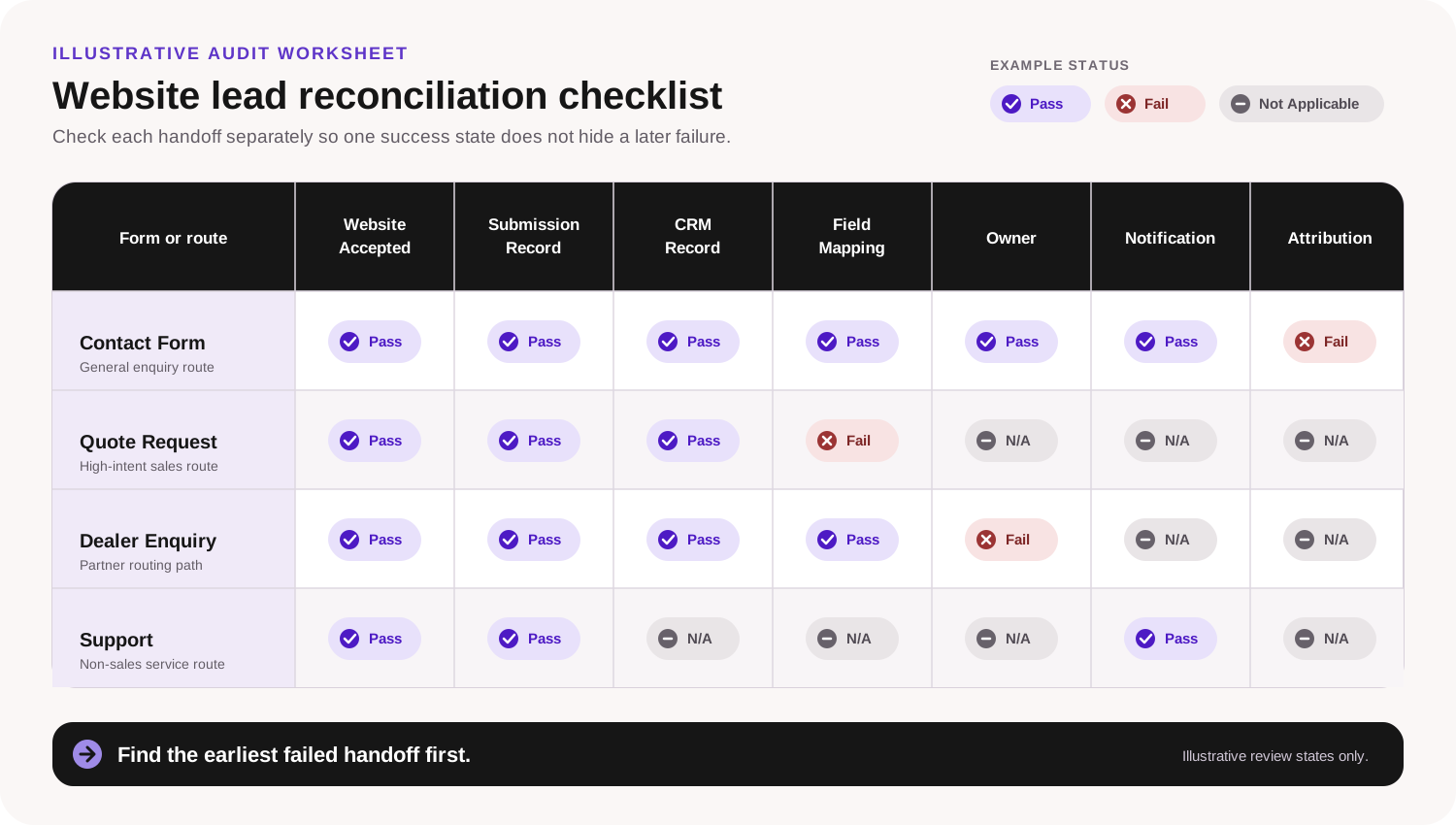
Original GreyBath audit worksheet. Pass, Fail and Not Applicable states are illustrative, not client results.
04 · Test production reality
Synthetic tests are not enough: reconcile real counts
The 45-minute exercise proves that known test cases can travel through the system. It does not prove that every real submission did. Reconcile a practical period, such as the previous seven or thirty days, using whichever window provides enough volume without making manual review unreasonable.
You need at least two independent data sources:
- System A: legitimate accepted website or form submissions.
- System B: corresponding expected CRM outcomes.
Do not compare raw website traffic with CRM leads. Compare like with like.
Calculate the reconciliation rate
Formula: CRM outcomes successfully reconciled ÷ legitimate accepted form submissions × 100
Illustrative inputs: 79 matching CRM outcomes ÷ 84 legitimate submissions × 100
Result: 94.0% reconciled
This does not mean the website “converts at 94 percent”. It means that, in this hypothetical sample, 94 percent of legitimate accepted submissions could be reconciled with the expected CRM outcome. Five cases need investigation.
Do not immediately label every mismatch a lost lead. A submission may have updated an existing contact, been duplicated, been correctly classified as spam, failed an integration, or be stored under a different identifier.
HubSpot’s current documentation provides a concrete example of why counts can diverge. A spam-classified submission does not create or update the associated CRM record or trigger form automation until it is released. That is neither an argument for nor against the platform. It is evidence that “submission count” and “CRM record count” require interpretation.
05 · Diagnosis
Nine failure patterns worth checking
Website success, CRM failure
The browser displays success, but the downstream API or integration fails.
Inspect: the authoritative submission, integration logs and CRM acceptance. Make failed handoffs visible and retryable instead of silently discarding them.
Existing contact updated, but no new sales task
The CRM correctly updates a known contact, but nobody is alerted to the new high-intent enquiry.
Inspect: the activity timeline, workflow rules and repeat-enquiry handling. Define what should happen when an existing contact submits again.
Contact created, opportunity missing
Contact creation succeeds while the expected deal or opportunity workflow does not.
Inspect: the documented object outcome for that form and the rule that creates the sales action.
Field mapping drift
Marketing changes a website value such as “Custom Portal”, but the integration expects “Portal Development”. The value may be rejected, blank or misclassified.
Inspect: website values, transformation logic and CRM option lists. Include end-to-end testing whenever form fields change.
Spam classification catches a legitimate enquiry
Anti-spam controls are necessary, but legitimate submissions can still require review.
Inspect: the platform’s quarantine or spam area and define who reviews it. HubSpot, for example, documents a separate spam-submissions workflow where authorised users can review, release or delete entries.
The CRM record has no owner
The lead exists, but nobody is accountable.
Inspect: routing conditions, default queues and fallback ownership for values that do not match a named rule.
The alert goes somewhere nobody monitors
The CRM is correct, but the notification reaches an abandoned mailbox or unused queue.
Inspect: operational alerts, active roles and employee-offboarding controls.
Attribution disappears
The enquiry reaches sales, but every record becomes “Source = Website”.
Inspect: the minimum useful source fields and whether they survive every relevant form and integration path.
An analytics event is treated as a sales lead
A
form_submitinteraction is reported as though the CRM outcome and sales handoff are proven.Inspect: the written business definition behind every lead KPI. Do not call every interaction a conversion.
06 · Keep an audit trail
Create one reusable lead-reconciliation register
You can manage the operational record in a spreadsheet before buying any new software. Do not put passwords, API keys or unnecessary sensitive personal information in it.
Operational registerRecord identifiers, ownership and exceptions
| Field | Illustrative value | Why it matters |
|---|---|---|
| Submission ID | WEB-2026-00981 | Durable lookup key |
| Submitted at | 24 Sep 2026 10:42 | Time-based search and latency |
| Form | Request Quote | Expected process |
| Submission page | /industrial-automation | Journey context |
| Submission system | Website database | First authoritative record |
| CRM record ID | LEAD-88291 | Reconciliation target |
| CRM created or updated | Created | Duplicate and repeat handling |
| Owner | West Sales | Accountability |
| Assigned at | 10:43 | Routing latency |
| First action | Call | Commercial follow-up |
| First action at | 11:20 | Response measurement |
| Source | Organic Search | Attribution |
| Campaign | N/A | Truthful applicability |
| Status | Reconciled | Review state |
| Exception | None | Investigation and correction |
07 · Useful measurement
Three numbers management should monitor
You do not need twenty lead-capture KPIs. Start with three definitions that correspond to the actual handoffs.
Do not demand campaign values for referrals, offline enquiries or traffic where your collection model does not legitimately provide them. The goal is truthful measurement, not artificially filling every CRM field.
Add response-time measurement only after capture is reliable
Businesses often begin by asking how quickly sales contacted a lead. That matters, but first establish whether sales received it. A response-time dashboard built on incomplete intake data can create false confidence.
Recommended sequence: Capture integrity → Assignment integrity → Response measurement → Qualification → Revenue analysis
08 · Hypothetical example
A seven-day audit finds three different problems
ABC Industrial Systems is fictional. This example demonstrates the calculations and diagnostic process; it is not a GreyBath client result or an industry benchmark.
During one seven-day audit the company records 84 legitimate website submissions. The CRM contains 79 matching expected records. Of those 79, 71 have an owner and 68 contain the expected source information.
Form-to-CRM reconciliation: 79 ÷ 84 × 100 = 94.0%
Assignment coverage: 71 ÷ 79 × 100 = 89.9%
Attribution completeness: 68 ÷ 79 × 100 = 86.1%
Management initially thought it had one lead-tracking problem. Reconciliation exposes three.
The five unmatched submissions
- Two repeat enquiries updated existing contacts but did not create the expected sales task.
- Two submissions were rejected because a recently added service option did not map correctly.
- One was held in the form platform’s spam review queue.
There was no single cause. That is why the systems must be reconciled instead of compared only at headline level.
The eight unassigned records
All eight selected “Other” in the service dropdown. The routing rules covered every named service but had no fallback. The solution is not a new CRM. It is a default assignment rule.
The eleven attribution gaps
Source information was present on landing-page forms but absent from the generic contact form. The company standardises the minimum source fields across the relevant forms and retests them.
No redesign is required. The improvement comes from treating the whole lead journey as one operational system.
09 · Match the solution to the risk
Use the simplest suitable architecture
You do not need a custom integration for every business. The right setup depends on lead volume, workflow complexity, evidence needs and business risk.
Option 1: Native CRM form
A CRM-native form embedded on the website can reduce the number of systems in the path. This is often sensible when forms are straightforward, the CRM owns the process, styling requirements are manageable and native routing meets the need. HubSpot documents how to embed its forms on an external site, while Microsoft documents both native forms and capture of an existing website form.
Option 2: Website form with a no-code integration
This can suit a smaller business when its existing forms work well, the logic is simple, volume is moderate and the automation product provides useful execution and error history.
Before relying on it, confirm what happens on failure, whether retries exist, how failures surface, who owns the automation account and what happens if credentials expire. “Connected” is not the same as “monitored”.
Option 3: Website form with a controlled server-side handoff
This becomes more relevant when workflows are custom, business rules are complex, several systems must be updated, stronger logging and retry control are required, or attachments and specialised validation are involved.
The website can store a durable intake record first and then send the information to downstream systems. Match the architecture to the risk. Do not custom-build complexity when an existing product solves the requirement adequately.
Option 4: Email-only intake as an interim process
For a very small business receiving a handful of enquiries, a monitored shared inbox can still be workable. Document it honestly. If the process is Website → sales@company.com, do not tell management that CRM integration exists.
Instead, monitor form delivery, mailbox access, responsibility and follow-up. Add CRM when the operational benefit justifies it. Simple and reliable can be better than sophisticated and unobserved.
10 · Keep it working
Add one release rule and one monthly control
Any important form change requires an end-to-end lead-flow test
Apply the rule when adding or renaming a field, changing dropdown values, replacing the form product, changing CRM or API credentials, changing routing or recipients, redesigning the page, adding CAPTCHA, changing consent handling, or changing thank-you behaviour.
Do not approve a release merely because the form looks correct. Submit a controlled test lead and follow it to the final owner.
Run a monthly five-lead control test
Once the system has been reconciled, test a small set of representative paths every month:
- General enquiry.
- Primary service enquiry.
- Secondary service enquiry.
- Existing-contact repeat enquiry.
- Routing edge case.
For each path, verify Website → Submission → CRM → Fields → Owner → Notification → Analytics and keep the evidence. If the architecture is business-critical, automated monitoring may eventually replace parts of the manual test. Understand the process manually first.
11 · Bound the conclusion
What this audit does not prove
This exercise checks lead-flow integrity. It does not prove privacy-law compliance, CRM or website security, accessibility, email deliverability to every recipient, advertising-attribution accuracy, identity-resolution accuracy, consent validity, overall CRM data quality, salesperson effectiveness or marketing ROI.
A perfect form-to-CRM reconciliation rate can coexist with poor-quality leads or weak sales execution. Likewise, an excellent sales team cannot follow up on enquiries it never receives. Treat lead capture as one layer of the overall revenue process.
12 · Take action
The 12-point website lead checklist
- List every commercially important form.
- Write down the expected destination for each form.
- Define the CRM object that should be created or updated.
- Create a unique test identity.
- Submit each form from the live website.
- Verify the authoritative submission record.
- Find the exact CRM outcome.
- Compare every important field.
- Verify the owner and routing.
- Verify the real notification or task workflow.
- Compare analytics terminology with the actual business event.
- Reconcile real submission counts against CRM outcomes for a representative period.
If you cannot complete one step, you have identified the next thing to investigate. That is already more useful than another dashboard.
The final takeaway
A website form is not healthy merely because its submit button works. The business outcome exists only when the right information reaches the right operational system and somebody becomes accountable for the next action.
Think of every enquiry as a chain: Submitted → Captured → Transferred → Matched → Assigned → Actionable → Measurable.
Audit those checkpoints separately. Once you can reconcile them, marketing and sales can discuss lead quality, response time and ROI using the same evidence. Before that, even a beautifully designed CRM dashboard may simply report incomplete data.
Technical verification, if needed
When an internal audit finds a broken handoff
GreyBath can trace the path across the website, API, CRM, routing and analytics layers when a team cannot isolate the failure. The audit remains useful whether or not you engage us.
Research record
Sources
Official documentation was checked on 24 September 2026. It supports the platform examples and event definitions, not the condition of any particular business system. The audit model, fictional worked example and management formulas are GreyBath editorial tools.
- Google Analytics: Enhanced measurement events, including the conditions and definitions for form interaction events.
- Google Analytics: Recommended events, including optional lead-generation events that require implementation.
- Microsoft Dynamics 365 Customer Insights: Capture forms, including field mapping and mapping-status handling.
- HubSpot: View and analyse form submissions, including individual submission and associated CRM record views.
- HubSpot: Form submission reports, including the distinction between submission counts and unique contacts.
- HubSpot: Manage spam form submissions, including the effect of spam classification and release.
- HubSpot: Embed forms on an external site, used only as an example of a native CRM form option.
Keep reading
More practical thinking from GreyBath across design, engineering and growth.
All articles