

The Technician Visited, but the Customer's Problem Is Still Not Resolved
A practical guide to separating completed technician visits from resolved customer complaints, pending parts, follow-up work and customer verification.

Share this article
Browse all insightsA packaging machinery supplier receives a complaint from a customer.
Cover disclosure: the cover is an AI-generated editorial illustration. The people, organisation, records and situation are fictional and do not depict a GreyBath client.
The customer's carton-sealing machine is not working consistently.
The service coordinator assigns a technician.
The technician visits the factory, inspects the machine and identifies a component that needs replacement.
The required spare part is not immediately available.
The technician explains the situation to the customer's maintenance supervisor and returns to the office.
In the service register, the visit is marked:
Completed.
The service manager sees the completed visit and assumes the complaint has been handled.
Two days later, the customer calls again.
Your technician visited, but the machine is still not repaired. When will somebody complete the work?
The service coordinator checks the records.
There is a visit report.
There is a technician's observation.
But nobody has been clearly assigned responsibility for obtaining the spare part and arranging the next visit.
The original customer problem remains unresolved.
The technician completed the visit. The company did not complete the customer's service requirement.
For small manufacturers, machinery suppliers, equipment distributors and service companies, this distinction can make a significant difference to after-sales performance.
A business does not necessarily need expensive field-service software to solve it.
It needs to distinguish the activities performed from the customer problem those activities were supposed to resolve.
A service complaint and a technician visit are different records
Many small businesses maintain a straightforward service register.
A customer calls.
The employee records the complaint.
A technician receives the assignment.
The technician visits the location.
The visit is marked completed.
This can work when most problems are resolved immediately.
It becomes less reliable when a service request requires several activities.
Consider an industrial equipment supplier.
A single customer complaint may require:
An initial technical assessment.
A technician visit.
A spare-parts requirement.
A commercial approval.
A second technician visit.
A test of the repaired equipment.
Final customer communication.
All these activities belong to one underlying customer issue.
Completing one activity does not automatically complete the others.
What existing field-service software already recognises
Zoho FSM documents separate work-order and service-appointment records.
A work order can represent the overall service requirement, while appointments are scheduled for the field work needed to fulfil it.
Its documented workflow also allows service tasks to remain partially completed and to be resumed through subsequent appointments.
The lesson applies even if your company does not use Zoho.
A useful service process should distinguish:
| Record | What it represents |
|---|---|
| Customer service request | The problem or requirement raised by the customer |
| Technician appointment | A scheduled visit or field-service activity |
| Service report | What the technician observed and performed |
| Pending work | What remains necessary to resolve the issue |
| Spare-parts requirement | Material required for the repair or service |
| Customer verification | Evidence or confirmation relating to the service outcome |
| Case closure | The documented decision that the required service process has been completed |
A business does not need seven separate software modules.
It needs these distinctions to remain clear in its records.
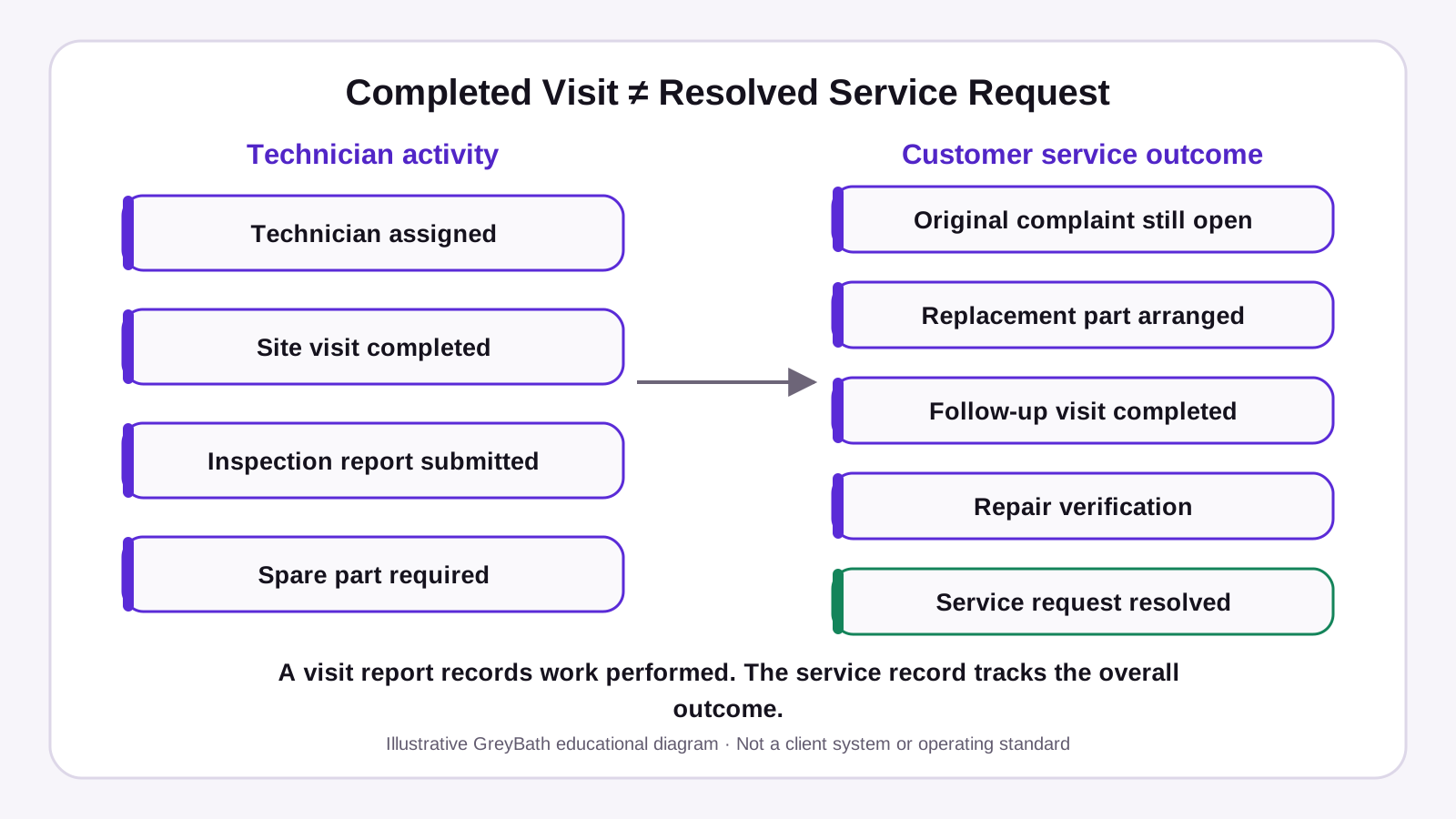
Original GreyBath 2D educational diagram recreated from the owner-supplied visual specification. Figures and examples are illustrative.
Why a signed service report may not mean the problem is solved
A technician visits the customer's factory.
The customer signs the service document.
The office receives the report.
The service coordinator marks the complaint completed.
But what exactly did the customer acknowledge?
Possibly:
The technician attended the premises.
Or:
The technician examined the equipment.
Or:
The technician completed the work described in the report.
Or:
The customer confirmed that the original problem was resolved.
These are different statements.
A signature cannot automatically be interpreted as confirmation of all four.
Read what the service document actually says
Suppose the report contains:
Observation: Suspected component failure.
Work performed: Inspection and preliminary testing.
Pending: Replacement component required.
Customer signature: Received.
The customer may simply be acknowledging that the technician attended and performed the recorded inspection.
That does not establish that the machine has been repaired.
Zoho FSM's service-report documentation specifically allows technician feedback, service summaries, customer feedback and signatures to be recorded as separate inputs.
For an SME, a practical improvement is to make the meaning of acknowledgement explicit.
For example:
Customer acknowledges technician attendance and the work recorded above. Outstanding actions remain subject to completion and verification.
The precise wording should suit the service agreement and actual circumstances.
Do not use a signature field to imply acceptance of work that has not been completed.
Every unresolved service request needs a next action
A service register often contains entries such as:
Parts pending.
Customer informed.
Technician to revisit.
Awaiting approval.
These phrases describe a situation.
They do not necessarily establish what happens next.
Consider:
Spare part pending.
The service manager still needs to know:
Which part?
Who has to arrange it?
Has its specification been verified?
Is it available in stock?
Has purchasing been approved?
Has the supplier confirmed an availability date?
Who will inform the customer?
When will the position be reviewed?
A useful service record should answer the next-action question.
Compare two updates
Update A
Service pending due to spare part.
Update B
Replacement component required. Technical identification confirmed. Stores has no available stock. Purchase request assigned to the procurement coordinator. Supplier availability not yet confirmed. Service coordinator to update the customer after procurement responds.
The second update does not guarantee a faster repair.
It gives the business a clear responsibility and information trail.
That is the foundation of reliable follow-up.
Build the service process around the customer's original problem
A field technician may complete several tasks during one visit.
But the customer's complaint has an underlying reason.
For example:
Carton-sealing machine stops intermittently during production.
The service process should preserve that original problem statement.
After the first inspection, a technician may identify another technical issue.
The company should record the finding and associated work.
It should not silently replace the original complaint with:
Technician visit completed.
Otherwise, management loses the ability to determine whether the initial customer requirement was actually addressed.
Give every service request a stable reference
For example:
Service Request: SR-2026-104
The first visit might be:
Appointment: SA-104-01
A second visit might be:
Appointment: SA-104-02
Both remain associated with the original service request.
The organisation can then see the complete history without treating every visit as an unrelated customer complaint.
These identifiers are illustrative.
Your existing system may already generate suitable references.
Use those rather than introducing duplicate numbering.
A worked example: twelve service requests and ten completed visits
Consider a fictional company called Western Packaging Equipment Services.
It sells, installs and services carton-sealing and packaging machinery for manufacturing customers.
This is a hypothetical scenario, not an actual GreyBath project.
During one reporting period, the company receives twelve customer service requests.
Technicians complete ten site visits associated with ten of those requests.
The manager's weekly report highlights:
10 Technician Visits Completed
That number is correct.
But it does not tell the full service story.
A review of the underlying requests shows:
| Customer service position | Requests |
|---|---|
| Visit completed and service resolution verified | 5 |
| Technician visited; spare parts still required | 3 |
| Technician visited; outcome awaiting additional testing or customer verification | 2 |
| Initial technician visit not yet completed | 2 |
| Total service requests | 12 |
All figures are hypothetical. For this example, each of the ten attended requests has one completed technician visit.
The company has completed ten visits.
But only five of the twelve customer requests have reached verified resolution.
Seven remain open for different reasons.
That does not necessarily mean the technicians performed badly.
Three cases require parts.
Two need further verification.
Two have not yet received their initial service visit.
The management decision is different for each category.
What happens if the company tracks only completed visits?
The service manager may see high technician activity and assume that most customer problems are resolved.
Outstanding spare-parts requests can disappear from the main report.
The company may discover them only when customers call again.
What changes with a request-level view?
The manager can immediately see:
Five resolved service requests.
Three cases awaiting parts.
Two awaiting verification.
Two awaiting initial visits.
Now the business can assign the appropriate next actions.
The figures have not changed.
The interpretation has improved.
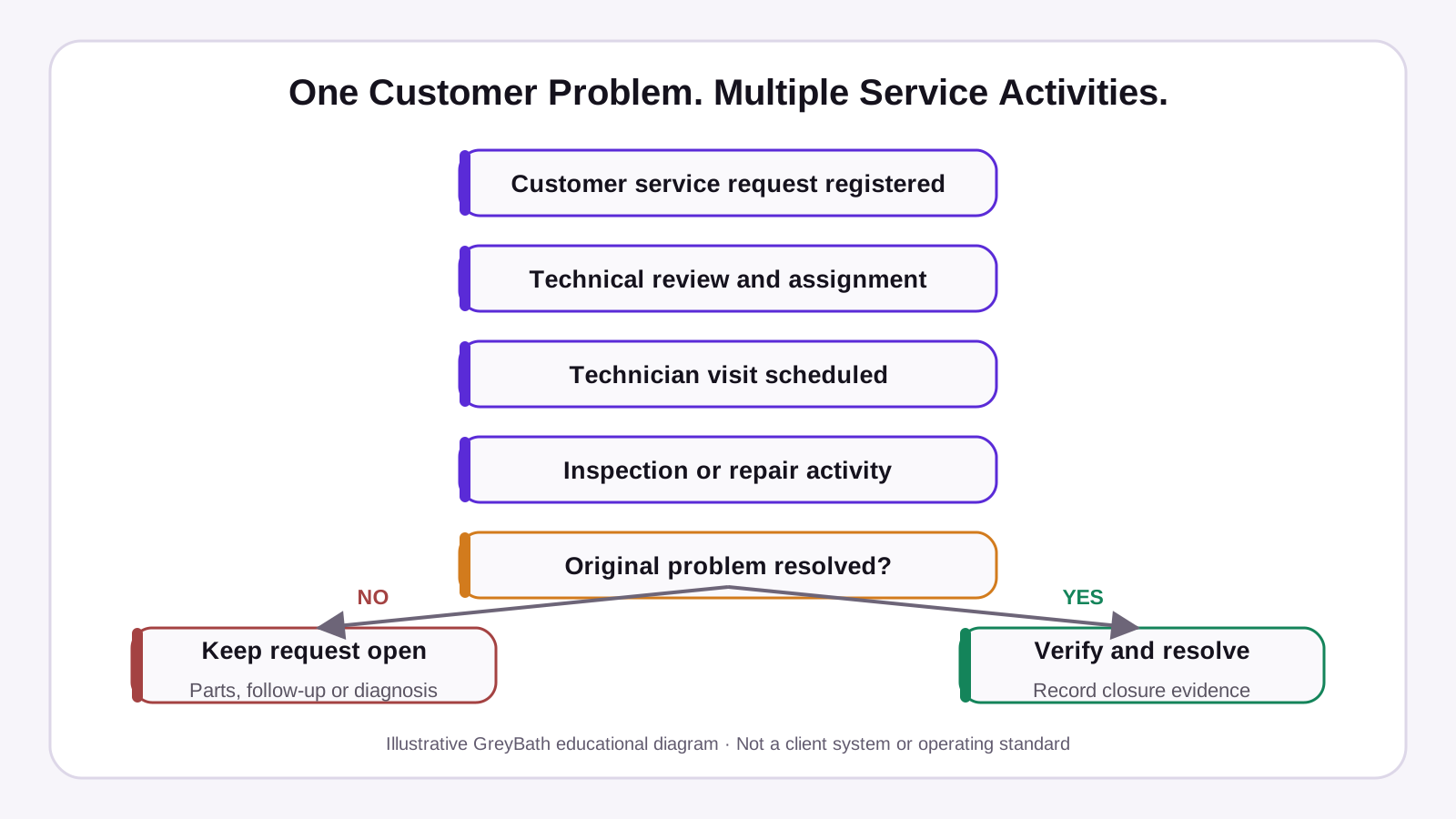
Original GreyBath 2D educational diagram recreated from the owner-supplied visual specification. Figures and examples are illustrative.
Spare parts should remain linked to the service request
For machinery suppliers, many repairs require components.
Some parts are readily available.
Others must be ordered.
Some may require technical identification before procurement can proceed.
The service process needs to keep the part requirement connected to the original customer complaint.
Consider a hypothetical request:
| Field | Information |
|---|---|
| Service request | SR-2026-104 |
| Customer | Western Foods Packaging |
| Equipment | Carton-sealing machine |
| Equipment reference | Customer asset CS-014 |
| Initial visit | Completed |
| Repair position | Not resolved |
| Part requirement | Replacement component identified |
| Stock position | Not available in service stock |
| Procurement owner | Stores and procurement coordinator |
| Availability | Awaiting supplier confirmation |
| Customer update owner | Service coordinator |
| Next action | Obtain confirmed procurement position |
The service coordinator should not need to search through several WhatsApp conversations to find the current part status.
The information should remain attached to the request.
Do not promise a delivery date without a reliable source
Suppose the technician tells the customer:
The part will arrive in three days.
But procurement has not yet confirmed availability.
The customer begins planning around that statement.
If the component takes longer, the company has created an avoidable expectation.
A better update is:
The required component has been identified. Availability is being confirmed with our supplier. We will update you once the delivery position is established.
Once a dependable date is available, communicate it with any relevant conditions.
A service system should distinguish an estimated date from a confirmed commitment.
The spare part can arrive without anybody scheduling the repair
This is another operational gap.
Procurement purchases the component.
Stores receives it.
The service team may not immediately know that it is available.
Meanwhile, the customer's complaint remains pending.
The solution is not simply to create a spare-parts dashboard.
The process must identify what should happen when the component becomes available.
For example:
Component received and accepted → Service coordinator notified → Technician availability checked → Customer appointment arranged.
Before creating another application, check whether the existing inventory or field-service system already supports part records and status updates.
Zoho FSM's documentation, for example, describes services and parts associated with work orders and options for connecting service information with Zoho Books or Zoho Inventory, subject to the supported integration and configuration.
For an SME using different software, integration feasibility must be checked separately.
A company can also manage the first version manually through a controlled parts-pending register.
The important requirement is that the arrival of a required part creates a clear next action for the service team.
Keep technician activity separate from customer resolution
A useful service dashboard should not display only:
Visits scheduled
Visits completed
Technicians available
Technician utilisation
These are useful operating measures.
However, the customer-service manager also needs to know:
Which customer problems remain open?
Which requests are waiting for parts?
Which require another visit?
Which are waiting for customer verification?
Which have been resolved?
Which problems have returned after closure?
These are different questions.
Two views are better than one confusing status
Technician activity view
Shows what field employees are scheduled to do and what work they completed.
Customer service view
Shows whether the customer's original issue remains unresolved, is awaiting another action or has reached closure.
The records should be linked.
But the statuses should not automatically be identical.
Decide what “resolved” means for your business
Different service companies need different closure requirements.
A supplier installing new equipment may need installation checks and handover documentation.
A maintenance company may need to record that the agreed service work was completed.
A machinery-repair company may need the required functional checks and customer communication.
The definition should reflect the actual agreement and work.
A practical resolution model
| Stage | Meaning |
|---|---|
| Request registered | Customer issue recorded |
| Assigned | Responsible service person identified |
| Visit scheduled | Technician activity arranged |
| Diagnosis or work in progress | Assessment or repair underway |
| Waiting for parts or approval | A specific dependency remains |
| Repair work completed | Required technical work recorded as completed |
| Verification pending | Required testing or customer confirmation remains |
| Resolved | Defined resolution conditions are satisfied |
| Closed | Required records and administrative closure completed |
These are suggested internal stages, not mandatory software labels.
One request may involve multiple visits.
An administrative closure should not hide unresolved technical or customer obligations.
Customer acknowledgement needs a defined meaning
Where customer acceptance is required, specify what the customer is confirming.
If the customer is unavailable, the company may need to keep verification pending or apply a separately agreed closure procedure.
Do not automatically interpret customer silence as proof that a repair was successful.
Also do not make closure impossible simply because a customer never responds.
Use a documented, reasonable policy consistent with the agreement and nature of the service.
What if the customer reports the same problem again?
Imagine that the company completes a repair.
The equipment passes the agreed checks.
The service request is closed.
Four days later, the customer reports the same symptom.
Should the company create a completely new complaint?
Or reopen the original request?
There is no universal answer.
The appropriate treatment depends on whether the issue is genuinely recurring, part of the original unresolved work or a separate new fault.
The important requirement is to preserve the relationship between the records.
Why reopening matters
Freshdesk's official documentation describes automation rules that can reopen previously resolved or closed tickets when customers respond, depending on how those rules are configured.
Zoho Desk also supports configurable ticket statuses and reopening behaviour after a customer reply.
These capabilities are useful because the customer conversation does not always end when an employee marks a ticket closed.
For an equipment service company, record whether a subsequent complaint is:
The original issue still unresolved.
A recurrence after an apparently successful repair.
A different issue affecting the same equipment.
A clarification that does not require further repair.
These distinctions support accurate service history.
Do not count every repeat customer message as a failed repair.
But do not discard genuine recurring issues merely because they require another work order.
Assign one person to manage the customer outcome
A service request may involve several employees.
The technician performs the inspection.
Stores checks spare-parts availability.
Procurement arranges a purchase.
A service coordinator schedules the next visit.
A service manager approves a commercial exception.
The customer should not have to coordinate these departments personally.
Assign one internal owner for the overall service request.
That person does not need to perform every activity.
They need to know the current position and ensure the necessary next action is assigned.
For example:
| Pending activity | Responsible team |
|---|---|
| Technical diagnosis | Authorised service technician |
| Part identification | Technical/service team |
| Stock availability confirmation | Stores |
| Part procurement | Procurement |
| Next appointment | Service coordinator |
| Customer communication | Assigned customer-service owner |
| Warranty or commercial approval | Authorised commercial manager |
| Final resolution review | Service owner under company policy |
A small business may combine several of these responsibilities.
The main control is that the service request must have an accountable owner until the agreed outcome is reached.
Warranty status and repair completion are separate decisions
Suppose a customer reports a machine fault.
The equipment was sold fourteen months ago.
The customer believes the repair should be covered under warranty.
The service team has not yet established the applicable warranty conditions.
Should it close the complaint because the warranty has expired according to a basic date field?
Not automatically.
Warranty coverage may depend on the agreement, installation date, covered components, exclusions, maintenance requirements and other relevant terms.
Likewise, an approved warranty claim does not establish that the physical repair has been completed.
Maintain the correct information
A useful equipment record may contain:
Customer identity
Equipment or serial reference
Installation date
Relevant warranty period
Service history
Open complaints
Applicable service agreement
Zoho FSM's asset-management documentation describes recording equipment installation dates, warranty-expiry information and linked service history, although asset-management features depend on the relevant edition.
Use such records to support an authorised decision.
Do not let a dashboard automatically decide contractual coverage from incomplete information.
The commercial question—who pays—must remain distinct from the technical question—what work is required.
A service report should describe what happened, not just say “Done”
Consider three technician reports.
Report A
Work done.
Report B
Machine checked. Customer informed.
Report C
Inspected equipment under the approved procedure. Recorded the reported fault and diagnostic observations. Replacement component required. No permanent repair completed during this visit. Follow-up service required after component availability is confirmed.
The third report gives the service coordinator a more useful position.
It also avoids implying that a repair was completed when only an inspection occurred.
A practical service-report structure
| Field | Information to capture |
|---|---|
| Service request ID | Original customer complaint reference |
| Appointment reference | Specific site visit |
| Customer and location | Where the work occurred |
| Equipment reference | Relevant machine or asset |
| Reported issue | Customer's original problem |
| Work performed | Actual activity completed |
| Observations | Findings supported by the inspection |
| Parts used | Verified parts and quantities |
| Outstanding work | Activities not yet completed |
| Operational restrictions | Relevant restrictions under the customer's authorised procedures |
| Customer acknowledgement | What the customer acknowledged |
| Technician | Person performing the work |
| Next action | Specific required follow-up |
| Responsible owner | Person accountable for that follow-up |
For safety-related equipment work, follow the applicable authorised maintenance and operating procedures. A general service-report field is not permission to restart equipment or bypass safety controls.
Keep the reporting proportionate to the actual job.
A routine inspection may require less detail than a complex repair.
Do not let “On Hold” hide unresolved complaints
Support software often allows a ticket to be placed on hold.
That can be useful when the team is waiting for parts, customer information or a third party.
However, it creates a reporting risk.
Zoho Desk's official documentation explains that its On Hold state can pause certain SLA timers and remove affected tickets from particular overdue views and escalation conditions.
That functionality may be appropriate for a defined service-level agreement.
But an SME should not assume that pausing a software timer means the customer problem has disappeared.
Track two separate things
Contractual service-level time: Calculated according to the actual agreement and configured rules.
Total time the customer request remains unresolved: The elapsed time from registration to genuine resolution, with any relevant exclusions or pauses reported separately.
For example, a service request may have been waiting for parts for six days.
The software may not consider it overdue under a particular SLA configuration.
Management should still be able to see that the customer has been waiting six days.
This is especially important when procurement delays or third-party dependencies are outside the individual technician's control.
A useful dashboard should show both the dependency and the elapsed time.
Start with a controlled service register
A small equipment supplier may not need specialised software immediately.
If it handles a manageable number of service requests, a shared register can provide useful visibility.
The minimum working record should include the following information.
| Field | Example |
|---|---|
| Service request ID | SR-104 |
| Customer | ABC Manufacturing |
| Equipment | Carton-sealing machine |
| Complaint | Intermittent stoppage |
| Request received | 10 October 2026 |
| Current position | Repair pending |
| Initial visit | Completed |
| Work remaining | Replacement component and verification |
| Pending dependency | Part availability |
| Dependency owner | Procurement coordinator |
| Customer communication owner | Service coordinator |
| Next action | Confirm component availability |
| Next review | 14 October 2026 |
| Resolution status | Open |
Illustrative example. The dates and customer are fictional.
The business can add fields when actual requirements justify them.
Avoid building a complicated register that employees stop maintaining.
The objective is reliable service continuity.
A useful customer update can prevent repeated enquiries
Customers often call again because they have no reliable information about what happens next.
A service coordinator may know that a spare part is pending.
But unless that information is communicated, the customer may believe nobody is working on the issue.
A practical update should cover:
What has been completed?
What remains pending?
Who is handling the next action?
When will the customer receive another update?
For example:
Hi, our technician has completed the inspection of your machine. The replacement component is required to complete the repair. We are checking availability and will update you once the procurement position is confirmed. The service request will remain open until the pending work is addressed.
Do not promise an unsupported repair date.
Also avoid repeating generic messages such as:
Our team is working on it.
A customer benefits more from accurate information about the actual next step.
Measure resolved service requests, not just completed visits
When reviewing after-sales performance, use measures that distinguish activity from customer outcomes.
Service requests genuinely resolved
Count requests that have reached the company's defined resolution requirements.
Use a consistent reporting period.
Do not count an inspection-only visit as resolution.
First-visit resolution
A useful measure for relevant on-site repair work is:
Eligible service requests resolved through one technician visit ÷ eligible requests assessed × 100
Define the eligible group carefully.
Exclude or separately classify cases that are still too recent to determine the outcome.
A one-visit installation or inspection is not automatically comparable to an emergency equipment repair.
The objective is to understand the effectiveness of visits, not encourage technicians to close work prematurely.
Requests waiting for spare parts
Track the number of open requests whose next action depends on parts.
Also record how long each has been waiting and whether a responsible procurement owner exists.
This can reveal repeat availability issues.
Requests awaiting customer verification
Track work reported as technically completed but still requiring the agreed verification or acceptance.
Do not interpret the entire category as customer dissatisfaction.
Some customers may simply have delayed testing.
Repeat visits
Measure how often a service request requires another visit.
Classify the reasons.
A planned multi-visit job is different from a return visit caused by incomplete preparation or an unsuccessful repair.
Reopened service requests
Track cases reopened after closure.
Review the reason and whether the problem genuinely recurred.
Zoho Desk's current reporting documentation includes reopened-ticket metrics that can help service managers investigate incomplete or recurring resolutions.
Customer updates missed
Track instances where the business committed to a customer update but did not provide it within the agreed timeframe.
This measures communication reliability separately from repair completion.
When your existing software may already be enough
Before commissioning a new application, examine your current tools.
Your business may already use:
A CRM
An accounting or ERP system
An inventory application
A service helpdesk
A field-service management system
Some may already support the functions described here.
For example, Zoho FSM provides work orders, service appointments, partial task completion and service reports.
Zoho Desk provides configurable ticket statuses, while Freshdesk supports automation around customer replies and ticket reopening.
That does not mean every SME needs one of these products.
It means the business should first identify whether its current software can represent the actual process.
When a spreadsheet is enough
A controlled register may work when service volume is manageable, few employees update records and pending cases are reviewed consistently.
When existing software needs configuration
If a helpdesk already handles tickets but does not distinguish completed visits from unresolved service cases, review its statuses, required fields and closure rules.
Configuration and staff training may solve the problem.
When a connected application becomes worthwhile
A connected workflow becomes more relevant when customer complaints, technician reports, inventory and commercial approvals exist in different systems.
The business may need a unified view without entering the same information repeatedly.
Before development, determine which system owns each record and whether supported APIs or authorised exports are available.
Custom development should reduce coordination work.
It should not create another disconnected service register.
A mobile application is useful only when technicians can use it properly
Field-service employees often work at customer sites.
They may need to record observations, service reports, photographs or completion details.
A mobile application can be useful for this.
But the design must consider practical operating conditions.
Some customer facilities restrict mobile photography.
Some locations have weak internet connectivity.
Technicians may wear protective equipment.
Customer acknowledgement may require an authorised representative who is not immediately available.
If offline reporting is required, the application should distinguish information saved on the device from information successfully synchronised to the server.
The system should also handle duplicate submissions and corrections.
Do not assume every technician can complete a detailed digital form while standing beside operating machinery.
The correct workflow may involve recording essential observations during the visit and completing the formal report in a suitable location afterward.
Do not automate commercial or technical decisions without authority
A service system may be able to identify that a part is required.
It should not automatically approve an expensive warranty replacement without the appropriate rules.
Likewise, a technician marking work complete should not automatically authorise an unsafe machine to return to operation.
The relevant commercial, technical and safety decisions belong to the people authorised under the company's procedures.
Software can record and route these decisions.
It should not silently replace them.
The same applies to customer privacy.
Service records may contain employee contact details, equipment information, photographs, site-access information and commercially sensitive notes.
Collect only what is needed, restrict access and apply suitable retention and security controls.
When this approach may need to change
Not every business requires the same service process.
A company providing routine cleaning or inspection services may use a straightforward completion report.
A machinery supplier may require equipment identification, parts history and technical verification.
A company maintaining safety-critical electrical, pressure or lifting equipment may need specialised inspection, certification and authorisation procedures.
A manufacturer dealing with regulated medical or pharmaceutical equipment may face additional contractual and regulatory obligations.
For these cases, a generic customer-service workflow is not a substitute for the required technical controls.
The right process should reflect the equipment, customer agreement and actual service risk.
The management decision
When a technician returns from a customer's site, the service department should not ask only:
Was the visit completed?
It should also ask:
Was the customer's original problem resolved?
If not, what remains pending?
Is another component required?
Has another visit been arranged?
Does the customer need to perform a test?
Who owns the next action?
When will the customer receive an update?
These questions are more valuable than a dashboard that shows completed visits without revealing unresolved complaints.
Start with one service register.
Separate the customer request from the technician appointment.
Keep the original issue reference.
Assign responsibility for unfinished work.
Define what resolution means.
Then check whether your existing software can maintain the process.
A completed technician visit is an activity. A resolved customer problem is the outcome.
Your service records should make that distinction clear.
Where GreyBath can contribute
GreyBath develops custom web applications, CRM workflows, ERP integrations, dashboards and mobile applications.
For machinery manufacturers, equipment suppliers and B2B service companies, a potential GreyBath implementation could connect customer complaints, technician activities, spare-parts requirements and follow-up responsibilities in one controlled workflow.
Depending on the existing systems, this could include a service-request portal, technician visit reports, customer-wise service history, pending-parts alerts, role-based access and management dashboards.
Where supported interfaces exist, GreyBath could assess integration with the client's existing CRM, ERP or inventory software rather than replacing those systems.
Any implementation would depend on the actual service process, available data, access permissions, integration feasibility and agreed scope.
For a smaller business, configuring an existing helpdesk or maintaining a reliable shared register may be sufficient.
GreyBath's role becomes relevant when coordinating service requests, technicians, spare parts and customer follow-ups across multiple systems is creating repeated manual work.
Related GreyBath context: ERP, CRM, portals and dashboards and web applications and integrations.
Sources reviewed
These sources support the documented product behaviour and operating concepts discussed above. They do not validate the fictional examples or guarantee a particular result.
Keep reading
More practical thinking from GreyBath across design, engineering and growth.
All articles