

The Employee Has Left. Who Removed Their CRM, Email and Business-App Access?
A practical employee-offboarding guide for restricting business-system access while preserving authorised email, files, CRM records and operational ownership.

Share this article
Browse all insightsA sales executive resigns from a manufacturing company.
Cover disclosure: the cover is an AI-generated editorial illustration. The people, organisation, records and situation are fictional and do not depict a GreyBath client.
The employee completes the notice period.
HR collects the company laptop.
Accounts processes the final settlement.
The reporting manager receives the customer handover.
The employee's official email account is disabled.
Management considers the exit process complete.
Two weeks later, the company's IT administrator reviews access to its CRM.
The former employee's login is still active.
The employee also remains listed as an administrator in a marketing application.
Several customer documents are shared with an account that the business no longer controls.
Nobody deliberately decided to keep these permissions active.
The company simply did not have one process covering every application.
The employee has left the company, but some access to the company's information has not been removed.
For small manufacturers, distributors, trading companies and other SMEs, this can happen even when HR has followed its normal employee-exit procedure.
The problem is not necessarily employee misconduct.
It is that employee exit, business-data handover and application-access removal are often managed by different people.
A reliable process must connect all three.
Returning the laptop does not remove digital access
Consider a sales executive working for a regional industrial distributor.
The employee may use:
Google Workspace or Microsoft 365 for email.
A CRM for customer details and sales follow-ups.
An ERP for orders and inventory.
Google Drive or OneDrive for quotations and documents.
A transporter portal for shipment information.
A marketing platform for customer campaigns.
A shared sales mailbox.
A business social-media account.
The employee might access some systems using their official email address.
Others may have separate usernames and passwords.
Some permissions may have been granted directly to their personal account.
Others may exist through shared logins, groups or external invitations.
Disabling the official email account does not automatically establish that every other access route has been removed.
One employee can have several independent access paths
| Access type | Example | What must be verified |
|---|---|---|
| Official email account | Google Workspace | Account no longer permits unauthorised sign-in |
| Named CRM user | Sales executive login | User deactivated and assignments transferred |
| ERP access | Orders, inventory and customer information | Individual permissions removed |
| Shared business files | Customer quotation folders | Direct and group-based access reviewed |
| Third-party applications | Marketing or logistics platform | Separate account or permissions disabled |
| Business administrator roles | Advertising or social-media management | Administrative permissions removed |
| Shared credentials | Common portal login | Known credentials reviewed and appropriately rotated |
| Automated access | User-linked tokens or integrations | Dependencies identified and access safely transferred or revoked |
This is an illustrative access map.
The actual systems depend on the company.
For a six-person business, even a small number of uncontrolled accounts can create unnecessary exposure.
The first improvement is to understand which applications employees can access.
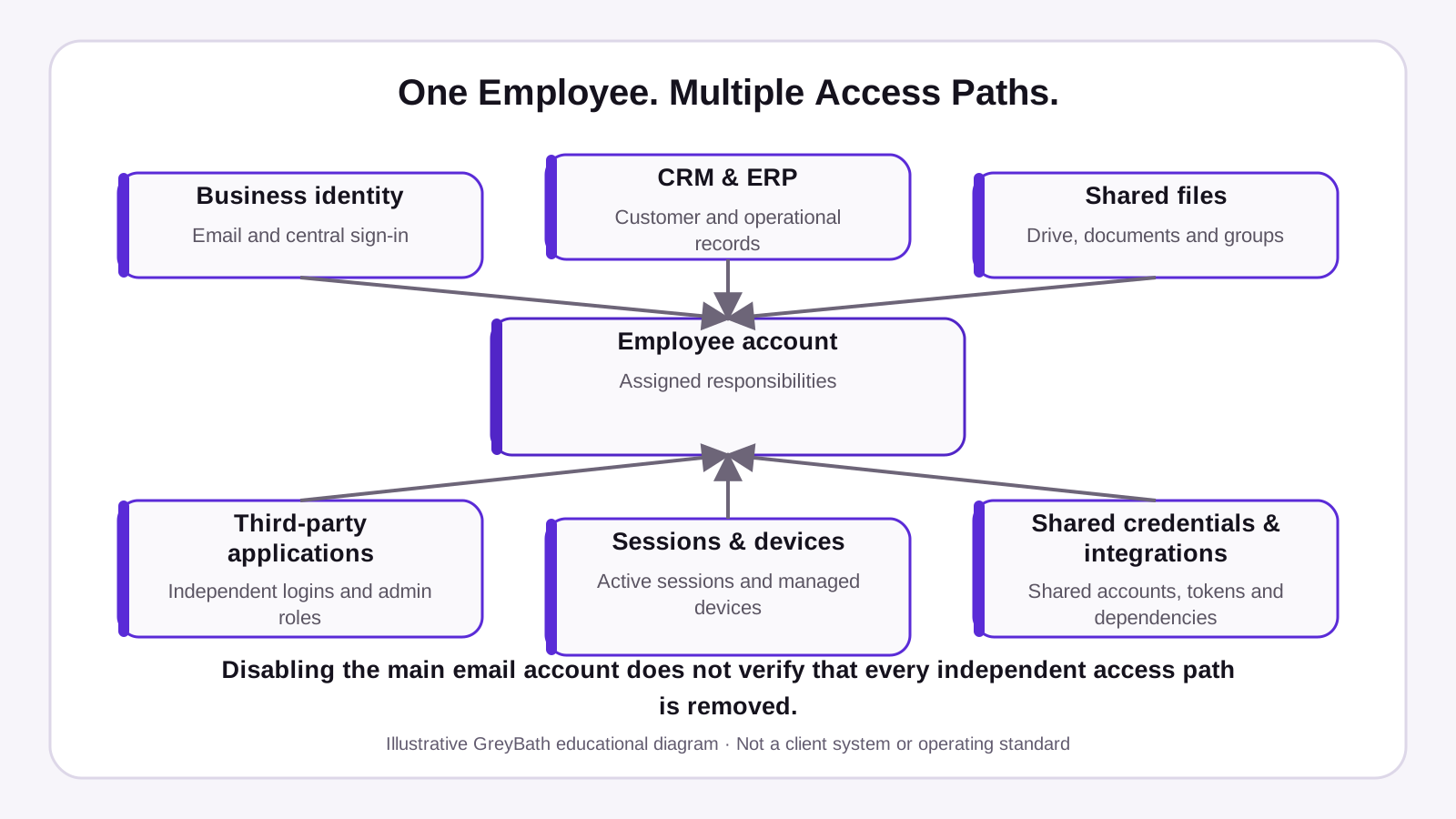
Original GreyBath 2D educational diagram recreated from the owner-supplied visual specification. Figures and examples are illustrative.
An employee exit has two separate objectives
Many businesses focus only on removing access.
That is important.
But employee offboarding also involves preserving information needed to continue business operations.
Consider a sales executive responsible for 40 customers.
Their CRM account contains customer assignments and follow-up notes.
Their email contains active quotations and customer commitments.
Their Drive contains approved commercial documents.
Their calendar contains upcoming customer meetings.
Management needs this information to remain available to authorised employees.
At the same time, the departing employee should no longer have unauthorised access after the agreed cutoff.
These are different requirements.
Objective 1: Remove unnecessary access
The departing employee should no longer be able to enter business applications or use credentials that their role no longer requires.
Objective 2: Preserve authorised business continuity
Customer relationships, legitimate business correspondence, files and ongoing responsibilities should remain accessible to the appropriate employees.
A company can complete the first objective poorly by deleting everything immediately.
It can complete the second objective poorly by keeping the former employee's account active indefinitely.
The correct process removes access while preserving the business information that the organisation is entitled and required to retain.
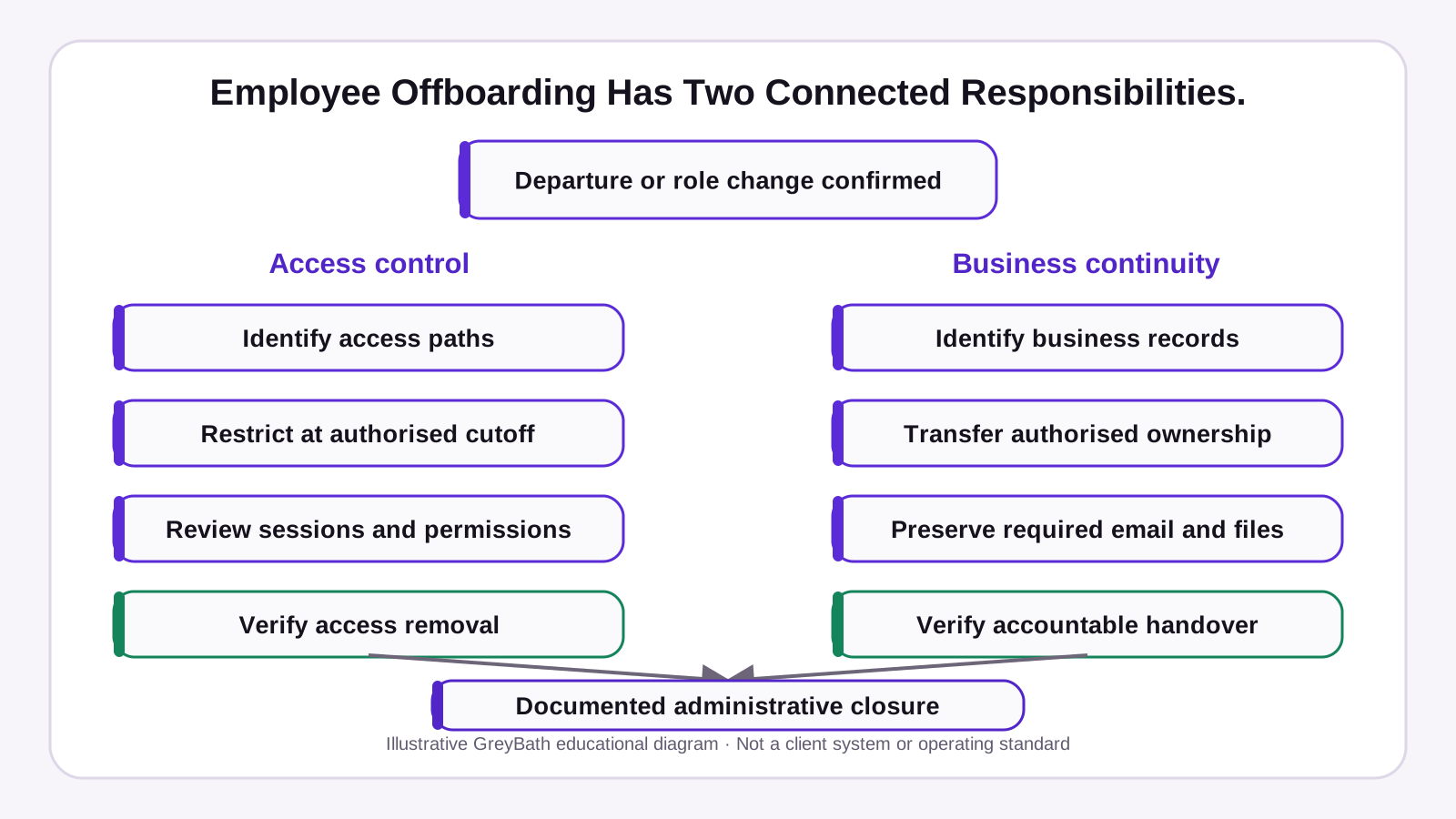
Original GreyBath 2D educational diagram recreated from the owner-supplied visual specification. Figures and examples are illustrative.
Do not delete the email account without understanding what happens to its data
For many SMEs, the employee's email account is the first system HR asks IT to close.
However, account suspension and deletion have different consequences.
How Google Workspace handles this
Google's official Workspace documentation explains that administrators can suspend a user to block access to organisational Google services while retaining email, documents and other account data.
Google also states that suspended accounts generally continue to incur licensing charges under its regular annual and flexible billing arrangements.
That means suspension can be a useful immediate access-control action, but it is not necessarily the final licensing or retention decision.
Google also notes that a user already participating in a Google Chat session can continue until that session ends, so suspension should not be treated as proof that every active session terminated instantly.
Google's documentation also warns that deleting a user can remove data that has not been properly transferred or preserved.
Deleted user accounts generally have a 20-day restoration window, but restoration does not guarantee recovery of every category of deleted information.
For a business, the practical sequence is:
Restrict access at the authorised exit point.
Identify business information that must be retained.
Transfer or preserve that information using supported methods.
Complete account deletion or archival decisions according to policy.
Do not postpone required access removal merely because data transfer is still being organised.
And do not assume that immediate permanent deletion is the safest choice.
What about Microsoft 365?
Microsoft documents a similar separation between preventing sign-in and preserving business information.
Its official offboarding guidance covers account restrictions, mailbox handling, OneDrive access, forwarding or shared-mailbox options, licensing and eventual account deletion.
The exact procedure depends on the organisation's Microsoft 365 configuration and retention requirements.
For both platforms, the business should follow the provider's current administrative guidance rather than applying one generic account-deletion instruction.
Shared files need a separate review
Imagine a sales executive maintains customer quotation files in Google Drive.
Some files belong to the company.
Some are owned by the employee's managed account.
Others are stored in shared drives.
A few documents have been shared directly with an external account.
Suspending the employee's main Google Workspace account does not automatically establish that every separately granted permission or external copy has been addressed.
Google's suspension documentation notes that other collaborators can retain access to shared documents. Its data-transfer guidance also distinguishes files owned by individual users from files already held in shared drives.
A proper handover therefore needs to answer:
Which important business files did the employee own?
Which files are stored in company-managed shared locations?
Which external accounts have been granted access?
Who should become responsible for the files?
Are any sharing permissions no longer justified?
Do not transfer everything blindly
A departing employee's business account may contain information subject to different confidentiality and retention requirements.
Not every file should automatically be copied to the incoming salesperson.
Access should be based on legitimate business responsibility.
For example, a replacement salesperson may need customer quotations and order history.
They may not need access to HR files, confidential management discussions or unrelated departments' information.
Preserve what the business needs.
Transfer it to the appropriate authorised location.
Avoid creating unnecessary copies.
A CRM user should not remain active because customers still need attention
Consider a company using a CRM for sales management.
An employee leaves.
The CRM account contains:
Customer contacts.
Open leads.
Active opportunities.
Sales follow-up tasks.
Quotation history.
Customer notes.
The manager may hesitate to deactivate the user because their customer records are still assigned to that account.
This is a workflow problem.
The company needs to distinguish ownership of business records from permission to log in.
Reassign responsibility before losing operational visibility
A useful CRM handover identifies:
| CRM information | Required decision |
|---|---|
| Open leads | Which salesperson now owns them? |
| Active opportunities | Who will continue negotiations? |
| Customer accounts | Who is the relationship owner? |
| Pending follow-ups | Who receives the existing tasks? |
| Quotations | Where are approved versions maintained? |
| Customer service cases | Which team continues the response? |
| Reports and dashboards | Does anything depend on the departing user's account? |
These records should normally remain in the recognised CRM.
Do not export customer data into several personal spreadsheets as the default handover method.
Once the appropriate reassignment and retention plan is established, remove the former employee's unnecessary application access at the authorised cutoff.
If the system cannot reassign records without temporarily retaining an inactive account, use its supported administrative process.
The former employee does not need continued access merely because their name remains in historical records.
The biggest gap is often outside the main email system
A business may use Google Workspace as its main login system.
Some applications allow employees to sign in using Google.
Other applications have independent credentials.
A third-party tool may also have separate administrative accounts or long-lived integrations.
That means removing the employee's Google access may not complete offboarding across every business platform.
Do not assume single sign-on removes every independent account
Single sign-on can simplify identity management.
But the business still needs to understand how each connected application handles account suspension, active sessions and deprovisioning.
Google's documentation for automated provisioning to supported applications demonstrates this distinction.
For example, its Notion provisioning documentation allows administrators to configure different deprovisioning timeframes when a Google account is suspended or deleted.
These can include actions within 24 hours or after longer configured periods.
This is an example of provider-specific behaviour, not a universal rule for all applications.
The practical question is:
When we disable the employee's main identity, what exactly happens to their account in every connected application?
If that answer is unknown, the offboarding process is incomplete.
Review active sessions, not just account passwords
An employee may have signed in to a business application from a laptop, mobile phone or browser.
Changing the password does not necessarily establish that every existing session has immediately ended.
Some platforms provide separate session-revocation controls.
Microsoft's official documentation, for example, describes resetting a user's password and signing them out of active Microsoft 365 sessions.
It notes that session expiry can depend on token validity and that blocking sign-in may take time to become fully effective.
This is why an access-removal procedure should identify the provider-supported controls for:
Disabling sign-in.
Revoking active sessions.
Removing authentication methods where appropriate.
Removing independent application access.
Verifying that the intended restrictions have taken effect.
Do not assume that pressing one button proves every access path has closed.
Similarly, do not experiment with signing in as a former employee to test access.
Use authorised administrator views, access records and provider-supported verification methods.
Shared passwords create a different offboarding problem
Some small businesses still use shared accounts.
For example:
A common logistics portal login.
A shared marketplace account.
A customer-service tool accessed through one username.
A supplier portal used by several employees.
These arrangements may exist because the service does not support individual users or because the company never configured separate accounts.
When an employee leaves, disabling their official email does not change a shared password they already know.
The preferred long-term approach
Where the application supports it, use individual named accounts with appropriate roles.
This makes it easier to remove one employee without affecting others.
It also improves accountability.
NIST's guidance for small businesses supports limiting access to employees who need it and using proper credential management and administrative controls.
When shared credentials cannot immediately be eliminated
Identify the shared account and the people who require continued access.
Use the application provider's supported procedure to change its credentials and update authorised users.
Check whether active sessions, integrations or automated processes depend on those credentials.
Do not rotate a production integration credential without first understanding which services use it.
The objective is to remove unnecessary access without accidentally stopping a legitimate business process.
A worked example: one departing employee, eight access paths
Consider a fictional company called Konkan Industrial Distribution Pvt Ltd.
The company supplies industrial consumables to manufacturers across Maharashtra.
It has a small sales and operations team.
A senior sales coordinator resigns after three years.
This is a hypothetical example, not a GreyBath client case.
HR confirms the employee's final working day.
The reporting manager prepares a customer handover.
The administrator reviews the systems the employee used.
The findings are:
| System or access route | Initial finding | Required action |
|---|---|---|
| Google Workspace | Account still active | Restrict access at the approved cutoff |
| CRM | Named user remains active | Transfer responsibilities and deactivate access |
| ERP | Read-only customer access remains active | Remove unnecessary permissions |
| Shared customer files | Several permissions require review | Confirm authorised ownership and sharing |
| Logistics portal | Shared account known to employee | Review credential replacement and dependencies |
| Marketing platform | Employee retains an administrative role | Transfer required responsibility and remove role |
| Shared sales mailbox | Delegated access remains | Remove delegation |
| Third-party sales tool | Access status unknown | Verify directly through application administration |
These are eight identified access paths, not proof of eight security breaches.
The business has not established that the former employee accessed or misused any system after departure.
The problem is that management cannot initially demonstrate that all relevant permissions have been removed.
What happens during the review?
The IT administrator suspends the managed email account at the authorised cutoff.
The sales manager transfers open CRM responsibilities to the replacement employee.
The CRM administrator then disables the departing employee's login.
The ERP administrator removes the individual account's access.
The team reviews shared-file permissions and preserves necessary customer documents.
The marketing platform's remaining administrator confirms that the departing employee's role has been removed.
The service owner arranges an appropriate credential change for the shared logistics portal after checking its active dependencies.
The third-party sales tool's account administrator verifies and records the final access position.
What has actually improved?
The business now has evidence of the intended access restrictions.
Customer responsibilities remain with authorised employees.
Important records have not been deleted unnecessarily.
The company can identify who completed each action.
The improvement is not a claim that the company prevented a particular financial loss.
It is that employee access no longer depends on assumptions made during the exit process.
One person should own the complete offboarding record
HR usually knows when an employee is leaving.
IT knows how to restrict certain accounts.
The department manager knows which customer records need reassignment.
The application owner knows who controls a third-party platform.
These people may all complete their individual responsibilities.
But somebody needs to verify that the whole process is finished.
For a small company, this can be the operations manager or another designated person.
The owner does not need administrator access to every system.
They need visibility into the status and evidence of the required actions.
A practical responsibility model
| Responsibility | Suggested owner |
|---|---|
| Confirm departure and authorised cutoff | HR or management |
| Identify business applications used | Department manager and IT |
| Restrict primary identity access | Authorised IT administrator |
| Reassign CRM records and responsibilities | Sales or department manager |
| Transfer required business documents | Authorised application administrator |
| Remove independent third-party access | Relevant application owner |
| Review shared credentials and integrations | Technical administrator |
| Recover company equipment and access items | HR, administration or IT |
| Verify final completion | Designated offboarding owner |
These are suggested responsibilities.
A six-person company may combine several roles.
What matters is that the actions have clearly assigned owners and an independent review appropriate to the risk.
Use one access-removal register
An SME can maintain a controlled access register using a spreadsheet.
It does not need a custom employee-management portal immediately.
The register should record where the employee had access and what happened to it.
Reusable employee-access handover template
| Field | What to record |
|---|---|
| Employee reference | Internal employee ID or approved identifier |
| Department | Sales, Accounts, Operations or other team |
| Exit or role-change date | Authorised effective date |
| Application | CRM, ERP, email or other service |
| Account identifier | Relevant business username |
| Access type | User, administrator, shared or integration-related |
| Application owner | Person responsible for that system |
| Required action | Disable, remove permission, transfer ownership or review |
| Business-data handover | Separate preservation or transfer requirement |
| Current status | Pending, in progress, completed or exception |
| Action completed by | Authorised administrator |
| Completion date | Date and time |
| Verification evidence | Restricted reference to the relevant admin record |
| Exception owner | Person responsible for unresolved cases |
Do not place passwords, recovery codes, API keys or confidential customer data inside the register.
Where evidence contains sensitive information, store it in an appropriately restricted location.
The register should link to the evidence or identify where authorised reviewers can find it.
Keep exceptions visible
Some actions may require additional coordination.
For example, an application owner may be unavailable.
A shared integration may need to be transferred before a credential is revoked.
A customer-owned portal may require the customer to remove the employee's access.
These cases should not be marked complete merely because a request has been sent.
Record the pending action, responsible person and next review.
Where continued access presents a material risk, escalate promptly through the company's authorised security or management process.
Separate immediate access removal from later account cleanup
Some offboarding work is time-sensitive.
Other activities can be completed after access has been restricted.
A practical operating sequence is:
Before the authorised departure point
Identify the applications, outstanding work and business records requiring handover.
Plan replacement ownership and administrative access.
Confirm who has authority to perform each action.
At the authorised cutoff
Restrict the employee's access through the appropriate identity and application controls.
Review active sessions and credentials according to the relevant provider's documented procedures.
For elevated-risk departures, management and authorised administrators may need a different timing and escalation approach.
After access has been restricted
Complete the remaining business-data transfers, retention decisions and account cleanup.
Verify third-party permissions and shared credentials.
Review outstanding exceptions.
At final administrative closure
Confirm that the required access removals and handover actions have supporting evidence.
Document any legitimate retained accounts, preservation requirements or unresolved exceptions.
Do not confuse administrative closure with a claim that the company has eliminated every possible cybersecurity risk.
This process is about appropriate access control and continuity.
Business data should not depend on one employee's personal account
Consider a purchasing employee who created an important supplier spreadsheet using a personal cloud-storage account.
The company may use that file every day.
But the business does not control the account.
If the employee leaves or becomes unavailable, continuity may depend on their cooperation.
The same problem can occur with customer documents, design files, marketing accounts and external service portals.
Use organisation-controlled accounts for business-critical information
Where supported and appropriate, maintain business information in company-managed systems with clear ownership and administrative recovery.
For shared work, use approved shared drives, team workspaces or company-controlled repositories.
Avoid making an individual's personal account the only location of an important business record.
This does not mean the company automatically owns every document found in an employee's personal account.
Personal data, intellectual property, employment agreements and legal obligations must be respected.
The right approach is to establish ownership and permitted access before a dispute or emergency occurs.
Do not create more administrators just to make handover easier
An SME owner may respond to access problems by saying:
Give every manager administrator access so we don't face this problem again.
That creates a different risk.
A production manager may need production reports.
A sales manager may need customer records.
An accounts manager may need invoice and payment information.
None automatically requires unrestricted access to every application.
Google Workspace provides different administrator roles for tasks such as user management, groups and service administration.
Its documentation also recommends maintaining appropriate super-administrator continuity rather than relying on only one administrator.
The practical principle is:
Give employees enough access to perform their responsibilities, but avoid unnecessary permanent privileges.
A good access model makes onboarding and offboarding easier because permissions are associated with defined roles.
Access should also change when an employee changes departments
Employee offboarding is not limited to resignations.
Consider a sales executive promoted to operations manager.
The employee now needs access to operational reports.
But they may no longer require every permission previously used in Sales.
If the company only adds permissions for the new role, the employee can gradually accumulate access across departments.
This is sometimes described as access accumulation or privilege creep.
NIST's current small-business guidance recommends restricting access according to business need and removing access when employees leave or their needs change.
A useful internal process therefore covers:
New employees receiving access.
Employees changing responsibilities.
Temporary permissions reaching their end date.
Employees leaving the company.
The same access register can support all four situations.
Measure verified access removal, not completed HR paperwork
An exit process can look complete because HR has collected every signature.
That does not prove every business account has been disabled.
Management should measure actual access-control outcomes.
Verified access-removal completion
A practical measure is:
Required access-removal actions with verified completion ÷ total required access-removal actions × 100
For a hypothetical employee with eight required actions, suppose six have been verified.
The completion rate is:
6 ÷ 8 × 100 = 75%
This is a process measure, not a security score.
The two remaining actions may involve very different risks.
An unresolved administrator account may matter more than several ordinary low-risk permissions.
Do not use the percentage to hide significant exceptions.
Time between departure and restriction
Record the time between the authorised access cutoff and verified restriction.
Use a consistent definition.
For high-risk applications, an unjustified delay should be investigated individually.
The company should define appropriate internal deadlines based on risk and operational requirements rather than assuming one period is suitable for every system.
Accounts with unknown ownership
Track applications where the company cannot identify the administrator responsible for removing access.
This often indicates that the access inventory needs improvement.
Shared credentials requiring review
Track shared logins known to departing employees.
Record whether the credentials were safely replaced, the account was migrated to named users or an authorised exception remains.
Business records awaiting handover
Track customer accounts, work items and important documents that still require reassignment.
This measure supports continuity.
It should remain separate from the access-removal measure.
A customer record being unassigned is not proof that the former employee still has access.
When existing software is enough
A small business may need no additional software.
If it uses Google Workspace, one CRM and a few other applications, a restricted spreadsheet and disciplined administrative procedures may be sufficient.
The business should use each platform's built-in account, permission and session controls.
Where available, it can also use role-based access and standard employee groups to simplify routine changes.
The first project should be establishing one reliable access inventory.
Not purchasing an elaborate identity-management platform.
When a custom workflow becomes useful
A connected process becomes more relevant when:
Employees use many separate applications.
HR and IT repeatedly miss each other's updates.
Multiple branches have different application administrators.
Permissions are difficult to review.
Customer records require structured reassignment.
Manual offboarding regularly leaves unresolved exceptions.
The company may then need a workflow connecting HR, application owners and department managers.
However, building another dashboard does not automatically remove access.
The proposed system needs either appropriate supported integrations or clearly assigned manual actions with evidence.
Automation should not disable a business-critical integration without review
Consider a company using an external application to send order notifications.
The integration may have been configured by an employee who has now left.
The company discovers that an integration token or service credential is associated with that person's account.
Immediately revoking the credential could interrupt customer notifications.
Leaving it active indefinitely may also create unnecessary risk.
The correct response is to identify the dependency, establish organisation-controlled ownership where supported, replace the credential safely and verify that the intended service continues operating.
Then the old access can be revoked according to the approved plan.
The same applies to API integrations, webhooks, scheduled reports and automated data transfers.
A properly designed offboarding workflow must recognise the difference between:
Human access that should end.
Business automation that should continue under controlled ownership.
These should not be managed as though they are the same account type.
What this process cannot guarantee
Employee offboarding reduces unnecessary access.
It does not guarantee that information was never copied before the employee left.
It cannot independently determine whether a former employee has retained information outside company-controlled systems.
It cannot establish compliance with every employment, privacy or contractual requirement.
Nor does disabling one identity automatically close every independently managed application.
For suspected data misuse, preserve relevant evidence and involve authorised management, IT/security specialists and legal advisers as appropriate.
Do not use employee offboarding as a reason for unrestricted surveillance or unauthorised access to personal accounts and devices.
For company-managed devices, use supported management and data-removal procedures.
For personally owned devices, actions must follow applicable permissions, agreements and legal requirements.
The objective is a controlled and proportionate business process.
Not an assumption that every departing employee presents a threat.
The management decision
When an employee leaves, management should not ask only:
Has HR completed the exit formalities?
It should also ask:
Which business systems could this employee access?
Who removed those permissions?
Are any independent or shared logins still active?
Have customer responsibilities been reassigned?
Has important business information been preserved?
Can the company verify the actions were completed?
These questions connect cybersecurity with business continuity.
For a small company, the solution may begin with one controlled spreadsheet.
For a larger SME with several applications, the same principles can support a structured digital workflow.
The technology decision comes later.
An employee exit is complete only when the company has addressed both unnecessary access and the business responsibilities that must continue.
Where GreyBath can contribute
GreyBath develops custom business applications, ERP/CRM workflows, role-based systems, dashboards and integrations.
For SMEs using multiple internal applications, a potential GreyBath implementation could provide an employee-access register, approval-based onboarding and offboarding tasks, responsibility assignment, access-review dashboards and audit histories.
Where supported APIs, identity-management interfaces or authorised administrative integration methods exist, GreyBath could assess connections with existing ERP, CRM or other business applications. Actual account deactivation would depend on the permissions and interfaces provided by those systems.
GreyBath's published capabilities include role-based access control, single sign-on, approval workflows and audit logging. These provide a technical foundation for a proposed connected access-management workflow.
GreyBath would not replace the organisation's HR authority, application administrators or legal and information-security responsibilities.
For smaller businesses, configuration of existing software and a controlled access register may be sufficient.
GreyBath's involvement becomes relevant when employee access and business-data handovers are spread across multiple systems and a single controlled workflow would reduce manual coordination.
Related GreyBath context: ERP, CRM, portals and dashboards and web applications and integrations.
Sources reviewed
These sources support the documented product behaviour and operating concepts discussed above. They do not validate the fictional examples or guarantee a particular result.
- Google Workspace — suspend a user temporarily
- Google Workspace — preserve former employee data
- Google Workspace — delete or remove a user
- Microsoft 365 — remove a former employee
- NIST — multi-factor authentication guidance for small business
- Google Workspace — third-party user provisioning example
- Google Search Central — helpful content
Keep reading
More practical thinking from GreyBath across design, engineering and growth.
All articles