

Your Customer Has Paid, but the Invoice Still Shows Overdue
A practical guide to matching verified bank credits, allocating receipts across invoices and preventing incorrect overdue reminders.

Share this article
Browse all insightsA customer says they have paid. Accounts verifies the credit in the bank statement, but the invoice still shows as overdue. Sales sends another reminder and the customer is left wondering why they are being asked to pay again.
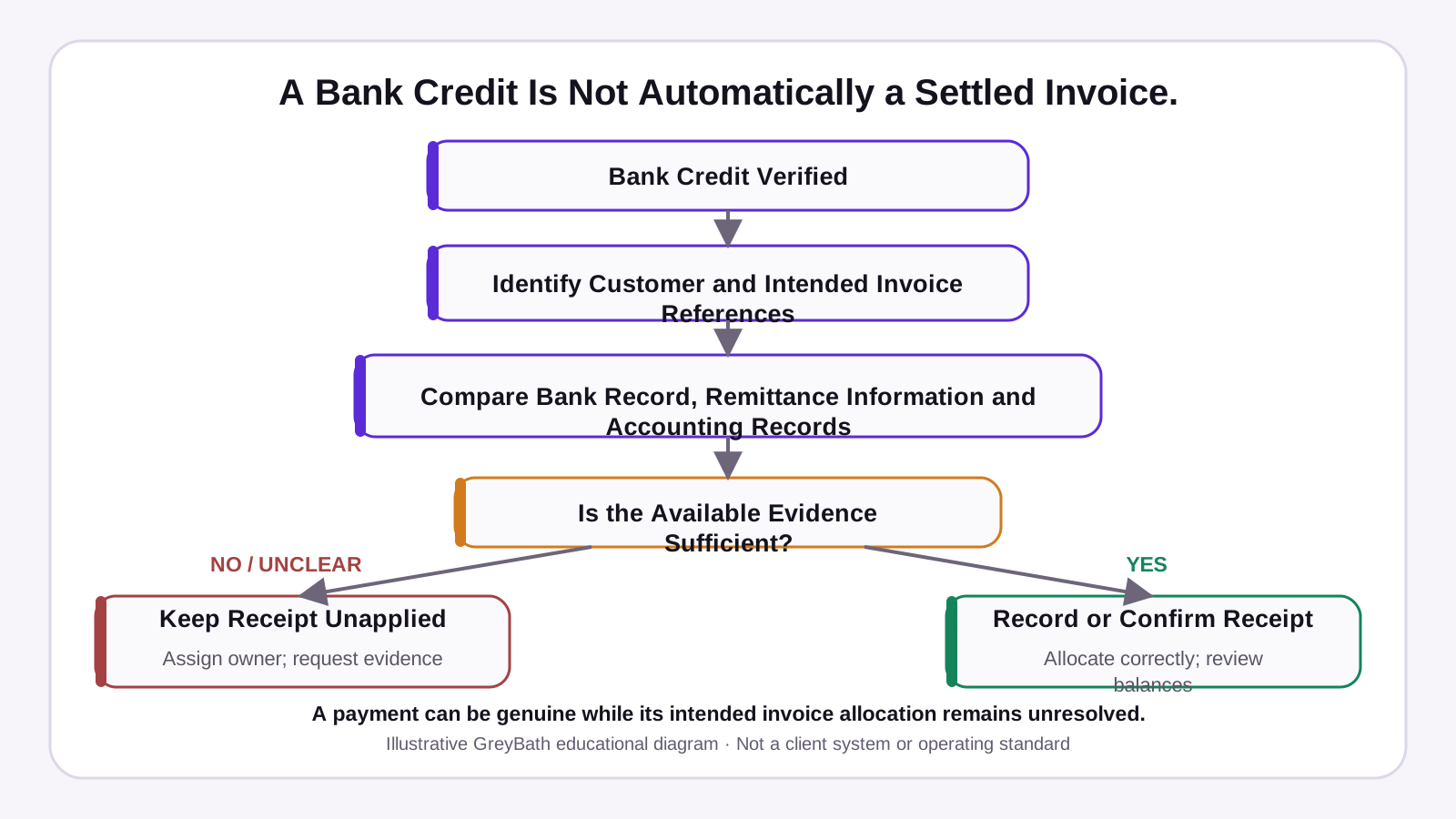
The receipt may still need to be recorded or allocated to the right invoice. Allocation means applying all or part of a recorded payment to a specific invoice. If Accounts has already done that correctly, the outstanding report or reminder list may be out of date.
Find where the payment got stuck
A receipt is the payment entry in your accounting system. An unapplied receipt has been recorded but has yet to be allocated, in full or in part, to an invoice. An outstanding balance is what the customer still owes after approved payments and adjustments.
Bank reconciliation and invoice allocation
Bank reconciliation checks the bank transaction against the entry in your books. Invoice allocation decides which invoice balances that entry reduces. A reconciled bank credit can still leave an invoice open if Accounts has yet to apply the receipt or if it was applied elsewhere.
| What you see | Possible reason | What to verify | Next action |
|---|---|---|---|
| Bank credit exists, with no recorded payment | The receipt entry is pending | Reference, date, amount, account and any imported or pending entry | Record one verified receipt through Accounts |
| Recorded payment remains unapplied | Invoice details are missing or allocation is pending | Customer, legal entity and intended invoices | Apply the existing receipt once the evidence supports it |
| Payment is against the wrong invoice or customer | An incorrect customer or invoice was selected | Original receipt, remittance details and allocations | Have authorised Accounts staff correct the existing entry |
| One payment covers several invoices | The customer made a combined transfer | Invoice-wise split and total against the verified receipt | Apply one receipt across the confirmed invoices |
| Payment is partial or includes a reported deduction | Part payment, credit or deduction | Amount paid, supporting documents and approved adjustments | Record the supported amounts and keep the verified balance open |
| Gateway payment is verified and settlement is pending | The provider has captured the payment and the bank payout is pending | Payment ID, capture status and expected settlement | Track the payout separately from the customer’s payment |
| The bank settlement is lower than the gross gateway payment | Documented fees or adjustments reduced the payout | Settlement ID, gross amounts, deductions and bank credit | Reconcile the payout using the provider’s breakdown |
| Accounts is correct but the Sales report still shows overdue | The report or reminder list has stale data | Current approved balance and last successful refresh | Refresh the report and review any queued reminder |
Match the receipt to the right invoices
Find the bank reference, such as the Unique Transaction Reference (UTR) for a bank transfer, or the gateway payment ID. Compare it with the payer details, amount, date and customer’s remittance advice, which is the breakdown of what they intended to pay. Two invoices can have the same value, so an amount match alone cannot establish allocation.
Check the invoice’s billing company and your receiving company. A group may pay from a different entity or use one central account for several branches. Confirm the relationship and invoice list before moving money between customer accounts.
| Information | What to ask for |
|---|---|
| Transfer details | Date, amount and transaction reference |
| Payer and billing entity | Company that paid and company named on the invoice |
| Invoice-wise split | Invoice numbers and amount intended for each invoice |
| Credits or deductions | Amount, reason and supporting reference |
If a receipt was applied incorrectly, locate the original entry and confirm the supporting evidence. Have an authorised Accounts user correct the allocation through the system’s supported procedure, preserving the audit history. Refresh the affected invoice balances and follow-up records. Do not create another receipt for the same money.
Worked example • ₹1,50,000 across two invoices
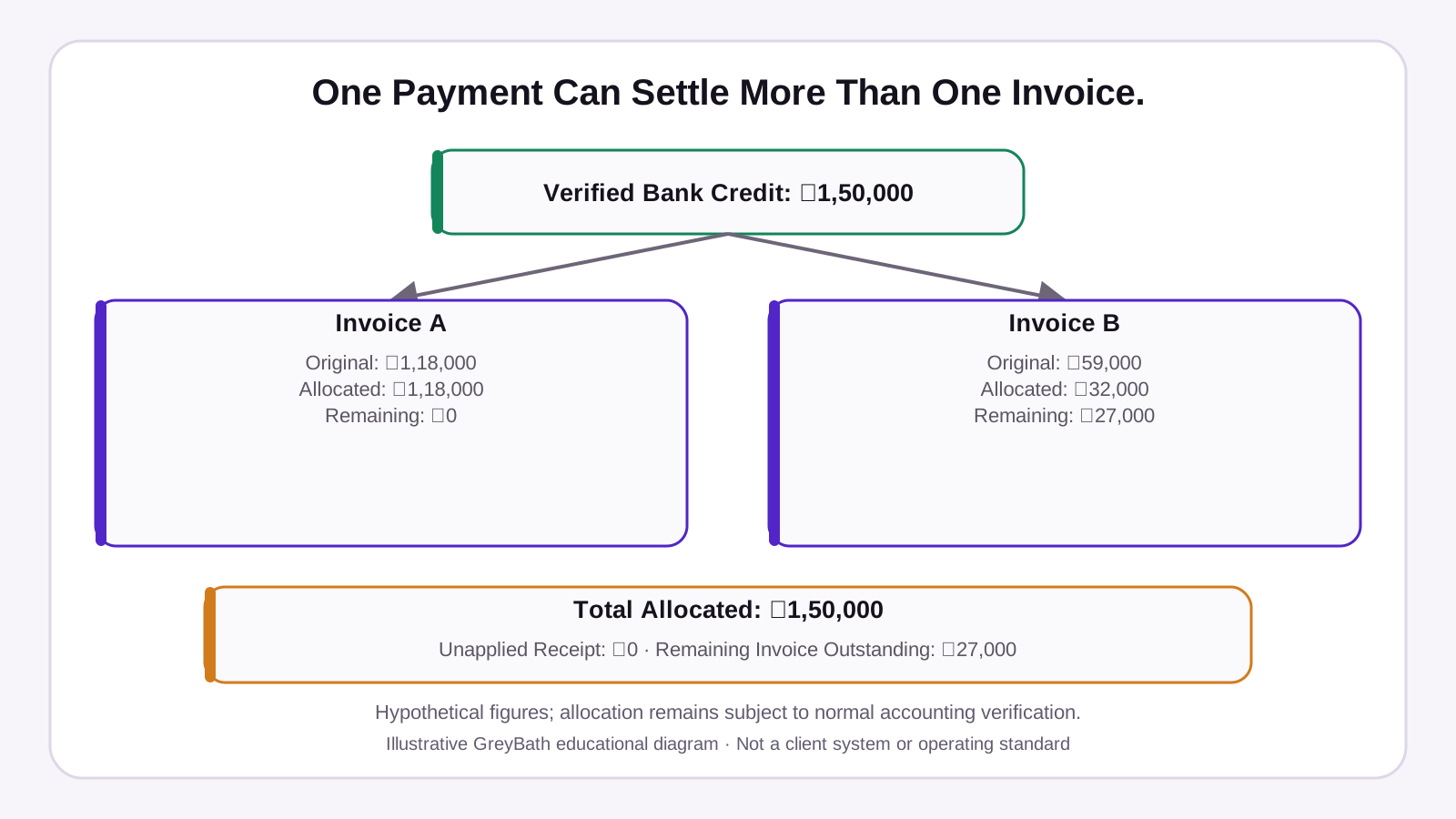
Hypothetical example. Western Industrial Supplies Pvt Ltd, a fictional distributor, verifies a direct bank credit of ₹1,50,000. The customer has two open invoices. The transfer reference identifies the bank credit, while the customer’s remittance advice confirms the split.
| Invoice | Outstanding before payment |
|---|---|
| INV-208 | ₹1,18,000 |
| INV-209 | ₹59,000 |
| Total | ₹1,77,000 |
After checking the remittance advice against the customer account and invoices, Accounts applies ₹1,18,000 to INV-208 and ₹32,000 to INV-209 using its authorised process.
| Invoice | Outstanding before | Payment allocated | Remaining balance |
|---|---|---|---|
| INV-208 | ₹1,18,000 | ₹1,18,000 | ₹0 |
| INV-209 | ₹59,000 | ₹32,000 | ₹27,000 |
| Total | ₹1,77,000 | ₹1,50,000 | ₹27,000 |
Handle deductions and unapplied receipts
A partial payment leaves a balance open. If a customer reports a deduction, such as tax withheld or a commercial adjustment, obtain the supporting records and have the amount checked through the applicable finance process. A credit note is an approved accounting document that reduces what is owed. Zoho Books India’s credit-note guide shows how credits can be applied to one or more invoices for the same customer.
Keep an advance or excess receipt in the appropriate customer account and apply it when authorised. Where the payer or invoice is unclear, track the receipt in an exception register until Accounts can resolve it. Record the final accounting reference once resolved so the register can be closed without duplicating the books.
| Field | What to record |
|---|---|
| Receipt details | Date, amount, receiving account and verified bank or provider reference |
| Customer and invoices | Verified or suspected customer, entity and candidate invoice references |
| Evidence and status | Confirmation received, open question and unapplied amount |
| Owner and review date | Person responsible, next action and when to review |
| Closure | Approved decision and accounting reference |
Get appropriate finance, tax or legal input for disputed allocations, foreign-currency receipts, export collections, chargebacks or unusual withholding. When several debts are involved, the customer’s instructions and applicable rules may affect allocation. See sections 59–61 of the Indian Contract Act, 1872.
Hold only the reminder that needs review
A customer’s claim is a reason to check the account. It does not mark an invoice paid. If a reminder may be incorrect, put a temporary hold on that invoice or payment. Record the reason, available evidence, responsible person and next review or expiry date.
Before releasing the reminder, check the latest approved balance and due date. If the data refresh failed, send the affected reminder for review. Unrelated invoices and verified remaining balances should follow their usual schedule. In the example, any further follow-up concerns only the verified ₹27,000 remaining on INV-209, subject to its due date and valid adjustments.
Remittance request you can adapt
Thank you. We’ve received your payment reference and are checking it. Could you share the transfer date, amount and invoice-wise split, including any deductions?
When the bank credit is already verified, start with “We’ve verified the bank credit and are checking how to apply it to your invoices.” For the earlier collection stage, see our guide to invoice approval and payment follow-up.
Separate gateway payments and bank settlements
For gateway payments, check three records separately.
- Customer payment status. Check the provider’s record for the payment ID and capture status. A captured payment is one the provider has confirmed as completed. A screenshot, checkout success page or authorisation alone does not confirm capture. See Razorpay’s payment states.
- Merchant settlement status. Settlement is the provider’s payout to your business bank account. A captured payment can await payout, and a payout can group several customer payments. Use the provider’s settlement ID, breakdown and schedule for your account. See Razorpay’s settlement guidance and settlement dashboard guide.
- Invoice allocation status. Check how the verified customer payment was applied in your accounting system, regardless of when the bank payout arrives.
In a hypothetical single-payment payout, a gross payment of ₹1,00,000 less ₹2,360 in illustrative fees and associated charges gives a net settlement of ₹97,640. These are sample figures. Use the provider’s actual fee and adjustment records. The difference between the customer payment and bank payout may reflect those charges, so verify the breakdown before following up with the customer.
Assign responsibility and refresh balances
Use the accounting system as the official source of invoice balances. Sales, a spreadsheet or a CRM may track follow-up, but they should reflect the latest approved balance and show when it last refreshed.
| Activity | Suggested responsibility |
|---|---|
| Verify and reconcile the payment | Accounts verifies the bank or provider record and checks existing entries |
| Confirm customer and invoice details | Accounts, with Sales obtaining remittance details where needed |
| Allocate or correct the receipt | Authorised Accounts user records the application and retains the audit history |
| Approve unusual deductions or adjustments | Authorised finance manager or appropriate specialist |
| Refresh follow-up and review exceptions | Sales checks the approved balance. Finance reviews open exceptions and assigns action. |
A small team can combine roles while keeping approval clear. Start by tracking the age and value of unapplied receipts and the number of reminders corrected after a refresh. These measures show where work is piling up or customers are getting conflicting messages.
Check what your current software can handle
Start with the software you already use. A small team can track open exceptions in a controlled spreadsheet while recording receipts and allocations in its books. TallyPrime supports optional vouchers from imported bank statements for review. When bill-wise tracking is enabled, its receipt voucher workflow lets you apply the payment to individual invoices. Zoho ERP documents applying receipts to multiple invoices and handling partial or excess payments.
Automation can suggest a match or flag an exception when the same transaction appears twice. Keep human review for uncertain payers, conflicting references, unusual deductions and cross-company payments. Consider an integration when your accounting, payment and follow-up tools repeatedly leave staff checking the same records by hand.
Connect your payment and follow-up workflow
GreyBath can help connect approved accounting, payment and CRM records so your team can see unmatched receipts, assign exceptions and review approvals in one workflow. The accounting system stays authoritative, and Sales can use its verified balances for follow-up.
Start by checking what your existing software can do. Integration depends on the interfaces your software supports and the permissions available. If your team still checks bank entries, invoices and customer messages separately, bring one example to discuss with us.
Speak to GreyBath about payment follow-upSources
Keep reading
More practical thinking from GreyBath across design, engineering and growth.
All articles